Free Excel Leave & Vacation Management Template with Team Calendar and Balance Tracker
Most small businesses manage time off with a shared calendar, a stack of emails, and someone's memory. Nobody has one clear record of who has used how many days; requests get approved without noticing that two designers or three colleagues are already away, and by autumn a few people discover they have almost nothing left.
This Excel leave management template gives you one place for all of it. Log each request, set its status to Pending, Approved, Rejected, or Cancelled, and the workbook counts working days (skipping weekends and your holidays), updates every employee's balance for each leave type, and checks the request for conflicts before you sign it off.
It is built around entitlement balances and calendar conflicts rather than attendance or payroll. It uses plain formulas and works in desktop Excel with no macros.
Key Features
- Leave Requests table with dropdowns for employee, leave type, status, and approver, and automatic working-day counts that exclude weekends and the holidays you list.
- Conflict check on every request: double-booked (same person overlaps), over team capacity (more than your limit off on a working day), and same role off (two people with the same Role/Team overlap).
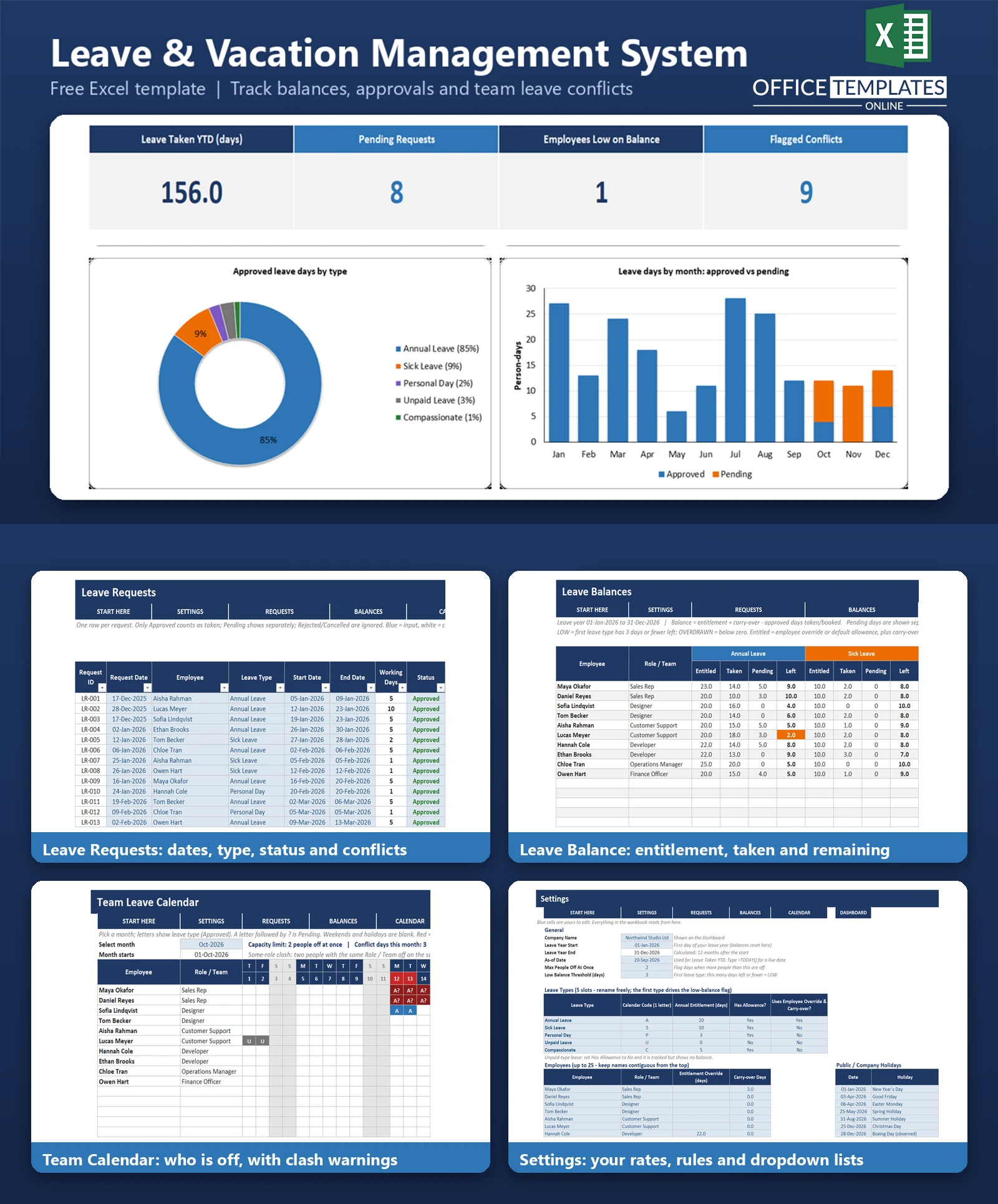
- Leave Balance sheet for every employee and five leave types showing entitled, taken, pending, and days left, with LOW and OVERDRAWN flags.
- Per-employee entitlement override and carry-over days for the first leave type (Annual Leave in the sample).
- Team Calendar month view with a month selector, colour-coded leave letters, pending requests, over-capacity days, and same-role clashes.
- Dashboard with four KPIs, two charts and an employee-by-month heatmap.
What You Can Track
- Up to 25 employees with role, entitlement override, and carry-over.
- Five configurable leave types, each with a calendar letter, a yearly allowance, and an option for tracked-only leave such as unpaid leave.
- Up to 300 leave requests with request date, start and end date, status, approver, and notes.
- Company holidays (room for 20) and a leave year start date of your choice.
- Capacity limit (maximum people off at once) and a low-balance threshold.
Dashboard & Reports
The Dashboard shows Leave Taken YTD (days), Pending Requests, Employees Low on Balance, and Flagged Conflicts. Below the KPI cards, a doughnut chart shows the share of approved days by leave type, and a stacked column chart shows leave days by month split into approved and pending. A heatmap lists approved days for each employee by month and their remaining annual balance.
The Team Calendar is the day-by-day view: pick a month and see who is off, which requests are still pending, and which days breach your capacity limit or put two people in the same role away together.
Who Is This Template For
- Owners and office managers of small businesses and teams of up to 25 people.
- HR coordinators who approve leave and need a clear balance for each employee.
- Team leads who must keep enough cover in each role.
- Agencies, clinics, shops and studios that plan around busy periods.
How to Use the Template
- In Settings, enter your company name; leave year start, capacity limit, and holidays blank.
- Review the five leave types and list your employees with role, override, and carry-over.
- Log each request on Leave Requests and choose a status from the dropdown.
- Read the Conflict Check column before approving a Pending request.
- Check Leave Balance for days left and Team Calendar for cover.
- Use the Dashboard for a summary. Delete the sample rows and names when you are ready to enter your own.
Benefits
- One record of balances and requests instead of emails and memory.
- Fewer surprises: conflicts are visible before approval.
- Employees with low or negative balances are highlighted.
- Flexible: rename leave types, change allowances, holidays, and the leave year.
Excel Requirements
The workbook contains no macros and works in modern desktop Excel for Windows or Mac. It uses standard functions such as NETWORKDAYS, SUMIFS, COUNTIFS, SUMPRODUCT, INDEX, and MATCH.
Frequently Asked Questions
Does it work for part-time staff or half days?
Not directly. Days are counted as whole working days Monday to Friday, so half days are not supported. You can give part-time employees a smaller entitlement override.
How does the balance work?
Balance = entitlement + carry-over - approved days taken. Pending days are shown separately and are not deducted until the request is approved.
What counts as a conflict?
Double-booked (the same person has an overlapping request), over team capacity (more people off on a working day than the limit on Settings), and same role off (another person with the same Role / Team overlaps).
Can I change the leave types?
Yes. There are five slots. Rename them, change the letter and allowance, or mark a type as having no allowance so it is only tracked.
What about a leave year that does not start in January?
Set the Leave Year Start date in Settings. Balances and the calendar months follow it. Requests count toward the year in which they start.
How many employees and requests can it hold?
25 employees and 300 requests in the prepared table.
Does it need macros?
No. Everything runs on formulas and dropdowns.
Can I remove the sample data?
Yes. Clear the blue input cells on Settings and Leave Requests, but keep the formula columns.

You may also like