Free Excel Employee Shift Scheduler Template with Coverage Dashboard
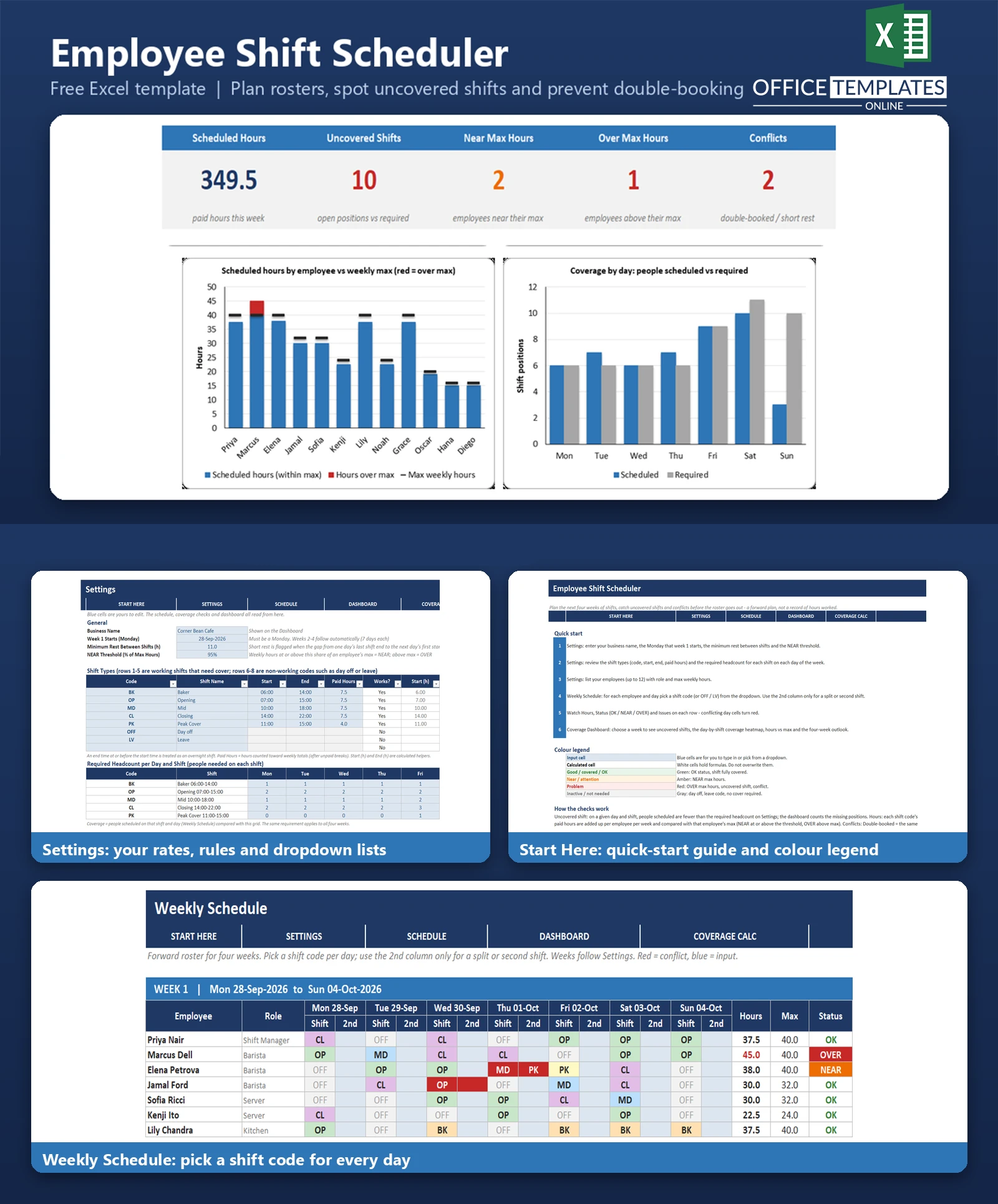
Building a weekly roster by hand is slow, and the mistakes only show up when the shift starts: nobody is booked for the Sunday opening, one barista is scheduled beyond their hours, or someone closes at 10 pm and is expected back at 7 am. Cafes, restaurants, shops, and other service businesses with rotating shifts deal with this every week.
This Excel shift scheduler lets you plan the next four weeks in one grid. Employees run down the side, Monday to Sunday runs across, and every cell is a shift-code dropdown. As you fill it in, the workbook adds up each person's hours against their weekly maximum, compares the people scheduled on every shift with the headcount you need, and flags double-bookings and short rests between shifts.
It is a forward-planning roster, not a record of hours worked. It uses plain formulas and works in desktop Excel with no macros.
Key Features
- Four-week roster on one sheet with a shift-code dropdown in every day cell and an optional second column per day for split shifts.
- Weekly hours per employee compared with a maximum, with OK, NEAR, and OVER status.
- Uncovered-shift detection: scheduled headcount versus the required headcount for each day and shift.
- Conflict checks for double-booked days and for short rest between one day's last shift and the next day's first shift, including across weeks.
- Coverage Dashboard with a week selector, five KPIs, two charts, and a red and green day-by-shift heatmap.
- Four-week outlook showing hours, open positions, near and over max counts, and conflicts for every week.
What You Can Track
- Up to 12 employees with role and maximum weekly hours.
- Five working shift types with code, start time, end time, and paid hours, plus three codes for days off and leave (sample: OFF and LV).
- Required headcount for each of the five shifts on each day of the week.
- Four consecutive weeks starting from any Monday you choose.
- Minimum rest between shifts and the percentage of max hours that counts as NEAR.
Dashboard & Reports
The Coverage Dashboard opens with a week selector and five KPI cards: Scheduled Hours, Uncovered Shifts, Near Max Hours, Over Max Hours, and Conflicts. Below them, a column chart shows each employee's scheduled hours against their weekly maximum, with any hours over the maximum in red, and a second chart compares people scheduled with people required on each day.
The coverage heatmap shows scheduled over required headcount for every shift and day. Red cells are short, green cells are fully covered, blue cells have more people than required, and gray cells need no cover. A four-week outlook table underneath shows whether each week is ready to publish or still needs attention.
Who Is This Template For
- Cafe, restaurant, and bar managers building weekly rotas.
- Retail shop owners scheduling opening, mid, and closing shifts.
- Small service businesses with rotating shift work and a team of up to 12.
- Shift supervisors who want a quick check for gaps before publishing the roster.
How to Use the Template
- In Settings, enter your business name, the Monday week 1 starts, the minimum rest, and the NEAR threshold.
- Edit the shift types (code, start, end, paid hours) and the required headcount grid.
- List your employees with role and maximum weekly hours.
- On Weekly Schedule, pick a shift code for each employee and day, using OFF or LV for days off and leave.
- Check the Hours, Status, and Issues columns on each row; conflicting day cells turn red.
- Open the Coverage Dashboard, choose a week, and work through the red cells in the heatmap.
- Delete the sample data when you are ready to enter your own team and shifts.
Benefits
- Gaps in cover are visible before the roster goes out instead of on the day.
- Employees who would exceed their hours are highlighted as you build the schedule.
- Late-close-to-early-open patterns are flagged automatically.
- One workbook and one page to plan four weeks.
Excel Requirements
The workbook contains no macros and works in modern desktop Excel for Windows or Mac. It uses standard functions such as SUMPRODUCT, SUMIFS, COUNTIF, INDEX, MATCH, and IFERROR. The dropdowns, conditional formatting, and tables need desktop Excel to work fully.
Frequently Asked Questions
How many employees and weeks does it cover?
Up to 12 employees and four consecutive weeks, starting from the Monday you set in Settings.
What counts as an uncovered shift?
Each shift on each day has a required headcount in Settings. If fewer people are scheduled than required, the missing positions are counted as uncovered shifts. Extra people on another shift do not offset a shortage.
How are conflicts detected?
A day is double-booked when the two shift cells for one employee overlap in time, contain the same code, or combine a working shift with an off code. Short rest is flagged when the gap between one day's last shift end and the next day's first start is below the minimum rest you set, including from Sunday into the next Monday.
What do OK, NEAR, and OVER mean?
OVER means scheduled hours are above the employee's maximum. NEAR means hours are at or above the NEAR threshold, 95 percent by default, of the maximum. Anything else is OK.
Can I change the shift times and add my own shifts?
Yes. There are five working shift slots with editable code, name, start, end, and paid hours, and an overnight shift is handled when the end time is before the start. You cannot add more than five working shifts.
Does it calculate pay or labour cost?
No. It plans shifts and hours only, and has no wage or cost calculation.
Does it need macros?
No. Everything runs on formulas, dropdowns, and conditional formatting.
How do I clear the sample cafe roster?
Clear the employee names in Settings and delete the shift codes in the blue day cells on Weekly Schedule, keeping the formula columns. The README lists the steps.












