Watercolour Flowers and a Bold Blue Name
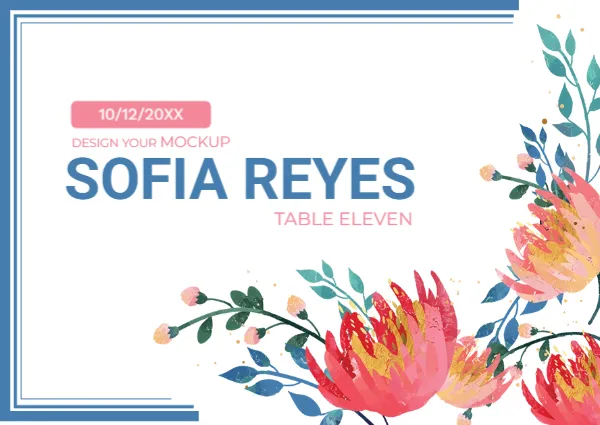
Blue frame lines sit in the top left corner of this white card, and big watercolour flowers in red, orange and coral with blue and teal leaves fill the right and lower right. A pink tag holds the date 10/12/20XX, with a leftover line DESIGN YOUR MOCKUP beneath it, then SOFIA REYES in bold blue capitals and TABLE ELEVEN in pink.
A Landscape Card With Open Space
The card is 5.83 x 4.13 inches. The upper left is mostly white, so the name stands out clearly against it, while the flowers live in the corner.
Leftover Text to Delete
The line DESIGN YOUR MOCKUP under the date is sample text, so delete it before printing. Then replace 10/12/20XX, SOFIA REYES and TABLE ELEVEN with your own date, guest name and table.
Preparing the Watercolour Card
- Delete the mockup line.
- Set the date.
- Type the guest name.
- Enter the table.
- Print on textured card.
A Painterly Look for Garden Weddings
Watercolour flowers look hand painted, which suits garden parties, spring weddings and artistic couples. The mix of red and blue is lively without being too sweet.
Blue Type for a Modern Touch
The strong blue name feels modern against the soft painted flowers. It also provides a good contrast, which keeps the name readable at a distance.
Pink Tags as Labels
The pink date tag and the pink table text pick up the flower colour. They tie the text to the artwork and add a feminine touch without extra decoration.
Textured Paper for Watercolour
A slightly textured, matte paper makes the flowers look like real paint. Smooth gloss can make the print look too digital, so test both finishes.
Handling Long Names
The name is large and bold, so long names will run into the flowers. Shrink the font for lengthy names, but keep a single size for all guests where you can.
Matching Other Stationery
Use the same flowers on invitations and thank you cards, and the whole wedding looks consistent. Ask your printer to cut cards to the same size for a tidy set.
Final Checks Before Printing
Read every name aloud against the guest list, and confirm table numbers with the seating plan. Print on a spare page first to check colours.
Step by Step Editing of the Wedding Place Card Floral Watercolor Protea Blue Design
- On the wedding place card floral watercolor protea blue design, click the main headline and type your own words, keeping a similar length.
- Retype every name, date and contact line on the wedding place card floral watercolor protea blue design, checking each against a trusted source.
- Search the wedding place card floral watercolor protea blue design for the words Lorem and Company so that no placeholder remains.
- Click any logo or photo on the wedding place card floral watercolor protea blue design, choose Replace Image and resize the new picture to fit.
- Zoom the wedding place card floral watercolor protea blue design to full size and read each line aloud before you save it.
- Keep a clean master of the wedding place card floral watercolor protea blue design without private details, so later versions start tidy.
Have a look at the blush pink roses place card. Another option is the navy flourish place card. A related layout is the bright floral tent card. Looking beyond the wedding place card floral watercolor protea blue design? See all wedding place card templates.