Free Excel Employee Timesheet Template: Track Hours, Overtime and Gross Pay
If you pay people by the hour, someone ends up adding up clock-in and clock-out times before every payday. Break minutes get forgotten, night shifts that finish after midnight confuse the sums, and working out who has crossed into overtime means going back through a week of paper or scattered spreadsheets. One slip and the payroll is wrong.
This Excel timesheet template lets you log each shift once and does the rest. It calculates hours worked (including shifts that cross midnight), splits them into regular and overtime hours using a weekly threshold, applies each employee's hourly rate, and totals the results for the pay period you choose.
It is built for cafes, shops, warehouses, security teams, and other small businesses with hourly staff. The result is an internal payroll preparation tool: a tidy hours-and-pay table you can hand to whoever runs payroll. It works in desktop Excel with plain formulas and no macros.
Key Features
- Shift log with Date, Employee (dropdown), Time In, Time Out, Break minutes, and Notes, in a real Excel Table with room for 600 shifts.
- Hours worked calculated automatically: time out minus time in minus unpaid break, with overnight shifts detected and labelled.
- Weekly overtime by calendar week (Monday to Sunday) beyond a threshold you set, paid at an overtime multiplier you set.
- A default unpaid break used whenever the Break cell is left blank.
- Employee list with roles and hourly rates for up to 20 people.
- Pay period selector driven by your first period start date and period length (weekly, fortnightly, or any length up to 31 days).
- Payroll Export block with employee, ID, period dates, regular hours, overtime hours, and gross pay, plus a check that it matches the summary.
What You Can Track
- Hours worked per shift, per employee, and per pay period.
- Regular hours versus overtime hours.
- Gross pay for each shift and each employee.
- Average hours per week for each employee and for the team.
- Each employee's share of total hours.
- Who is working overtime in the current period.
Dashboard & Reports
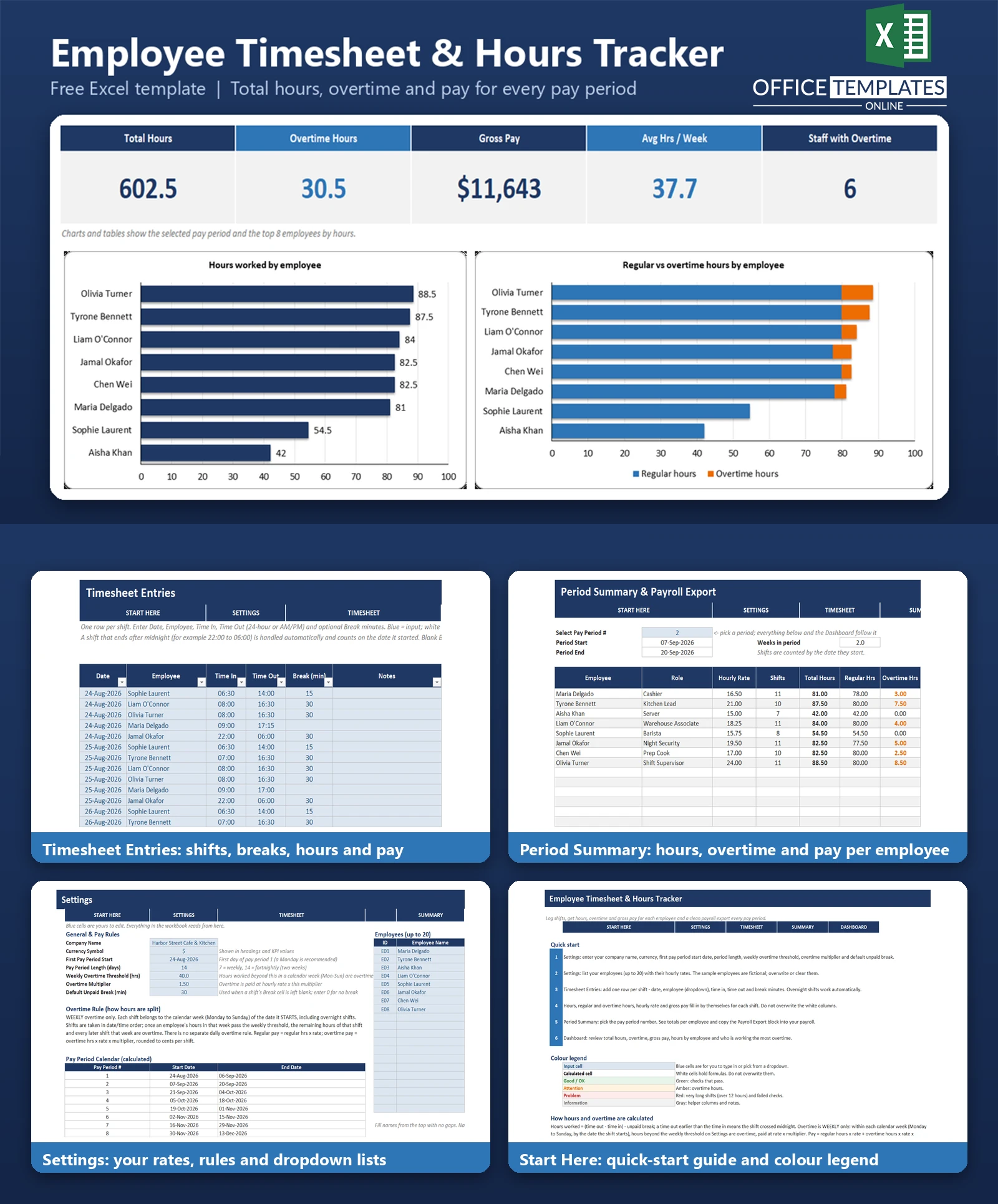
The Period Summary lists every employee with shifts, total hours, regular hours, overtime hours, gross pay, average hours per week, and an overtime flag, with a totals row. Below it sits the Payroll Export block.
The Dashboard shows five KPIs for the selected pay period: Total Hours, Overtime Hours, Gross Pay, Average Hours per Week, and Staff with Overtime. Two charts sit underneath: a bar chart of hours worked by employee and a stacked bar chart splitting each person's hours into regular and overtime. A table of hours and pay by employee and an overtime watch list of the top five overtime earners complete the page.
Who Is This Template For
- Owners and managers of small hourly-wage businesses who run payroll themselves.
- Cafes, restaurants, retail shops, warehouses, salons, and cleaning or security crews.
- Teams with night shifts that cross midnight.
- Bookkeepers who receive hours from clients and want them in a consistent layout.
How to Use the Template
- Open Settings and enter your company name, currency symbol, first pay period start date, period length, weekly overtime threshold, overtime multiplier, and default unpaid break.
- List your employees with their hourly rates.
- On Timesheet Entries, add one row per shift: date, employee, time in, time out, and break minutes.
- Watch hours, overtime, and gross pay fill in automatically for each shift.
- On Period Summary, choose the pay period number and review each employee's totals.
- Copy the Payroll Export block into your payroll process and check the Dashboard for overtime.
Benefits
- Cuts the time spent adding up hours by hand before payday.
- Reduces arithmetic mistakes, especially with breaks and overnight shifts.
- Makes the overtime rule explicit and applied the same way for everyone.
- Gives you one consistent export of regular hours, overtime hours, and gross pay each period.
- Includes fictional sample data so you can see how everything works, then clear it and start.
Excel Requirements
The template uses no macros and needs nothing to be enabled. It uses standard formulas and works in modern desktop Excel (2010 and later, including Microsoft 365). Sample data is fictional and can be cleared in a minute.
Frequently Asked Questions
Does it handle shifts that go past midnight?
Yes. If the time out is earlier than the time in, the shift is treated as crossing midnight, the hours are calculated correctly, and the row is labelled Overnight. The shift counts on the date it started.
How is overtime calculated?
Weekly only. Within each Monday-to-Sunday week, hours beyond the weekly threshold on Settings (40 by default) are overtime and are paid at the overtime multiplier (1.5 by default). There is no separate daily overtime rule.
Can I use weekly instead of fortnightly pay periods?
Yes. Set the pay period length on Settings to 7, 14, or any number of days up to 31, and choose the first period start date. The period calendar updates automatically.
What if I leave the break blank?
A blank Break cell uses the default unpaid break from Settings. Enter 0 if a shift had no break.
How many employees and shifts can it hold?
Up to 20 employees and 600 shift rows, with a calendar of 26 pay periods.
Does it calculate tax or net pay?
No. It calculates gross pay from hours and hourly rates. Tax and deductions are left to your payroll process.
Can I use a different overtime rule, such as daily overtime?
The template implements weekly overtime only. You can change the threshold and multiplier, but daily overtime, double time, and holiday premiums are not built in.
Does it use macros?
No. It uses formulas only, so it opens without security warnings in desktop Excel.












