Free Excel Vendor Management Template: Track Supplier Performance, Spend and Contracts
If you buy from more than a handful of suppliers, the details tend to end up everywhere: contact names in email, payment terms in someone's head, contract dates in a drawer. When something goes wrong, it is hard to say which suppliers are actually reliable and which ones quietly cost the most.
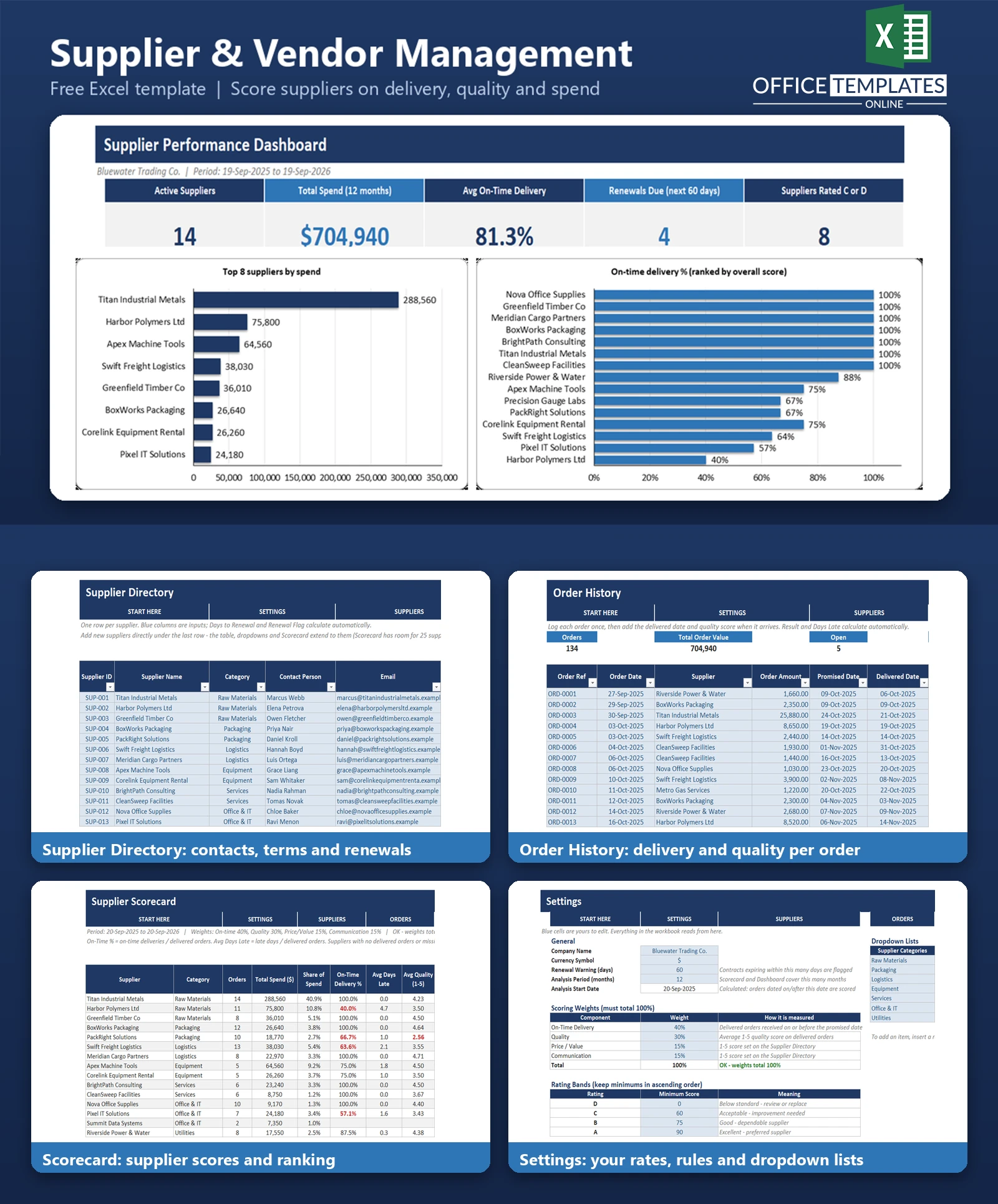
This vendor management template for Excel puts it all in one workbook. Keep a supplier directory with contacts, terms, and renewal dates, log your orders with promised and delivered dates, and let the workbook calculate on-time delivery, average quality, spend share, and an overall score for every supplier.
It is a relationship and performance tool, not a purchase order generator. Everything uses plain formulas and works in desktop Excel without macros.
Key Features
- Supplier Directory table with category, status, and payment terms dropdowns, contacts, renewal date, and 1-5 Price/Value and Communication scores.
- Automatic renewal flag: RENEWAL DUE within your chosen number of days, EXPIRED once past, otherwise OK.
- Order History table with an automatic delivery result (ON TIME, LATE, OPEN, or OVERDUE) and days late.
- Scorecard with one row per supplier: orders, spend, share of spend, on-time %, average days late, average quality, overall score (0-100), A-D rating, and rank.
- Editable scoring weights and rating bands, with a visible check that weights total 100%.
- Dashboard with five KPIs, three charts, and a watch list of the lowest-rated active suppliers.
What You Can Track
- Supplier contacts, category, payment terms, and status (Active, On Hold, Inactive, Prospect).
- Contract renewal dates and how many days remain.
- Order amounts, promised dates, delivered dates, and quality scores.
- Spend by supplier and each supplier's share of total spend.
- Delivery reliability and average lateness over an analysis period you set (12 months by default).
Dashboard & Reports
The Dashboard shows Active Suppliers, Total Spend, Average On-Time Delivery, Renewals Due, and Suppliers Rated C or D. Below them are a bar chart of the top 8 suppliers by spend, a bar chart of on-time delivery % ranked by overall score, and a doughnut showing the mix of A, B, C, and D ratings. The watch list names the lowest-rated active suppliers with their score, on-time %, and main watch point, such as late deliveries, quality, or communication.
The Scorecard sheet is the full report, with a portfolio total row and colour-coded ratings.
Who Is This Template For
- Small and mid-sized businesses that buy from several suppliers.
- Purchasing and operations managers who review supplier performance.
- Owners who want evidence before renegotiating or replacing a supplier.
- Office managers who keep track of contracts and renewals.
How to Use the Template
- Open Settings and enter your company name, currency symbol, renewal warning days, and scoring weights.
- Adjust the category, status, and payment terms lists if needed.
- Replace the sample suppliers in the Supplier Directory with your own.
- Log orders in Order History; add the delivered date and quality score once goods arrive.
- Review the Scorecard for scores, ratings, and ranks.
- Use the Dashboard to spot renewals and problem suppliers. Delete the sample rows when you are ready to start with your own data.
Benefits
- One place for supplier information instead of scattered files.
- A consistent, weighted way to compare suppliers that you control.
- Early warning on contract renewals.
- Clearer evidence for supplier reviews and negotiations.
Excel Requirements
The workbook contains no macros and works in modern desktop Excel for Windows or Mac. It uses standard functions such as SUMIFS, COUNTIFS, AVERAGEIFS, INDEX, MATCH, and RANK.
Frequently Asked Questions
Is this a purchase order template?
No. It focuses on supplier relationships and performance. Orders are logged only to measure spend, delivery, and quality.
How is the overall score calculated?
It blends on-time delivery %, average quality, Price/Value, and Communication using the weights in Settings, scaled to 0-100.
Can I change the weights and rating bands?
Yes. Edit them in Settings. A check cell tells you if the weights do not total 100%.
Why is a supplier shown as Not rated?
A supplier needs at least one delivered order with a quality score and both 1-5 scores in the directory before it can be scored.
How many suppliers can it handle?
The Scorecard has room for 25 suppliers. The Order History table can hold many hundreds of orders.
Does it need macros?
No. Everything runs on standard formulas.
Can I remove the sample data?
Yes. Clear the input cells in the Supplier Directory and Order History tables, keeping the table headers and formula columns.

← Previous Article
Free Excel Purchase Order Template with Order TrackingYou may also like