Free Excel Cash Flow Forecast Template for Small Businesses
Most small businesses don't fail because they aren't profitable on paper - they fail because cash runs out at the wrong moment. A big supplier payment, payroll, and rent landing in the same week can drain an account even when the business is otherwise healthy, and by the time it shows up in the bank balance, it's too late to plan around it.
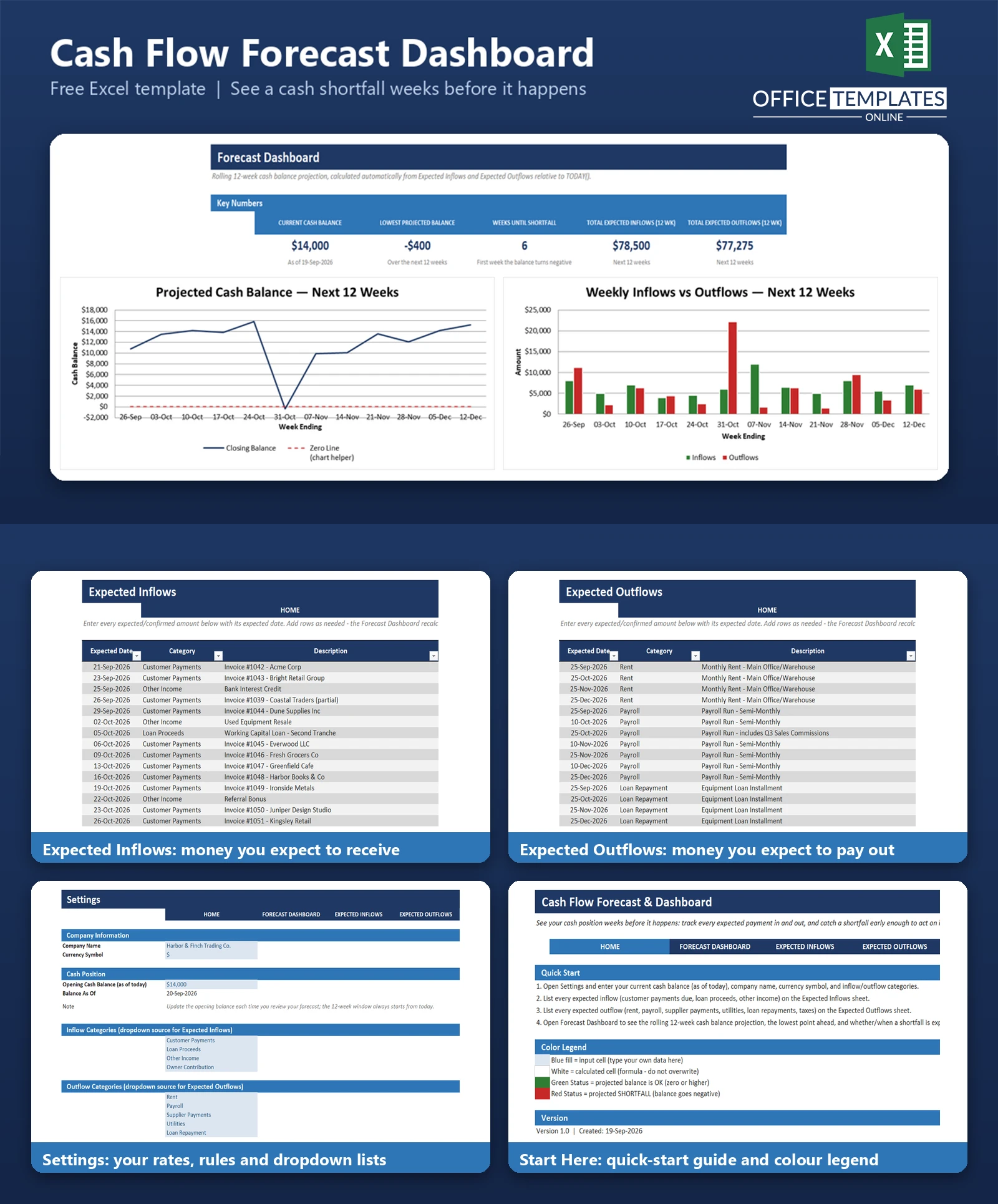
This free Excel cash flow forecast template gives you a rolling 12-week view of your cash position before it happens. You enter the payments you expect to receive and the bills you expect to pay, each with its own expected date, and the workbook projects your week-by-week balance automatically - flagging the exact week a shortfall is expected, if one is coming.
It's built for owners and bookkeepers who already have a rough sense of what's coming in and going out but have no simple way to see how those dates line up. No macros, no add-ins, no subscription - just a formula-driven Excel workbook you can start using today.
Key Features
- Rolling 12-week cash balance projection, recalculated automatically from two simple input lists
- Automatic shortfall detection - any week the projected balance goes negative is flagged in red
- Live KPI cards: Current Cash Balance, Lowest Projected Balance, Weeks Until Shortfall, Total Expected Inflows, Total Expected Outflows
- A "Weeks Until Shortfall" figure that is itself a formula, not a manual estimate - it updates the moment you change a date or amount
- Line chart of the projected balance across 12 weeks, with a zero-line reference so a dip below zero is easy to spot
- Clustered bar chart comparing expected inflows vs. outflows week by week
- Category dropdowns for both inflows and outflows, editable from a single Settings sheet
- Pre-loaded, realistic sample data (37 expected inflows, 44 expected outflows) so every chart and KPI is populated the moment you open the file
What You Can Track
- Expected customer payments, loan proceeds, and other incoming cash, each with its own expected date
- Expected rent, payroll, supplier payments, utilities, loan repayments, and tax payments
- Your current cash balance as of today, entered once and carried forward automatically
- Which week, if any, your projected balance is expected to turn negative
- How much is expected to move in and out of the business over the next 12 weeks in total
Dashboard & Reports
The Forecast Dashboard is the heart of the workbook. Five KPI cards summarize the current balance, the lowest point projected over the next 12 weeks, how many weeks away (if any) a shortfall is expected, and the total inflows and outflows expected in that window. Below the KPIs, a week-by-week table shows the opening balance, inflows, outflows, closing balance, and an OK/SHORTFALL status for each of the next 12 weeks - color-coded green or red so a problem week is obvious without reading every number. Two charts sit underneath: a line chart tracking the projected balance over time, and a bar chart comparing weekly inflows against outflows.
Who Is This Template For
- Small business owners who want to see cash problems coming before they happen, not after
- Sole traders and freelancers managing irregular income against fixed monthly obligations
- Bookkeepers and part-time finance staff who need a quick weekly cash check without opening accounting software
- Anyone preparing for a short-term financing conversation who wants a concrete, date-based projection rather than a guess
How to Use the Template
- Open the Settings sheet and enter your company name, currency symbol, and your current cash balance as of today.
- List every payment you expect to receive on the Expected Inflows sheet - date, category, description, and amount.
- List every bill and payment you expect to make on the Expected Outflows sheet the same way.
- Open the Forecast Dashboard to see your rolling 12-week projection, KPI cards, and charts update automatically.
- Revisit the file regularly (weekly is typical) and update the opening balance and any new expected items - the projection window always moves forward from today.
Benefits
- See a likely cash shortfall weeks in advance instead of discovering it in the bank balance
- Replaces manual balance math with formulas that recalculate the moment you add or edit a row
- One file covers both data entry and the resulting projection - no separate reporting step
- Works entirely offline in Excel, with no recurring subscription or account required
- Simple enough to hand to a bookkeeper or partner without training on new software
Excel Requirements
This template uses no macros or VBA - it is a plain .xlsx file that opens safely with macros disabled. It relies only on standard Excel formulas (SUMIFS, SUM, MIN, MATCH, IF, IFERROR, TODAY, TEXT) with no XLOOKUP, FILTER, SORT, UNIQUE, or other dynamic-array functions, so it behaves the same way across older and newer versions of Excel. It requires a modern desktop version of Excel (2016 or later, including Microsoft 365) or Excel Online, since it uses data validation dropdowns, conditional formatting, Excel Tables, and native charts that a plain spreadsheet viewer will not render correctly.
FAQ
Do I need accounting experience to use this template?
No. If you can list a date, a short description, and an amount, you can use it. There's no accounting knowledge required - you're simply recording what money you expect to move and when.
Does this replace my bookkeeping or accounting software?
No. This is a forward-looking planning tool based on expected amounts, not a record of actual transactions. It doesn't reconcile against a bank feed or replace double-entry bookkeeping - it's meant to sit alongside whatever you already use for historical records.
How far ahead does the forecast look?
The Forecast Dashboard ships with a 12-week rolling window that always starts from today. You can extend it further by adding more rows and copying the existing formula pattern, as explained in the included README.
What happens if my projected balance goes negative?
The week is flagged SHORTFALL in red on the dashboard table, and the "Weeks Until Shortfall" KPI card shows exactly which week it happens in (or "None" if no shortfall is projected) - so you can see it coming and plan around it.
Can I change the categories for inflows and outflows?
Yes. Both category lists live on the Settings sheet, and the dropdowns on Expected Inflows and Expected Outflows read from those lists automatically.
Does the template work if I open it on a different day than when I filled it in?
Yes - the 12-week window is calculated from TODAY(), so every time you open the file, the projection re-anchors to the current date. Just make sure the opening cash balance is kept up to date.
Is there a limit to how many inflow or outflow entries I can add?
No practical limit - both Expected Inflows and Expected Outflows are Excel Tables that expand automatically as you add rows.
Does this template use any macros?
No. Everything is built with standard Excel formulas, so it opens safely with macros disabled and works the same in Excel 2016 and later.

← Previous Article
Free Excel Income and Expense Tracker for Small BusinessesYou may also like