Free Excel Income and Expense Tracker for Small Businesses
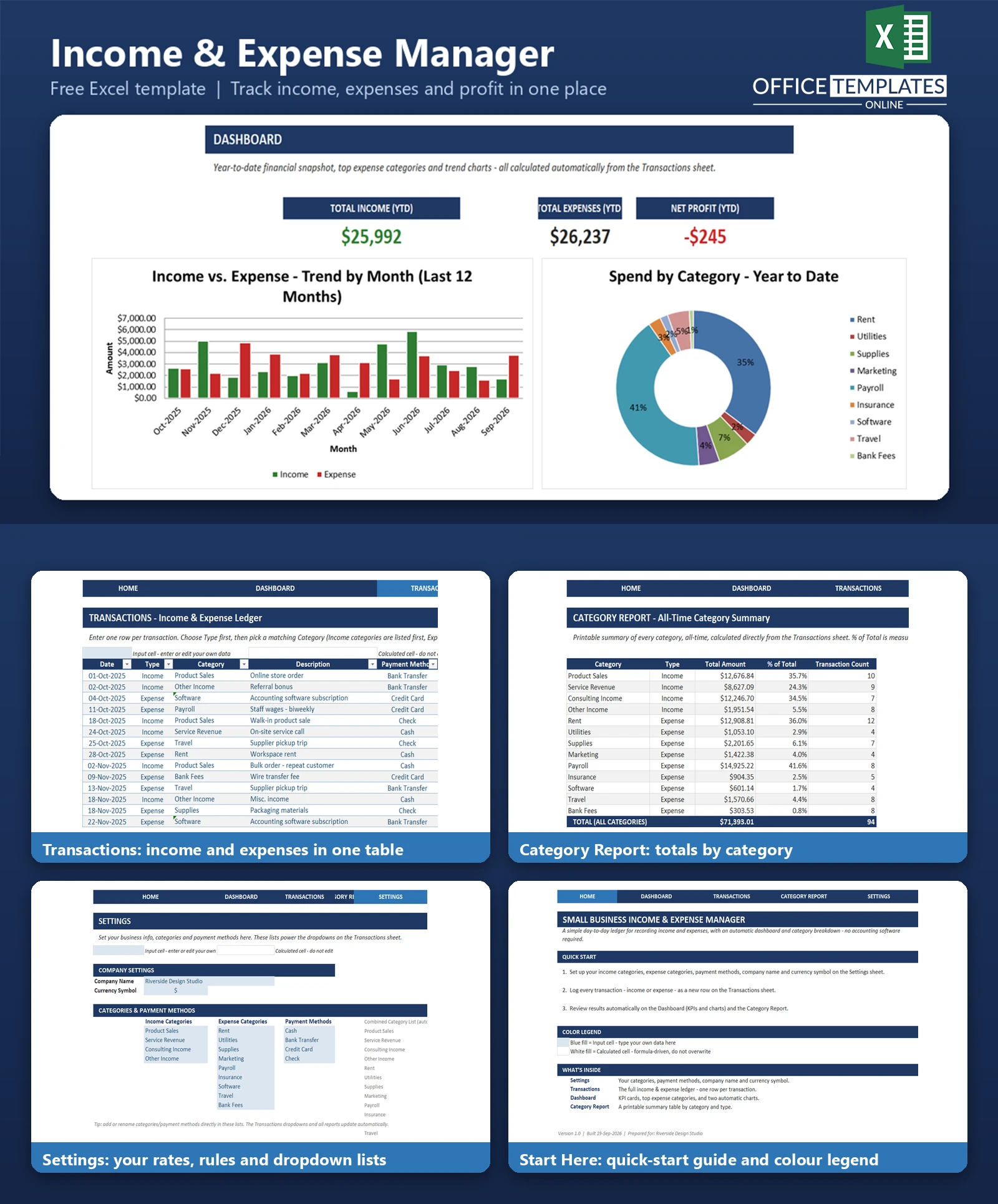
Most small business owners don't need a full accounting system - they need a clear, honest answer to one question: how much money did I actually make? The Small Business Income & Expense Manager is a free, ready-to-use Excel template built for sole traders, freelancers, and micro-businesses who currently track money in a notebook, a messy spreadsheet, or not at all.
Every transaction - income or expense - gets logged once in a simple table. From that single entry, the workbook automatically builds a live dashboard showing total income, total expenses, net profit, and your top expense categories, plus two charts and a printable category report. There's no software to install, no subscription, and no macros to enable - just a spreadsheet that does the math for you.
Whether you're preparing for tax season, trying to understand where your money is going, or simply replacing a shoebox full of receipts with something organized, this template gives you a bookkeeping system that fits on one screen and updates itself as you type.
Key Features
- Single, structured transaction ledger built as a real Excel Table with dropdown validation for Type, Category, and Payment Method
- Automatic Dashboard with Total Income (YTD), Total Expenses (YTD), and Net Profit (YTD) - color-coded green or red based on whether you're in the black or the red
- Top 3 Expense Categories calculated automatically, so you always know where your highest costs are
- Two built-in charts: an Income vs. Expense trend by month, and a Spend by Category doughnut chart
- Printable Category Report showing totals, percentage of total, and transaction counts for every category
- Fully editable Settings sheet - customize your company name, currency symbol, income categories, expense categories, and payment methods in one place
- Color-coded design: blue cells are yours to edit, white cells are calculated automatically - so you always know where it's safe to type
- Comes pre-loaded with 94 rows of realistic, seasonally-varied sample data covering a full 12 months, so every chart and KPI is meaningful the moment you open the file
What You Can Track
The Transactions sheet is the heart of the workbook. Each row captures:
- Date - when the transaction happened
- Type - Income or Expense
- Category - selected from your own customizable list (e.g., Product Sales, Service Revenue, Rent, Utilities, Payroll, Marketing, Software, and more)
- Description - a short note on what the transaction was for
- Payment Method - Cash, Bank Transfer, Credit Card, Check, or any method you define
- Amount - entered as a positive number; the Type column determines whether it's money in or money out
Because categories and payment methods live on the Settings sheet, you can rename, add, or remove them at any time, and every dropdown, chart, and report updates to match.
Dashboard & Reports
Dashboard
At a glance: Total Income (YTD), Total Expenses (YTD), and Net Profit (YTD), each pulled live from your transaction data using SUMIFS formulas. Below the KPI cards, a ranked Top 3 Expense Categories table shows exactly which categories are costing you the most this year. Two charts round out the page - a clustered column chart comparing income and expense month by month over the trailing 12 months, and a doughnut chart breaking down year-to-date spend by expense category.
Category Report
A clean, print-ready table listing every income and expense category with its all-time Total Amount, its percentage of total spend within its own type (income percentages sum to 100%, expense percentages sum to 100% separately), and its transaction count. It's formatted to print cleanly on a single page for record-keeping or quick review.
Who Is This Template For
- Freelancers and consultants who need a simple record of client payments and business expenses
- Sole traders and micro-business owners without accounting software
- Anyone currently tracking income and expenses in a notebook, a plain spreadsheet, or scattered receipts
- Small business owners who want a fast, visual answer to 'am I profitable this year?' without a learning curve
How to Use the Template
- Open the Start Here sheet for a quick overview and color legend.
- Go to Settings and enter your company name, currency symbol, income categories, expense categories, and payment methods (or keep the sample lists to start).
- Log transactions on the Transactions sheet - one row per transaction, using the dropdowns for Type, Category, and Payment Method.
- Review your results instantly on the Dashboard and Category Report sheets - both update automatically as you add data.
- When you're ready for real use, delete the sample rows from the Transactions sheet and start entering your own data.
Benefits
- Saves time versus manually totaling income and expenses in a plain spreadsheet or on paper
- Reduces errors - every total, percentage, and ranking is calculated by formula, not by hand
- Gives you a visual, up-to-date picture of profitability without waiting for a bookkeeper or year-end review
- No learning curve for anyone comfortable with basic Excel data entry - there's no software to install or account to create
- Fully customizable to your own categories, payment methods, and company details
Excel Requirements
This template is a standard .xlsx file with no macros or VBA, so it opens safely in Excel with macros disabled. It works in Excel 2016 and later on Windows and Mac, and in Excel for Microsoft 365. All formulas use widely supported functions (SUMIFS, COUNTIFS, LARGE, INDEX, MATCH, IFERROR, TEXT, EOMONTH, DATE, TODAY) rather than the newest Excel-only functions, so it also opens correctly in most spreadsheet apps that support .xlsx, including recent versions of LibreOffice Calc and Google Sheets (with minor formatting differences possible).
FAQ
Do I need accounting knowledge to use this template?
No. If you can type into a spreadsheet cell and pick an option from a dropdown, you can use this template. There are no accounting terms or double-entry bookkeeping concepts involved.
Can I use my own income and expense categories?
Yes. The Settings sheet holds fully editable lists for Income Categories, Expense Categories, and Payment Methods. Edit them any time and the dropdowns, dashboard, and reports update automatically.
Does this template support multiple currencies?
It's designed for single-currency use. You can set your currency symbol on the Settings sheet for labeling, though number formats default to a dollar-sign format that you may need to adjust manually if you use a different currency symbol.
How do I remove the sample data before using it for my own business?
Go to the Transactions sheet, select the sample rows below the header, and delete their contents (or delete the rows). The Dashboard and Category Report will simply show zero until you add your own transactions.
Will this template work with Google Sheets?
It's built and tested for Microsoft Excel. It may open in Google Sheets with some formatting or chart differences, since Google Sheets does not render every Excel feature identically.
Can I add more rows for additional transactions?
Yes. Just type into the row directly below the last row of the table - Excel automatically extends the table, carrying over formatting and dropdown validation.
Does the workbook calculate profit automatically?
Yes. Net Profit (YTD) is calculated automatically as Total Income minus Total Expenses, and the figure turns green when positive and red when negative.
Is this template free?
Yes, it's provided as a free, ready-to-use Excel template.












