Free Excel Accounts Receivable Template with Automatic Aging Report
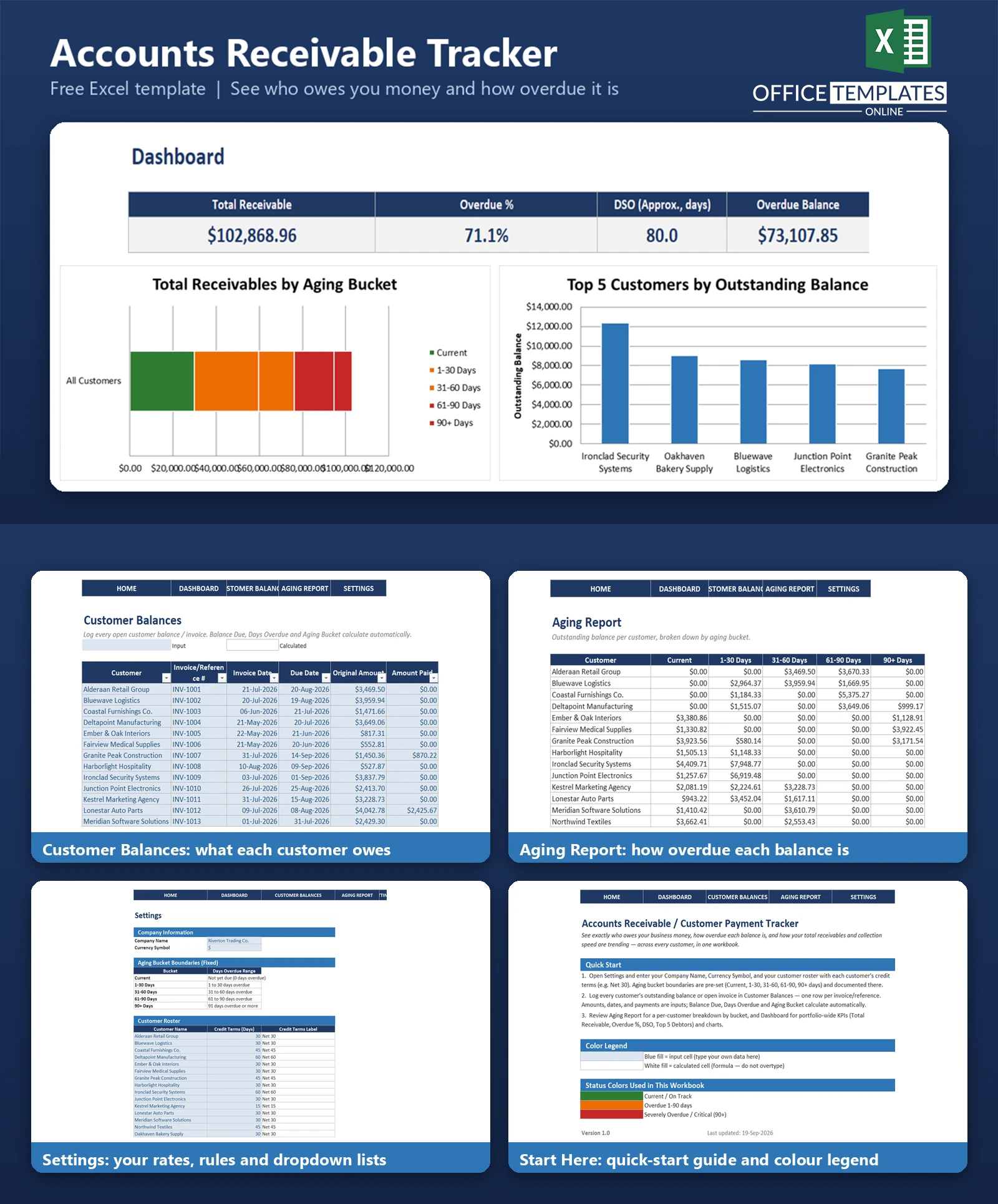
Chasing down who owes your business money - and how overdue each balance is - shouldn't require opening a dozen invoices or scrolling through an accounting system report you don't fully trust. This free Excel Accounts Receivable/Customer Payment Tracker template gives you one workbook that shows every open customer balance, automatically sorts it into aging buckets (Current, 1-30, 31-60, 61-90, and 90+ days overdue), and rolls it all up into a Dashboard with the KPIs that matter: Total Receivable, Overdue %, an approximate DSO (Days Sales Outstanding), and your Top 5 Debtors.
It's built for businesses that extend credit terms to multiple customers - Net 15, Net 30, Net 45, Net 60 - and need a fast, reliable answer to "who's overdue, and by how much?" without waiting on an accounting export or building a pivot table from scratch.
Unlike an invoice generator, this template doesn't create or format invoices - it assumes you already know your customers' outstanding balances (from your invoicing system, accounting software, or manual records) and gives you a dedicated, portfolio-wide lens for tracking and aging them. Everything is built with standard Excel formulas and formatting, with no macros, so it opens safely in any modern desktop copy of Excel.
Key Features
- Automatic aging bucket classification (Current/1-30/31-60/61-90/90+ days) using plain date-math formulas
- Automatic Balance Due and Days Overdue calculations for every customer balance
- Dropdown-validated Customer field pulled from your own customer roster in Settings.
- Color-coded conditional formatting (green/amber/red) so overdue severity is visible at a glance.
- Per-customer Aging Report with bucket-by-bucket totals and a total row
- Dashboard KPI cards: Total Receivable, Overdue %, approximate DSO, Overdue Balance
- Top 5 Debtors list built with LARGE and INDEX/MATCH formulas
- Two built-in charts: receivables by aging bucket, and top customers by outstanding balance
- Fully paid balances are handled gracefully and excluded from aging automatically
- Clickable navigation bar on every sheet for fast movement around the workbook
What You Can Track
- Every open customer balance or invoice reference, with invoice date, due date, original amount, and amount paid
- Balance Due per open item, calculated automatically as amounts are paid down.
- Days Overdue for every balance, recalculated live against today's date
- Which aging bucket each balance currently falls into
- Total outstanding balance per customer, and across your entire customer base
- Customer credit terms (e.g., Net 30, Net 45) alongside their roster entry
Dashboard & Reports
The Aging Report breaks down every customer's outstanding balance by bucket - Current, 1-30, 31-60, 61-90, and 90+ days - with a total row across all customers, so you can see concentration of risk at a glance.
The Dashboard adds four KPI cards (Total Receivable, Overdue %, an approximate DSO, and total Overdue Balance), a Top 5 Debtors table, and two charts: a stacked bar chart showing how your total receivables are distributed across aging buckets, and a bar chart ranking your top 5 customers by outstanding balance.
Who Is This Template For
- Small business owners who extend credit terms and need visibility without full accounting software
- Bookkeepers and office managers responsible for chasing down late payments
- Finance teams who want a lightweight, portfolio-level aging view alongside (not instead of) their accounting system
- Anyone who currently tracks customer balances in scattered spreadsheets or notes and wants one consistent system
How to Use the Template
- Step 1: Open Settings and enter your company name, currency symbol, and customer roster with each customer's credit terms
- Step 2: Log every open balance in Customer Balances - pick the customer, enter the invoice details and amounts; Balance Due, Days Overdue and Aging Bucket calculate automatically
- Step 3: Review the Aging Report for a per-customer breakdown and the Dashboard for portfolio-wide KPIs and charts
- Step 4: Update Amount Paid as customers pay down balances - the aging and totals refresh automatically
Benefits
- Replaces manual sorting of overdue balances with automatic, formula-driven aging
- Gives a single, at-a-glance view of collection risk across your entire customer base
- Surfaces your most overdue and highest-balance customers without building a report from scratch
- Uses only standard Excel formulas, so it's easy to inspect, audit, and customize
- No subscription, no add-ins, and no macros required
Excel Requirements
This template is a standard .xlsx workbook with no macros or VBA - it opens safely with macros disabled in any modern desktop version of Excel (2016 or later recommended for full chart, conditional formatting, and table style fidelity). It uses only Excel 2007-era functions (SUMIFS, IF, IFERROR, LARGE, INDEX, MATCH, TODAY)- no XLOOKUP, SORT, FILTER, UNIQUE, or SEQUENCE - so compatibility is not a concern even on older installations. It is not designed for Excel Online or Google Sheets, though basic data entry will still work in either.
FAQ
Does this template create or send invoices?
No. It tracks outstanding balances you already know about - from your invoicing system, accounting software, or manual records - and reports on how overdue they are. It does not generate or format individual invoices.
How is the aging bucket for each balance determined?
From Days Overdue: Current (not yet due), 1-30, 31-60, 61-90, or 90+ days overdue, calculated automatically from each balance's due date compared to today's date.
Is the DSO figure exact?
No - it's a clearly documented approximation. Since the template doesn't maintain a separate sales ledger, DSO is estimated as Total Receivable divided by the total original invoice amount in your data, multiplied by an assumed period (editable on the Dashboard, default 90 days). Treat it as directionally useful rather than an audited metric.
Can I add more than 15 customers?
Yes. The 15 customers in the sample file are just starting placeholders - add, remove, or rename customers in the Settings roster, and extend the dropdown range in Customer Balances to match.
What happens when a balance is fully paid?
Once Amount Paid equals the Original Amount, the balance shows as PAID in the Aging Bucket column and is automatically excluded from the aging totals and Overdue % calculation.
Does this replace my accounting software?
No. It's a lightweight, portfolio-level tracking and reporting layer for accounts receivable - useful on its own for smaller operations, or alongside accounting software as a fast, customizable aging view.
Will formulas break if I insert or delete rows?
The Customer Balances sheet is a live Excel Table, so inserting rows within it extends the formulas automatically. If you delete rows, make sure the calculated columns (Balance Due, Days Overdue, Aging Bucket) still contain their formulas in any remaining or newly added rows.
Does it work on Mac?
Yes - it's a standard .xlsx file with no platform-specific features, so it works the same way in Excel for Mac as in Excel for Windows.












