Free Excel Order Management Template for Small Businesses
If your orders live across a notebook, a WhatsApp thread, and a stack of emails, it's only a matter of time before something slips - a shipment that never goes out, a customer who orders twice by mistake, or a product nobody remembers to restock. The Customer Order Management System is a free, ready-to-use Excel template built to solve exactly that problem for small shops, product sellers, and order-based service businesses.
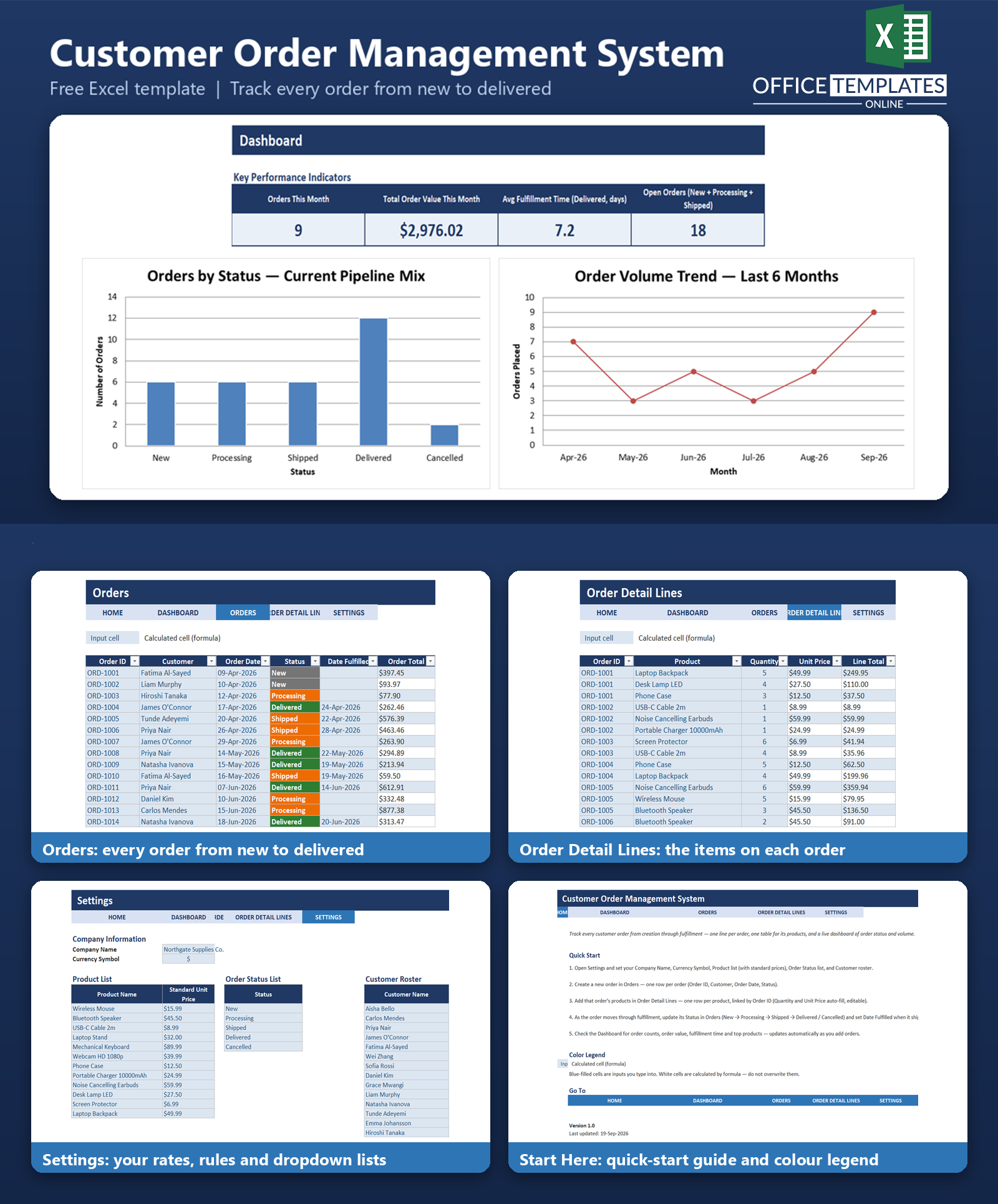
Every order gets logged once, its individual products are itemized separately, and the order's total value is calculated automatically - no manual adding, no separate spreadsheet per customer. As orders move from New to Processing to Shipped to Delivered, a live dashboard shows exactly how many orders are open, how much they're worth, and how fast they're being fulfilled.
There's nothing to install and no subscription to manage. Download the workbook, replace the sample data with your own products, statuses, and customers, and start logging real orders the same day.
Key Features
- Two-table order workflow: one row per order, and a separate table for each order's line items - linked automatically by Order ID
- Order Total calculated automatically from line items using SUMIFS - no manual math, ever.
- Fulfillment Days automatically calculated for delivered orders, so you can see how fast you're actually shipping.
- Dropdown-driven data entry for Customer, Product, Status, and Order ID - pulled from your own settings list, which cuts down on typos
- Color-coded order status (green = Delivered, amber = Processing/Shipped, red = Cancelled, gray = New) so the pipeline is readable at a glance
- A live dashboard with KPI cards and three charts, all driven by formulas - update an order and the dashboard updates itself.
- Pre-loaded with realistic sample data (32 orders, 90+ order lines) so you can see how everything works before you enter your own data
What You Can Track
- Order ID, customer, order date, and current status for every order
- Every product on every order, with quantity and unit price
- Order Total, rolled up automatically from that order's products
- Date an order was shipped or delivered, and how many days that took
- Which products are ordered most often, by total quantity
- How many orders are open right now, and how much they're worth
Dashboard & Reports
The Dashboard sheet turns your order data into a live operational snapshot, no pivot tables or manual updates required:
- KPI cards: Orders This Month, Total Order Value This Month, Average Fulfillment Time (for delivered orders), and Open Orders
- Orders by Status - a bar chart showing your current pipeline mix across New, Processing, Shipped, Delivered, and Cancelled
- Order Volume Trend - a line chart of order counts over the last six months, so you can spot seasonal patterns or growth
- Top 6 Products by Quantity Ordered - a bar chart ranking your best-selling products, calculated with formulas (no manual sorting)
Who Is This Template For
- Small shop owners and independent sellers taking orders by phone, DM, or in person
- Product-based businesses where a single order can include several different items
- Makers and craft businesses fulfilling custom, multi-item orders
- Anyone who has outgrown a paper order book but isn't ready for order-management software
How to Use the Template
- Step 1: Open the Settings sheet and enter your company name, currency symbol, product list with standard prices, order statuses, and customer list
- Step 2: Log each new order as a row in the Orders sheet - Order ID, customer, order date, and status
- Step 3: Add that order's products as rows in Order Detail Lines, using the same Order ID - quantity and price auto-fill from your Settings list
- Step 4: Update the order's Status as it moves through fulfillment, and set Date Fulfilled once it ships or is delivered
- Step 5: Open the Dashboard any time to see current order volume, value, fulfillment speed, and top products
Benefits
- Replaces scattered notebooks, chat threads, and email order records with one file
- Removes manual order-total math and the errors that come with it
- Gives an at-a-glance view of which orders are still open and need attention
- Works entirely offline and requires no account, login, or monthly fee
- Fully editable - every formula, list, and format can be adjusted to fit how you run your business
Excel Requirements
This template uses standard Excel Tables, formulas (SUMIFS, COUNTIFS, AVERAGEIFS, INDEX/MATCH, IF, IFERROR, LARGE, SUMPRODUCT), conditional formatting, and data validation dropdowns - no macros or VBA of any kind. It opens cleanly in modern desktop Excel (Excel 2016 and later, and Microsoft 365) with no add-ins or extra setup required.
FAQ
Do I need any add-ins or paid software to use this template?
No. It's a standard .xlsx file that opens in any modern version of Microsoft Excel. No macros, add-ins, or subscriptions are required.
Can I use this for a service business instead of physical products?
Yes - replace the sample "products" in Settings with your service names and standard rates, and the same order/line-item structure works for service bookings with multiple line items.
How do I add more than the sample number of orders or products?
Both the Orders and Order Detail Lines tables are real Excel Tables. Type into the row directly below the last row, and the table (formulas, formatting, and all) extends automatically. Add more products, statuses, or customers directly under the existing lists in Settings.
What happens to the Order Total if I add or change a product line?
Nothing you need to do manually - the Order Total on the Orders sheet is a formula that automatically re-sums every Order Detail Lines row with a matching Order ID.
Can I track partial shipments or split deliveries?
The template tracks one status and one fulfillment date per order. For orders that ship in multiple parts, the simplest approach is to mark the order Shipped once the first part goes out and Delivered once everything has arrived, or to log split shipments as separate orders.
Does the dashboard update automatically?
Yes. Every KPI and chart is formula-driven from the Orders and Order Detail Lines tables - there's nothing to refresh or recalculate by hand.
Is my data stored anywhere online?
No. This is a local Excel file with no cloud connection, tracking scripts, or external links - your order and customer data stays on your own computer.
Can I remove the sample data and start fresh?
Yes. Delete the contents of the sample rows in Orders and Order Detail Lines and start entering your own orders. Keep at least one row in each Settings list so the dropdowns and dashboard formulas continue to work.

← Previous Article
Free Excel Invoice Tracker Template with Automatic Payment StatusYou may also like