Free Excel Invoice Tracker Template with Automatic Payment Status
Chasing down which invoices are paid, which are still outstanding, and which customers are overdue is one of the most tedious parts of running a small business or freelance practice. Spreadsheets built ad hoc for each invoice rarely scale, and generic invoice templates stop being useful the moment you need to track payment status across dozens of customers.
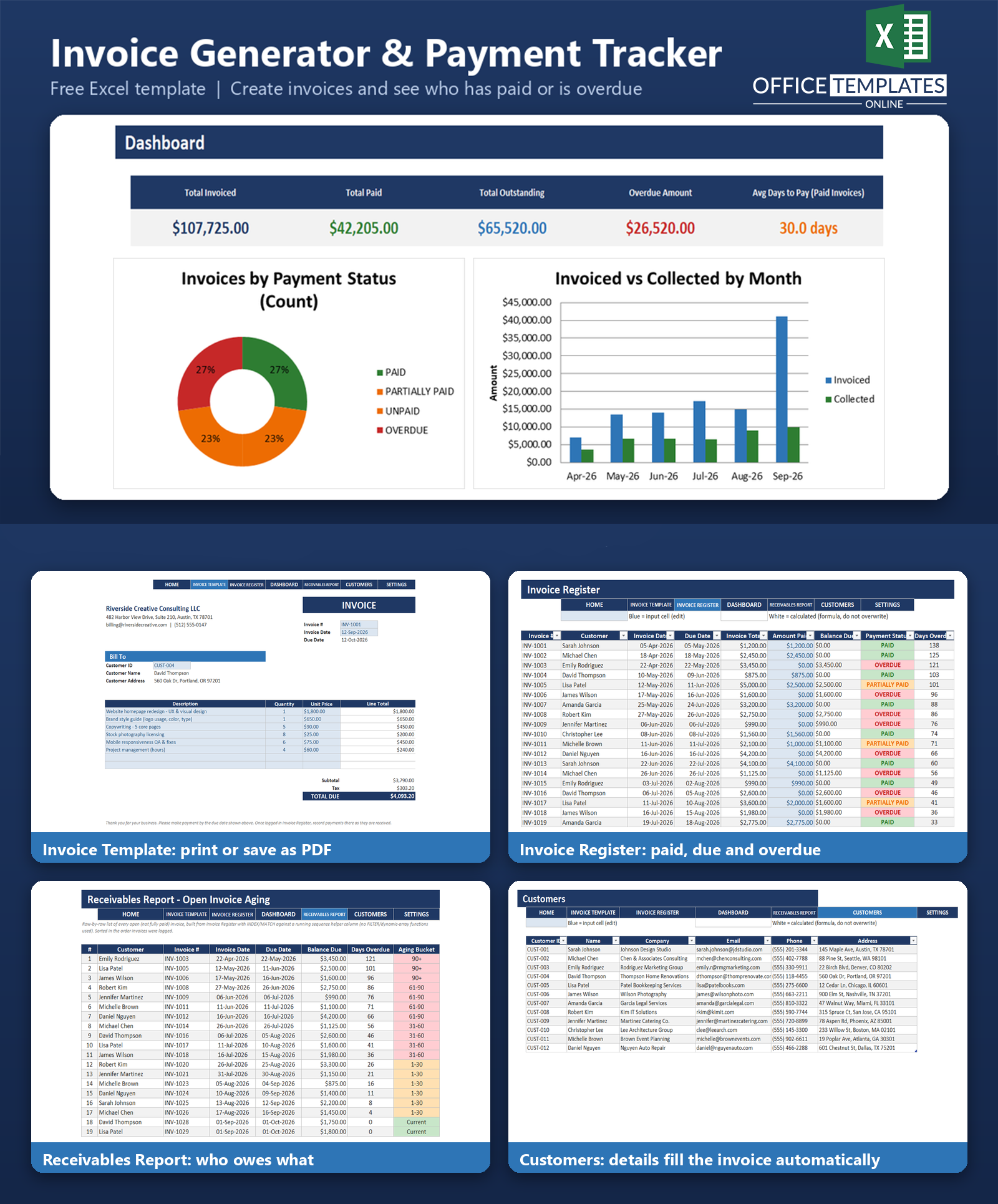
This free Excel Invoice Generator & Payment Tracker template solves that problem in a single workbook. Create a professional, print-ready invoice, log it in a central register, and record payments as they come in - the template automatically calculates the remaining balance, flags overdue invoices, and rolls everything up into a dashboard and an aging report. No add-ins, no subscription, and no macros: it's built entirely with standard Excel formulas so it opens safely on any modern desktop copy of Excel.
It's designed for freelancers, consultants, and small service businesses who send their own invoices and need a dependable way to answer one question at a glance: who owes me money, and how late are they?
Key Features
- Printable invoice template with automatic subtotal, tax, and total calculations
- Customer dropdown that auto-fills name and address on every invoice
- Central invoice register that calculates Balance Due and Payment Status automatically
- Automatic PAID / PARTIALLY PAID / UNPAID / OVERDUE classification for every invoice
- Days-overdue counter that updates live against today's date
- Color-coded conditional formatting - green, amber, and red status at a glance
- Dashboard with KPI cards, a payment-status chart, an aging chart, and a monthly invoiced-vs-collected chart
- Formula-driven receivables aging report, ready to print
- Pre-loaded with 12 sample customers and 44 sample invoices so every feature is demonstrated immediately
- No macros, no VBA, no add-ins required
What You Can Track
- Every invoice issued: number, customer, date, due date, and total
- Amount paid and remaining balance due, invoice by invoice
- Payment status: fully paid, partially paid, unpaid (not yet due), or overdue
- Exactly how many days an invoice is overdue
- Total invoiced, total collected, and total outstanding across your whole customer base
- Which customers currently owe you money, and how old that debt is (aging buckets: current, 1-30, 31-60, 61-90, and 90+ days)
Dashboard & Reports
The Dashboard sheet gives you an instant read on your receivables: five KPI cards (Total Invoiced, Total Paid, Total Outstanding, Overdue Amount, and an approximate Average Days to Pay), plus three charts - a payment-status breakdown, an aging-bucket bar chart, and an invoiced-vs-collected trend by month.
The Receivables Report sheet lists every open (not fully paid) invoice individually, complete with customer, invoice number, dates, balance due, days overdue, and an aging bucket - plus a bucket-total summary underneath. It's formatted to print cleanly as a stand-alone aging report.
Who Is This Template For
- Freelancers and independent contractors who invoice clients directly
- Consultants and agencies billing multiple clients or projects
- Small service businesses (photography, catering, repair, bookkeeping, design, and similar) that need a lightweight billing system
- Anyone currently invoicing from Word or a generic PDF with no way to track who has actually paid
How to Use the Template
- Open the Settings sheet and enter your company name, address, contact details, currency symbol, default tax rate, and default payment terms.
- Add your customers to the Customers sheet.
- Fill out the Invoice Template - pick a customer from the dropdown, add line items, and print or save it as a PDF to send.
- Log the invoice in the Invoice Register, then update the Amount Paid cell whenever a payment comes in.
- Check the Dashboard and Receivables Report any time for an up-to-date view of what's owed.
Benefits
- Removes manual balance and status calculations - formulas do the work every time an invoice or payment is entered.
- Makes overdue invoices visible immediately through color-coded status and an aging report, instead of being discovered late
- Keeps invoice creation and payment tracking in one file instead of scattered documents
- Works entirely offline, with no subscription or account required
- Uses only standard Excel formulas, so it remains compatible across Excel versions without macros or add-ins
Excel Requirements
This template requires a modern desktop version of Excel (Excel 2016 or later, including Microsoft 365) to support its data validation dropdowns, conditional formatting, and Excel Tables. It contains no macros or VBA code of any kind, so it opens safely with macros disabled and works the same way whether or not your organization allows macro-enabled files.
FAQ
Do I need any add-ins or a Microsoft 365 subscription to use this template?
No. It works in any modern desktop version of Excel, including perpetual-license versions like Excel 2019 and Excel 2021, as well as Microsoft 365. No add-ins are required.
Does this template include macros or VBA?
No. Every calculation is a standard Excel formula (SUMIFS, INDEX/MATCH, IF, IFERROR, COUNTIFS, and similar). The file opens safely with macros disabled because it contains none.
How does the template decide if an invoice is overdue?
An invoice is marked OVERDUE when nothing has been paid on it and today's date is past its due date. If a payment has been received but the invoice isn't fully settled, it's marked PARTIALLY PAID instead, regardless of the due date - see the included README for the exact logic.
Can I track more than the 44 sample invoices included?
Yes. The Invoice Register is a proper Excel Table, so adding a new row extends all the formulas (Balance Due, Payment Status, Days Overdue) automatically. Simply remove the sample rows before entering your real data.
Does it calculate sales tax or VAT automatically?
It applies a single tax rate that you set once on the Settings sheet, which then flows into every invoice's tax calculation. It does not handle multiple simultaneous tax jurisdictions or rates.
Is there a limit to how many customers I can add?
The Customers sheet is an Excel Table that expands as you add rows, so there's no built-in limit beyond Excel's own row capacity.
How is 'Average Days to Pay' calculated if there's no payment-date field?
It's an approximation, documented in the README: it averages the credit terms (due date minus invoice date) of invoices marked Paid, since the workbook doesn't capture a separate payment date. Treat it as a proxy for typical terms rather than an exact days-late measurement.
Can I use this for both product sales and service billing?
Yes. The line-item structure (description, quantity, unit price) works for either products or billable services - just adjust the descriptions and units to fit.












