Free Excel Payroll Calculator Template with Payroll Register and Printable Payslips
Running payroll yourself is mostly arithmetic, and that arithmetic is easy to get wrong: overtime at the wrong multiplier, a pension deduction taken after tax instead of before, or a year-to-date total that no longer adds up. Small business owners and office managers often end up rebuilding the same gross-to-net sums in a blank sheet every month.
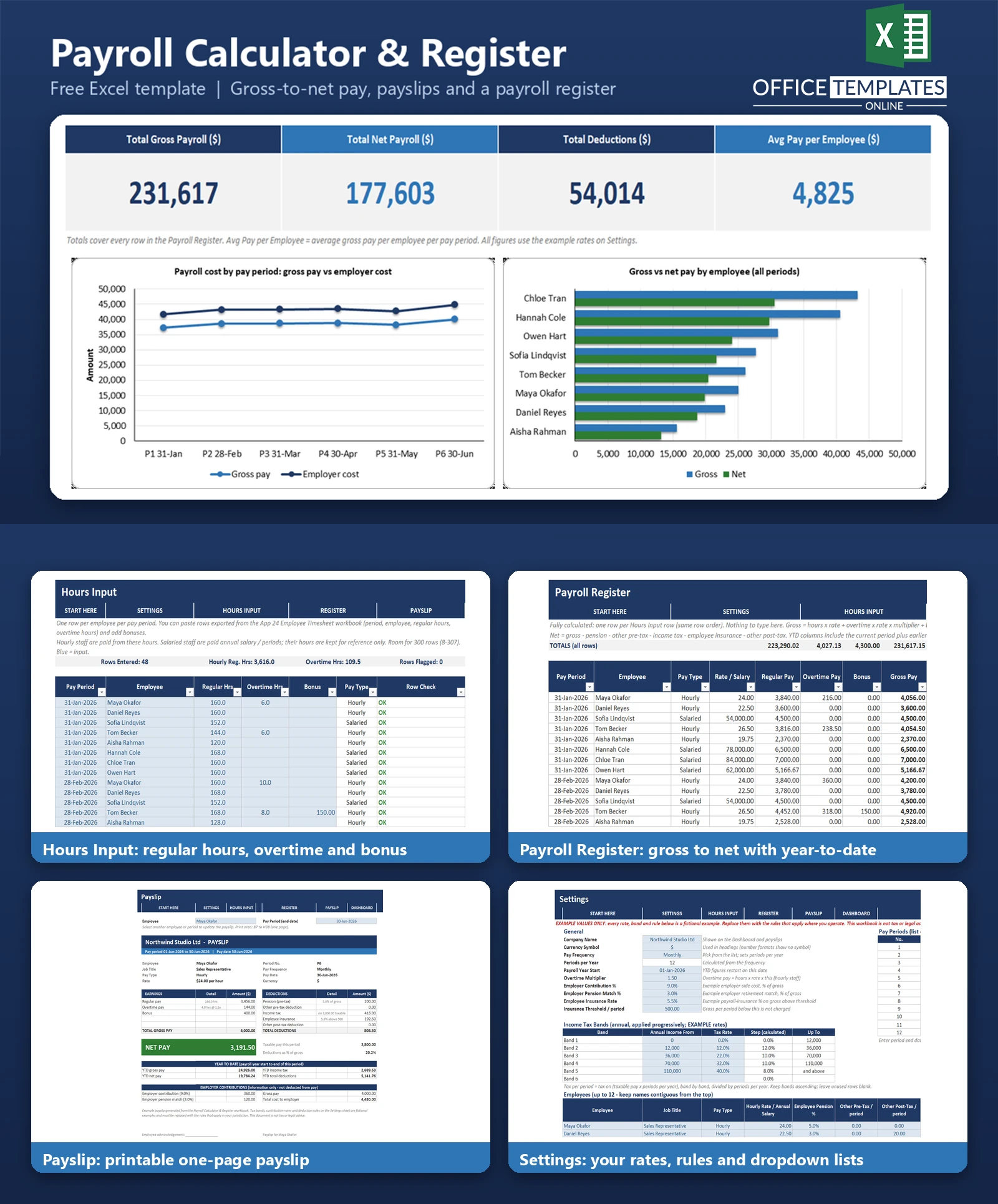
This Excel payroll calculator does the gross-to-net work for you. Enter hours (or paste them from a timesheet), and the workbook calculates gross pay, pension, other deductions, progressive income tax, employee insurance, net pay, employer cost, and year-to-date totals for every employee, then produces a printable one-page payslip for any employee and pay period.
It focuses on the output stage of payroll, not on capturing hours. All rates in the template are fictional examples that you replace with the rules that apply where you operate; the workbook is not tax advice. It uses plain formulas and works in desktop Excel with no macros.
Key Features
- Hourly and salaried employees, with an overtime multiplier and bonuses.
- Editable progressive income tax table with up to six bands, applied band by band.
- Employee pension % before tax, fixed other pre-tax and post-tax deductions, and an employee insurance rate with a threshold.
- Employer contribution % and employer pension match % to show the full cost of each payslip.
- Payroll Register with year-to-date gross, income tax, and net for every employee.
- Row Check column that flags unknown employees, unlisted periods, duplicate rows, and negative net pay.
- One-page printable Payslip chosen from employee and pay period dropdowns.
- Dashboard with four KPIs and two charts.
What You Can Track
- Up to 12 employees with job title, pay type, rate or annual salary, and deduction settings.
- Up to 12 pay periods with period end and pay date, using weekly, fortnightly, semi-monthly or monthly frequency.
- Up to 300 hours rows: pay period, employee, regular hours, overtime hours and bonus.
- Gross pay, deductions, net pay, employer contributions, and employer cost per employee per period.
Dashboard & Reports
The Dashboard shows Total Gross Payroll, Total Net Payroll, Total Deductions, and Average Pay per Employee. A line chart tracks gross pay and employer cost over the latest six pay periods, and a clustered bar chart compares gross and net pay for each employee. Two summary tables list the figures behind the charts.
The Payroll Register is the detailed report: one row per employee per period with every earning, deduction, and year-to-date total, plus a totals row. The Payslip sheet turns any register row into a formatted, print-ready payslip.
Who Is This Template For
- Small business owners who run payroll without payroll software.
- Office managers and bookkeepers preparing monthly payslips.
- Studios, shops, clinics and agencies with a mix of hourly and salaried staff.
- Anyone who wants to see exactly how each net pay figure is built.
How to Use the Template
- On Settings, enter your company, currency, pay frequency, payroll year start, and rates, and replace the example tax bands with your own.
- List your employees with pay type, rate or salary, pension %, and fixed deductions, and add your pay periods.
- On Hours Input, enter or paste the hours and bonuses for each employee and period.
- Check the Row Check column, then review the Payroll Register.
- Open Payslip, choose an employee and period, and print.
- Use the Dashboard for totals and charts. Clear the sample data when you are ready to enter your own.
Benefits
- Consistent gross-to-net calculation in one place, with every step visible.
- Payslips ready to print or save as PDF.
- Year-to-date figures without manual accumulation.
- Flexible rates and rules that you control.
Excel Requirements
The workbook contains no macros and works in modern desktop Excel for Windows or Mac. It uses standard functions such as SUMIFS, COUNTIFS, SUMPRODUCT, INDEX, MATCH, and IFERROR.
Frequently Asked Questions
Are the tax rates real?
No. All tax bands and contribution rates are fictional examples. You must replace them with the rules that apply in your country. The template is not tax or legal advice.
How is income tax calculated?
Taxable pay for the period is multiplied by the number of periods per year; tax is calculated band by band from the tax table, and the result is divided back to the period. This is a simplified annualised method, not a cumulative method.
Can I mix hourly and salaried employees?
Yes. Hourly staff are paid by hours; salaried staff are paid an annual salary divided by periods per year. Hours entered for salaried staff are kept for reference only.
Can I paste hours from a timesheet?
Yes. Hours Input has columns for pay period, employee, regular hours, overtime hours, and bonus, so rows exported from a timesheet can be pasted in. Check the Row Check column afterwards.
How many employees can it handle?
The prepared layout holds 12 employees, 12 pay periods, and 300 hours rows.
Does it handle starters, leavers, or back pay?
Not automatically. Pay is calculated for whole periods; you can adjust with a bonus entry.
Does it need macros?
No. Everything runs on formulas and dropdowns.
How do I remove the sample data?
Clear the employees and pay periods in Settings and the blue cells on Hours Input, keeping the formula columns.

← Previous Article
Free Excel Employee Shift Scheduler Template with Coverage DashboardYou may also like