Free Excel Employee Attendance Tracker Template for Small Businesses
If you run a shop, a small office, or a team of a dozen people, attendance often lives on a paper sign-in sheet by the door. Nobody adds it up, so the same few people arrive late week after week, and it only comes out at review time, when nobody remembers the dates.
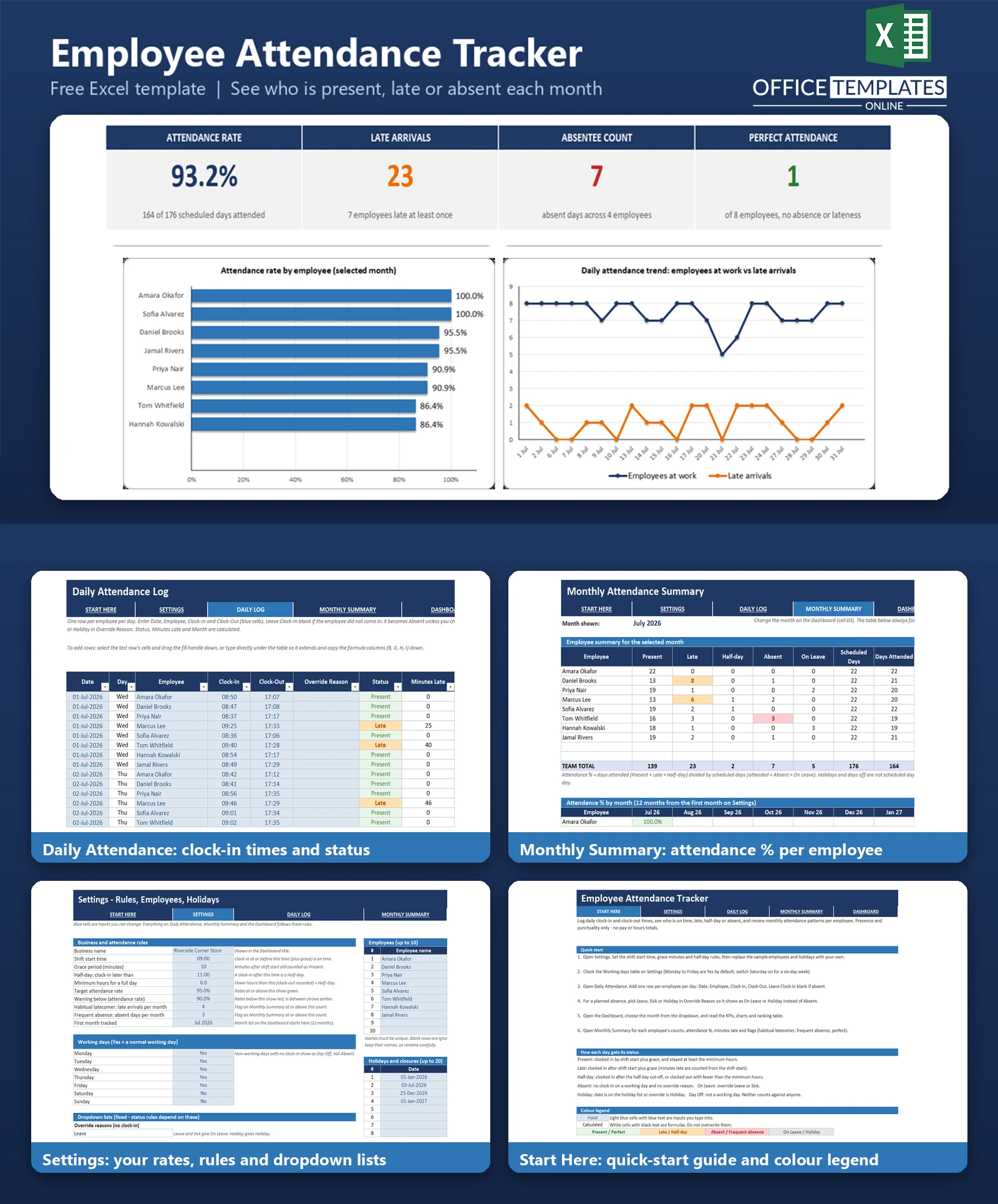
This Excel attendance tracker replaces the sign-in sheet with one workbook. You enter the clock-in and clock-out time for each employee each day, and the workbook decides whether the day was Present, Late, Half-day, Absent, On Leave, or a Holiday, based on the shift start time, grace period, and half-day rules you set once.
Monthly figures roll up automatically: days present, late arrivals, absences, attendance percentage, and minutes late per employee, plus a dashboard with a month selector, four headline numbers, and two charts. It tracks presence and punctuality only. It does not calculate pay or total hours, so it stays simple and is not a timesheet or payroll tool.
Key Features
- Settings sheet for shift start time, grace minutes, half-day cut-off, minimum hours for a full day, target and warning attendance rates, working days of the week, and a holiday list.
- Daily Attendance table where each row is one employee on one day, with automatic Status and Minutes Late.
- Override Reason dropdown (Leave, Sick, Holiday) so planned absences are not counted as Absent.
- Monthly Summary with counts per employee, attendance %, minutes late, and flags for Perfect, Habitual latecomer, and Frequent absence.
- A 12-month attendance % grid by employee, so patterns show up over time.
- Dashboard with a month selector, four KPI cards, a ranked bar chart, a daily trend line chart, and a ranking table.
- Room for 10 employees, 20 holidays, and thousands of daily rows. Sample data for eight fictional employees is included.
What You Can Track
- Clock-in and clock-out time for each employee each day.
- Days present, late, half-day, absent, and on leave.
- Minutes late, measured from the shift start.
- Attendance percentage per employee and for the whole team.
- Employees with no absences and no late arrivals in the month.
- Which employees pass your late-arrival or absence thresholds.
Dashboard & Reports
Pick a month from the dropdown at the top of the Dashboard. Four cards show the Attendance Rate, Late Arrivals, Absentee Count, and Perfect Attendance for that month. A bar chart ranks employees by attendance rate, and a line chart shows how many employees were at work each day next to the number of late arrivals. Below the charts, a ranking table lists every employee with their counts, attendance %, minutes late, and any flag.
The Monthly Summary sheet holds the same numbers in a full table with a team total, and a second grid shows attendance % by month for each employee. Colours follow your target and warning rates: green, amber and red.
Who Is This Template For
- Shop, cafe and salon owners who track staff presence day to day.
- Small office and workshop managers with up to ten employees.
- Supervisors who need a fair record of lateness and absence for staff conversations.
- Anyone who wants an attendance record without buying HR software.
How to Use the Template
- Open Settings and enter your shift start time, grace minutes, half-day rules, and target attendance rate.
- Check the working days table and add your holidays.
- Replace the sample employees with your own names and roles.
- Open Daily Attendance and add one row per employee per day with the clock-in and clock-out times. Leave clock-in blank for an absence.
- For planned time off, choose Leave, Sick, or Holiday in Override Reason.
- Open the Dashboard, choose the month, and review the KPIs, charts, and ranking.
- Use the Monthly Summary for each employee's counts and flags.
Benefits
- Rules are applied the same way to every employee, so lateness is not a matter of opinion.
- Repeated patterns, such as a habitual latecomer, become visible in one place.
- Perfect attendance can be recognised with real numbers.
- Less manual counting at the end of each month.
- Works offline in a file you own, with no subscription.
Excel Requirements
The workbook contains no macros and works in modern desktop Excel for Windows or Mac. It uses standard functions such as COUNTIFS, SUMIFS, INDEX, MATCH, LARGE, and EDATE. Data entry is done by typing or pasting times; it does not connect to a time clock or scanner.
Frequently Asked Questions
Does it calculate pay or hours worked?
No. It records presence and punctuality only. The clock-out time is used just to spot early departures that count as a half-day.
How does it decide a day is Late?
A clock-in later than the shift start plus the grace period is Late. With a 09:00 start and 10 minutes of grace, 09:10 is on time, and 09:11 is Late.
What is a Half-day?
A clock-in after the half-day cut-off time, or a recorded clock-out that leaves fewer hours than your minimum for a full day. Both limits are in Settings.
How are leave and holidays handled?
If the clock-in is blank and you pick Leave or Sick, the day is On Leave. Dates on the holiday list, and days you mark as non-working, are not counted against anyone.
How many employees can it handle?
Ten employees on the Settings list. The Daily Attendance ranges are sized for about 5,000 rows, roughly two years of data for eight employees.
Can I look at a different month?
Yes. Use the month dropdown on the Dashboard. The list covers 12 months starting from the first month you set in Settings.
Does it need macros?
No. Everything runs on standard formulas and works in desktop Excel.
How do I remove the sample data?
Clear the input columns in Daily Attendance and replace the sample names and holidays in Settings. The README lists the exact steps.

You may also like