Free Excel Inventory Valuation and Stock Movement Tracker for Audit-Ready Reporting
At every month-end or year-end, someone has to put a number on the stock. When quantities live in one file, purchase costs in another, and the count sheet is on paper, period-end valuation turns into a manual exercise that is slow, hard to defend to an auditor, and easy to get wrong. Shrinkage hides inside the noise until it is too late to trace.
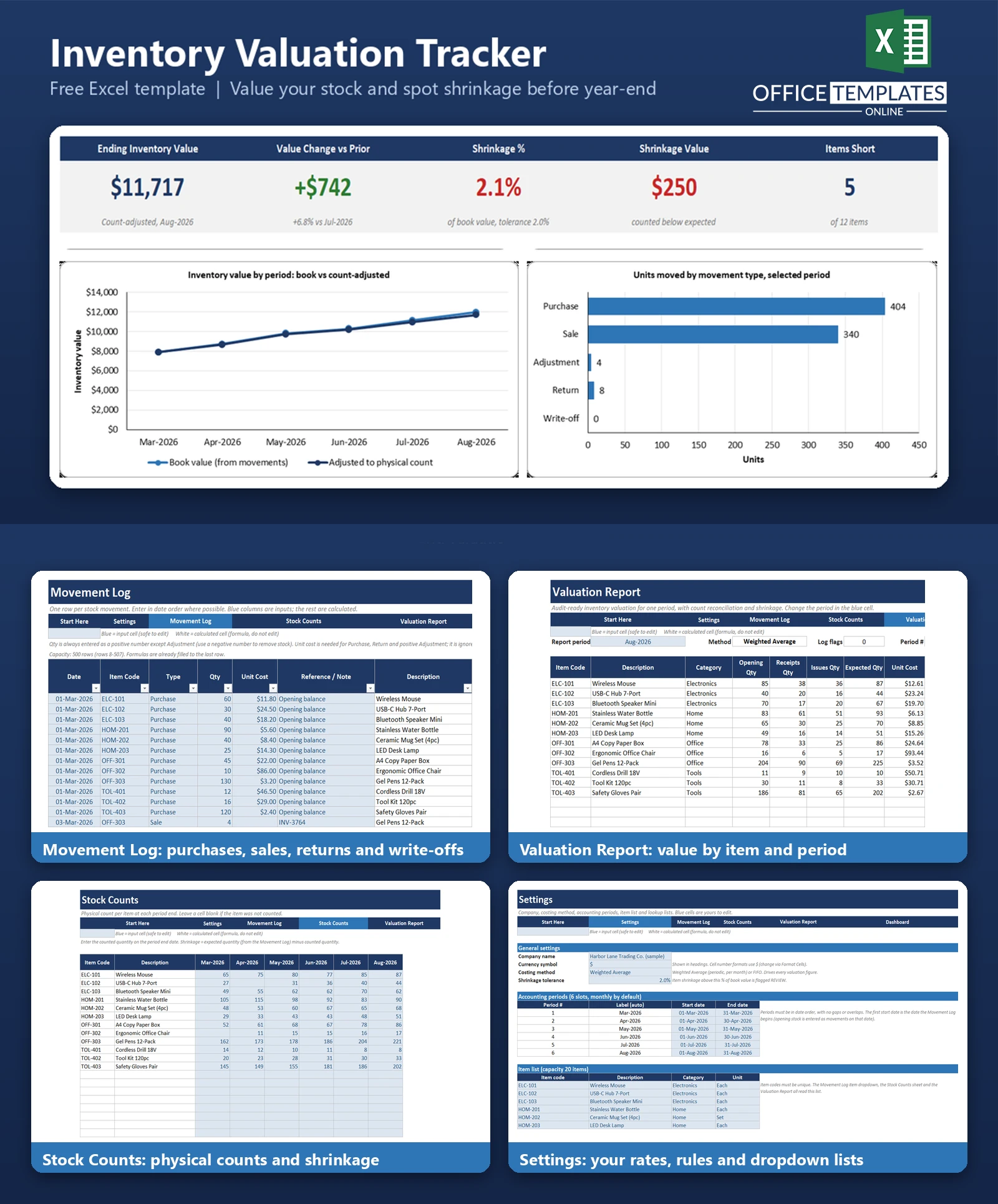
This Excel template gives you a single Movement Log for purchases, sales, returns, adjustments, and write-offs, plus a Stock Counts sheet for physical counts at each period end. It values your inventory for every period using either Weighted Average or FIFO costing, compares the expected quantity from your movements with what was counted, and shows shrinkage as quantity, value, and a percentage of book value.
It is built for small businesses, bookkeepers, and accountants who need a clear, repeatable valuation for the accounts or tax return. It contains no macros and runs in modern desktop Excel. Fictional sample data covering six months and twelve items is included so you can see every report working before you enter your own.
Key Features
- Movement Log Excel Table with 500 rows of capacity and item and type dropdowns.
- Costing method switch in Settings: Weighted Average (periodic, monthly) or FIFO
- Period-end valuation for up to six accounting periods and twenty items
- Stock Counts sheet: enter the counted quantity per item per period
- Shrinkage detection: expected quantity minus counted quantity, valued at book unit cost
- Configurable shrinkage tolerance with REVIEW, Within tolerance, OK, Overage, and Not counted statuses
- Roll-forward: opening value plus receipts less cost of issues, then adjusted to count
- Data check on every log row (unknown item, missing cost, stock below zero and more)
- Dashboard with five KPIs and three charts
What You Can Track
- Purchases, customer returns and positive adjustments at their unit cost
- Sales, write-offs and negative adjustments (costed by your chosen method)
- Expected quantity and book value per item at each period end
- Physical counts, variance quantity, shrinkage quantity and shrinkage value
- Count-adjusted inventory value and its change from the prior period
- Units moved by movement type in any period
Dashboard & Reports
The Valuation Report shows one period at a time: opening, receipts and issues quantities, expected quantity, unit cost, book value, counted quantity, variance, shrinkage and adjusted value for every item, with a totals row, a snapshot table for all periods and a roll-forward. The Dashboard shows five KPIs and three charts for the period you select.
- KPIs: Ending Inventory Value, Value Change vs Prior, Shrinkage %, Shrinkage Value, and Items Short
- Line chart of book value against count-adjusted value by period
- Bar chart of units moved by movement type
- Bar chart and table of the items with the most shrinkage
Who Is This Template For
- Small retailers, wholesalers and product businesses that value stock at period end
- Bookkeepers and accountants preparing inventory figures for clients
- Owners who want a clear view of shrinkage and its cost
- Businesses that outgrew a single stock list but do not need full ERP software
How to Use the Template
- On Settings, enter your company name, choose Weighted Average or FIFO, set your periods, and list your items.
- On the Movement Log, enter every movement. Opening stock goes in as Purchase rows dated on the first period start.
- At each period end, enter physical counts on the Stock Counts sheet.
- Make sure the Check column reads OK on every log row.
- On the Valuation Report, choose a period to see valuation and shrinkage by item.
- Review the Dashboard, then post Adjustment or Write-off rows next period to book any shrinkage.
Benefits
- One consistent valuation method applied to every item and period
- A documented trail from movements to closing value
- Shrinkage found and priced at each count instead of at year-end
- Switch costing method to see the effect on reported value
- Simple enough to maintain without accounting software
Excel Requirements
The template is a standard .xlsx workbook for modern desktop Excel (2010 or later, including Microsoft 365). It contains no macros, so there is nothing to enable. It uses long-established functions such as SUMIFS, SUMPRODUCT, INDEX, MATCH, and IFERROR and does not rely on dynamic arrays.
Frequently Asked Questions
Which costing methods are supported?
Weighted Average (calculated monthly, also called periodic) and FIFO. You choose in Settings, and every report updates.
How is FIFO calculated?
Closing stock is valued as the most recently received units: total receipt cost less the cost of the oldest units already issued.
How is shrinkage calculated?
Expected quantity from the movements minus counted quantity, multiplied by the book unit cost (book value divided by expected quantity).
Does the workbook post shrinkage automatically?
No. It reports it. To reflect it in the books, enter an Adjustment or Write-off in the next period.
How many items, periods, and movements fit?
Twenty items, six periods, and 500 movement rows.
Do I have to enter movements in date order?
No. Valuation does not depend on row order, although date order is easier to review.
Is this a substitute for an accountant?
No. It is a tracking and calculation tool; your accountant should confirm the method suits your jurisdiction.
Are macros required?
No. The workbook contains no macros or add-ins.












