Free Excel Asset Register & Equipment Maintenance Tracker Template
Most small businesses own more equipment than they can keep in their heads: vehicles, machinery, computers, tools, furniture and building systems. Without one list, nobody knows what each item cost, what it is worth today, where it sits, or when it was last serviced. Missed maintenance then turns into breakdowns, repair bills, and lost working days.
This Excel template puts every asset on a single register, works out straight-line depreciation and current book value, and reads a maintenance log to schedule the next service for each item. Anything overdue or coming due shows up in colour and on a dashboard attention list, so the person running the workshop, warehouse or office can act before something fails.
It is built for owners, facilities managers, office managers and operations leads who want a practical, formula-driven tool in a workbook they already understand, with no macros and no subscription.
Key Features
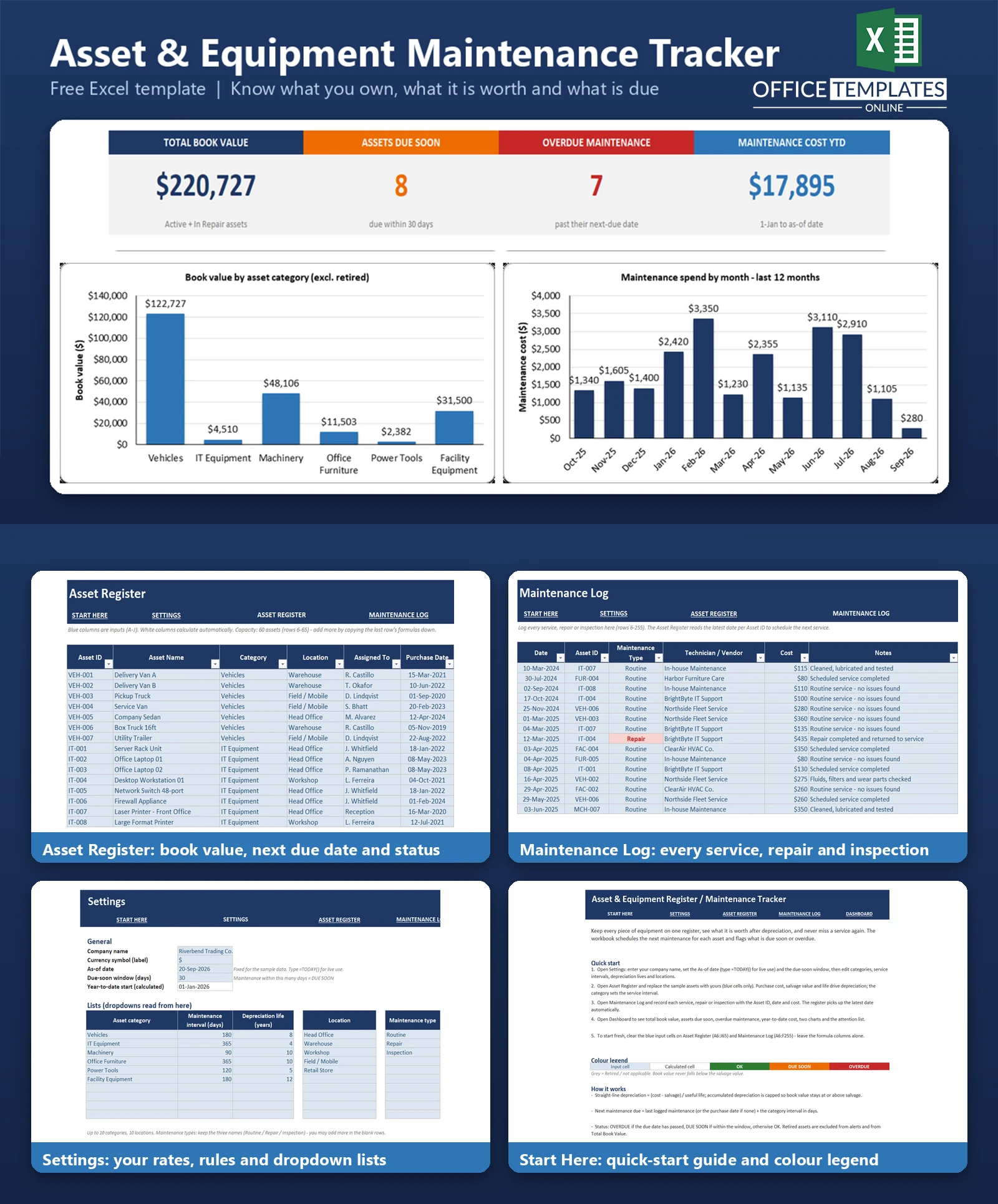
- Asset Register with 60 asset rows of capacity and 38 fictional sample assets across six categories.
- Straight-line depreciation with age, annual depreciation, accumulated depreciation, and book value that never drops below salvage value
- Next maintenance due calculated from the last logged service (or the purchase date if none) plus the category interval.
- Automatic OK/DUE SOON/OVERDUE status with colour highlighting; Retired assets are excluded from alerts
- Maintenance Log with 250 rows of capacity (90 sample entries) recording routine service, repair, and inspection with cost and vendor
- Settings sheet for categories, service intervals, depreciation lives, locations, as-of date, and due-soon window
- Dashboard with four KPIs, two charts, and a ranked attention list
What You Can Track
- Asset ID, name, category, location, and the person responsible
- Purchase date, purchase cost, salvage value, and optional useful-life override
- Asset status: Active, In Repair, or Retired
- Every maintenance event: date, type (Routine, Repair, Inspection), technician or vendor, cost, and notes
- Lifetime maintenance cost per asset and year-to-date maintenance spend
Dashboard & Reports
The Dashboard shows Total Book Value (Active and In Repair assets), Assets Due Soon, Overdue Maintenance, and Maintenance Cost YTD. A column chart shows book value by asset category, and a second column chart shows maintenance spend for each of the last 12 months. Below the charts, an attention list ranks up to 12 assets by urgency, with overdue items first, showing location, due date, days to due, and who is responsible.
Who Is This Template For
- Small manufacturers, workshops and trades businesses with machinery and tools
- Delivery and field-service companies managing a small vehicle fleet
- Offices, shops and warehouses tracking IT equipment, furniture and facility systems
- Facilities and operations managers who need a simple maintenance schedule and asset value list
How to Use the Template
- Open Settings and enter your company name, as-of date (or =TODAY() for live use), and due-soon window.
- Edit the categories, service intervals, depreciation lives, and locations.
- Replace the sample assets in the Asset Register using the blue input cells.
- Record each service, repair, or inspection in the Maintenance Log using the Asset ID dropdown.
- Review the Dashboard and the Maintenance Status column to plan upcoming work.
- To remove the sample data, clear the blue input cells on the register and the log and leave the formula columns in place.
Benefits
- One place to see what you own, where it is, and what it is worth
- A clear service schedule that reduces surprise breakdowns
- Maintenance costs by month and by asset for budgeting and replacement decisions
- Works offline in a file you control, with formulas you can inspect and adjust
Excel Requirements
The workbook contains no macros and uses standard formulas, Tables, dropdown lists, and conditional formatting. It is designed for modern desktop Excel on Windows or Mac (Excel 2010 or later). The As-of date is fixed at 20-Sep-2026 for the sample data; enter =TODAY() in Settings for live alerts.
Frequently Asked Questions
How is depreciation calculated?
Straight-line: (purchase cost minus salvage value) divided by useful life in years. Accumulated depreciation is capped so book value never falls below salvage value.
How does the template decide when maintenance is due?
It takes the most recent date for that asset in the Maintenance Log, or the purchase date if there is none, and adds the service interval set for the asset category in Settings.
Can I use a different service interval for one asset?
Intervals are set per category. To give an asset its own interval, create a category for it in Settings. The useful life can be overridden per asset.
What happens to retired assets?
Set the status to Retired. They keep their depreciation figures but are excluded from maintenance alerts and from Total Book Value.
How many assets and log entries can it hold?
The register has room for 60 assets and the log for 250 entries as delivered. You can extend both by copying the last row formulas down.
Does it use macros?
No. Everything runs on standard formulas, so it works without enabling macros.
Is the currency fixed?
Number formats display a dollar sign. You can change the cell number formats to another currency if needed.

← Previous Article
Free Excel Expense Reimbursement Tracker Template for Small BusinessesYou may also like