Free Excel Expense Reimbursement Tracker Template for Small Businesses
When employees pay for travel, meals, software, or supplies out of their own pocket, the claims usually arrive as photos of receipts, chat messages, and emails. Nobody is quite sure what has been approved, what has been paid, and which requests have been quietly sitting for three weeks. Over-limit claims slip through, and receipts go missing until the auditor asks.
The Business Expense Reimbursement Manager is an Excel workbook that gives owners, office managers, and finance staff one place to log every claim and follow it from Submitted to Approved to Paid (or Rejected). It is employee-initiated and approval-driven, not a general bookkeeping ledger.
Each request row checks itself against your category policy limits and receipt rules, counts how long it has been waiting, and feeds a dashboard that shows what is pending, what has been reimbursed, and how quickly approvals happen. There are no macros: it runs on formulas, dropdowns, and conditional formatting.
Key Features
- Status workflow by dropdown: Submitted, Approved, Rejected, Paid.
- Per-category policy limits with an automatic OVER LIMIT flag.
- Missing-receipt flag for claims above a receipt threshold (categories such as Mileage can be exempted).
- Days to Decision and Days Pending, with an AGING alert for stalled requests.
- Data Check column that spots missing decision or paid dates.
- Employee Summary with totals, pending amounts, over-limit and missing-receipt counts per person.
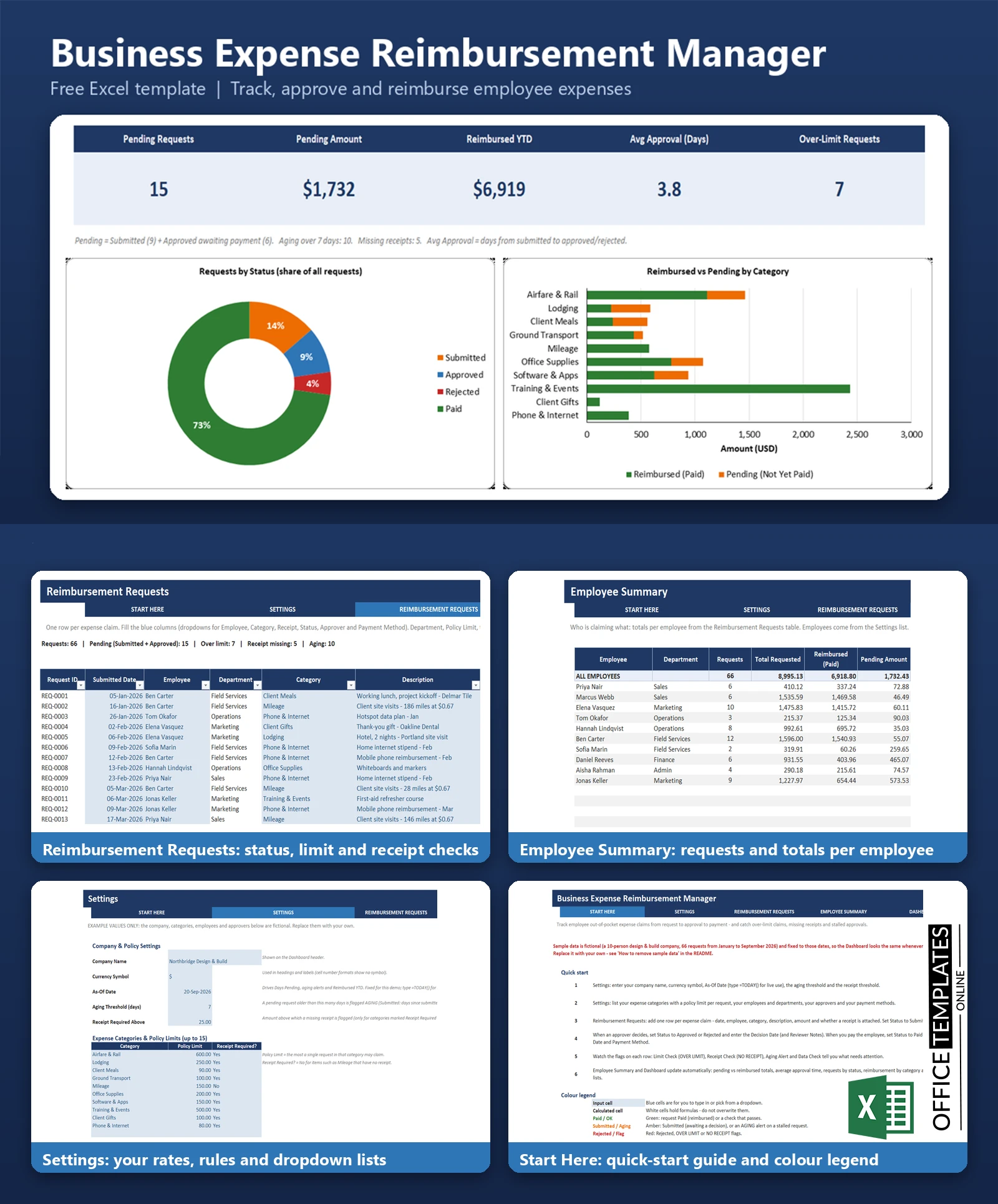
- Dashboard with KPI cards, a status doughnut chart, a reimbursed-vs-pending bar chart, and exception lists.
- Room for 500 requests, 15 categories, 20 employees, and 6 approvers.
What You Can Track
- Request ID, submitted date, employee, department, category, description, and amount.
- Receipt attached (Yes/No), status, assigned approver, decision date, paid date, and payment method.
- Reviewer notes, such as the reason for a rejection or an approved exception.
- Calculated policy limit, limit check, receipt check, days to decision, days pending, and aging alert.
Dashboard & Reports
The Dashboard shows five KPI cards: Pending Requests, Pending Amount, Reimbursed YTD, Average Approval Time in days, and Over-Limit Requests. Below them, a doughnut chart shows the share of requests by status and a stacked bar chart compares reimbursed and pending amounts by category. Two lists highlight the oldest pending requests and the policy exceptions (over limit or missing receipt).
The Employee Summary sheet lists each employee with the number of requests, total requested, reimbursed, pending, and rejected amounts, exception counts, and average days to decision.
Who Is This Template For
- Small business owners who reimburse staff by payroll, bank transfer, or check.
- Office managers and bookkeepers who chase approvals.
- Department heads who approve expense claims.
- Field-based teams with frequent mileage and travel claims.
How to Use the Template
- Open Settings and enter your company name, currency symbol, As-Of Date, aging threshold, and receipt threshold.
- List your expense categories with policy limits, then your employees, approvers, and payment methods.
- Clear the sample requests on the Reimbursement Requests sheet (blue input cells only) and add your own claims with status Submitted.
- When a claim is decided, change the status and enter the decision date; when paid, set Paid and enter the paid date and payment method.
- Review the flags on each row and the Dashboard for pending, aging, and exception items.
Benefits
- One consistent record of every claim instead of scattered emails and receipts.
- Policy limits and receipt rules applied the same way to everyone.
- Visibility of stalled approvals and amounts owed to staff.
- Simple to customise: categories, limits, and people are all lists on one Settings sheet.
Excel Requirements
The workbook contains no macros and works in modern desktop Excel for Windows or Mac. Set the As-Of Date to today (type =TODAY() in the Settings cell) for live use; the sample data is fixed to September 2026.
Frequently Asked Questions
Does it need macros?
No. Everything is done with formulas, dropdowns, and conditional formatting.
Can I change the categories and limits?
Yes. Edit the category list, policy limits, and Receipt Required setting on the Settings sheet; the Requests sheet reads from it.
How is a request counted as pending?
Requests with status Submitted or Approved (not yet paid) count as pending.
How is average approval time calculated?
It is the average of Decision Date minus Submitted Date across Approved, Rejected, and Paid requests.
How many requests can it hold?
The table is prepared for 500 requests, 15 categories, 20 employees, and 6 approvers.
Does it store receipts?
No. It records whether a receipt is attached; keep the images in your own filing system.
How do I remove the sample data?
Clear the blue input cells on Reimbursement Requests (columns B, C, E to N, rows 8 onward), then replace the sample lists on Settings.












