Social Worker Resume Template with Community Circles
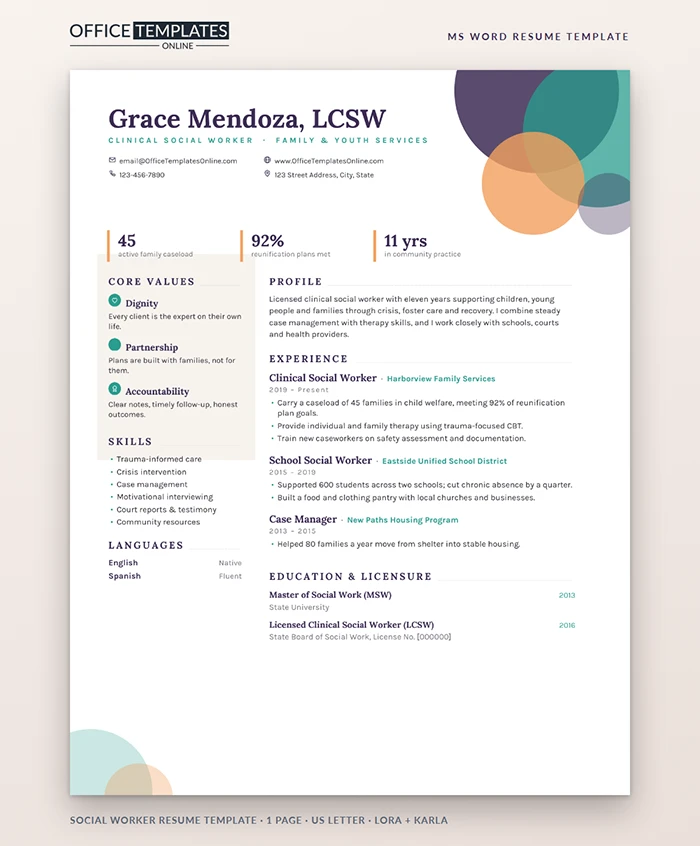
Social work is relationship work, and the people who hire social workers look for warmth, judgment, and steady follow-through. This resume is designed to show all three. Soft overlapping circles in purple, teal, and orange suggest community and connection, while a clear structure keeps your licensure, caseload, and outcomes easy to find.
The Feel of the Page
In the top-right corner, four translucent circles overlap as a small group gathered together, in deep purple, teal and warm orange. Two smaller circles echo them in the bottom-left corner. Your name and credentials are set in Lora in deep purple, with your specialism in spaced teal capitals and contact details in a simple grid. Under the header, three snapshot figures stand next to slim orange markers: caseload, plan outcomes, and years in practice.
Values Before Tasks
A soft beige panel on the left introduces your core values, each with a small teal icon: Dignity, Partnership, and Accountability, with one short sentence each. Below it are skills and languages. Agencies and schools care deeply about how you work with people, and leading with values shows that before they reach your job history. Change the three values to the ones you would happily defend in an interview, and keep each sentence under a dozen words so the panel stays calm and it's easy to read.
A Short Guide to Writing About Clients
Confidentiality comes first. Never use names, case details, or anything that could identify a family. Talk about numbers, approaches, and outcomes instead:
- Caseload size and type, such as 45 families in child welfare.
- Methods you use, such as trauma-focused CBT or motivational interviewing.
- Outcomes, such as reunification goals met, school attendance improved, or housing secured.
- Partnerships with schools, courts, health providers, and community groups.
Licensure Done Right
The last section combines education and licensure. List your MSW, then your license with the state board and the year you were licensed. A placeholder for the license number is included; many applicants add it only when the employer asks. If you are working towards clinical licensure, write LMSW, pursuing LCSW (supervised hours: 2,400 of 3,000) so hiring managers see your progress.
Changing Colors and Values in Word
- Double-click near the top of the page to open the header, where the circles and values panel live.
- Click any circle and choose a new Shape Fill; the transparency stays, so overlaps still look soft.
- Close the header and click a value title or sentence to rewrite it. The icons are small pictures you can delete or replace.
- Update the three snapshot figures; their orange markers are cell borders that stay in place.
Preparing for the Interview
- Bring one case story, fully anonymized. Describe the situation, your assessment, the plan you built with the family, and the outcome.
- Know your caseload numbers. Be ready to explain how you prioritize when everything feels urgent.
- Show how you look after yourself. Agencies want people who will stay; talk about supervision and boundaries.
- Connect your values to the agency's mission. Read their website and match one of your three values to their work.
Where This Template Works Best
Child and family social workers, school social workers, medical and hospice social workers, case managers, counsellors, and community outreach workers. Graduates can turn the snapshot into practicum hours, populations served, and languages spoken. Experienced practitioners applying for supervisor roles can add a line about the caseworkers they coach and the audits or file reviews they lead, which shows readiness to guide a team as well as families.
Lora and Karla are free Google Fonts. The page is one US Letter sheet; send a PDF with online applications.












