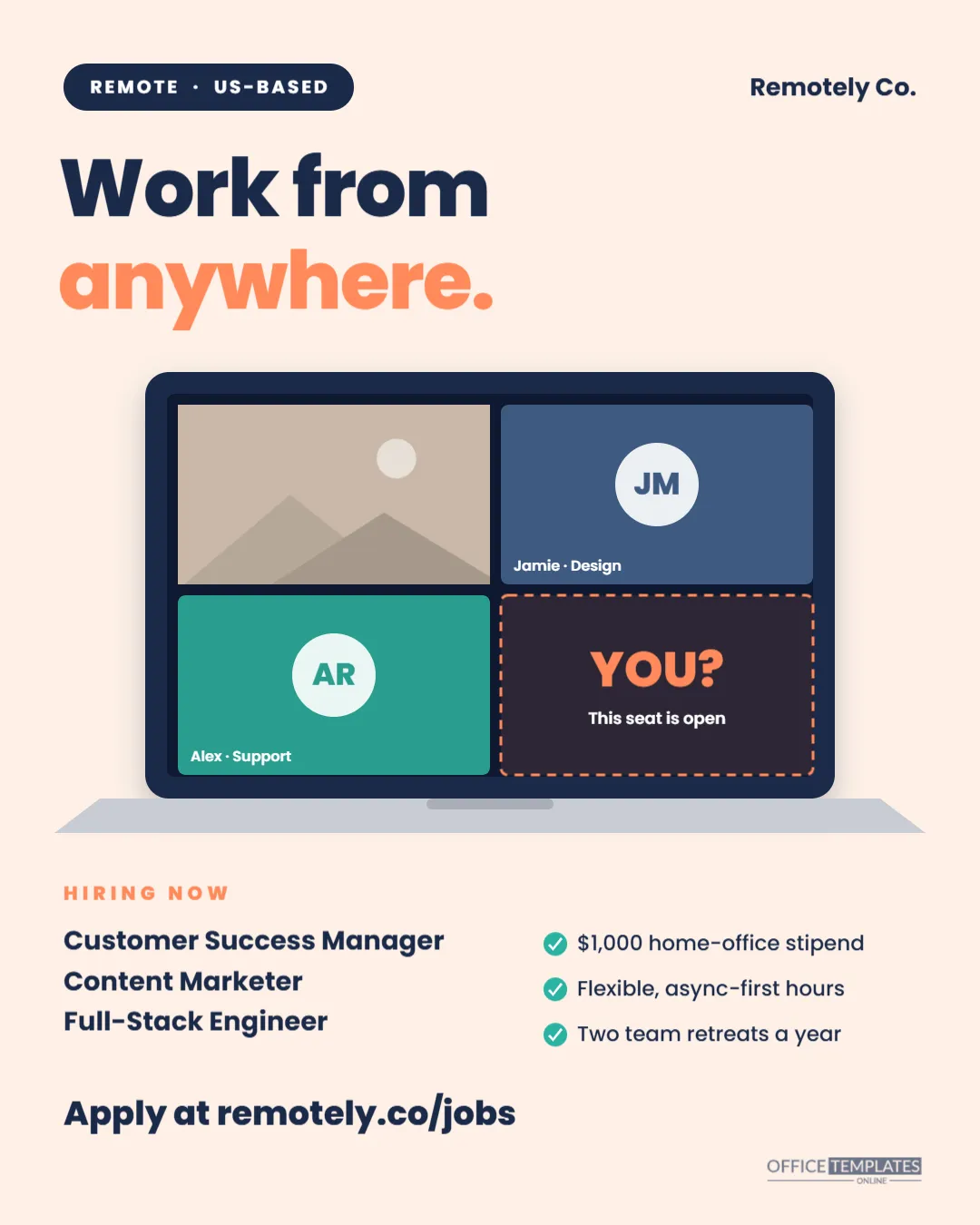
Remote roles attract applicants from everywhere, which means your post competes with thousands of others. This Remote Jobs Hiring Post makes the idea of joining a distributed team feel real. Under the headline Work from anywhere, a laptop shows a video call with four tiles: a photo of a team member, two colleagues with initials, and a fourth tile with a dashed orange border that simply says YOU? And this seat is open. Below the laptop, the roles on the left and the remote perks on the right, then the application link. The post is 1080 x 1350 pixels, the tall portrait format that fills more of a phone screen on Instagram, LinkedIn and Facebook. It suits remote-first startups, agencies, SaaS companies, customer support teams and any organisation with distributed roles.
The Empty Seat on the Call
Everyone who works remotely knows the video-call grid. Showing one tile as an empty, dashed seat is a simple visual invitation: the team is already on the call, and there is a place for the reader. It is more personal than a generic laptop photo, and it communicates remote work at a glance, without the usual beach-and-hammock clichés that experienced remote workers roll their eyes at.
Screen, Keyboard and Perks: The Post Layout
- Top: a navy pill reading REMOTE · US-BASED on the left and the company name, Remotely Co., on the right.
- Headline:Work fromanywhere. In orange, both in heavy Poppins.
- The laptop: a navy screen bezel with a soft shadow and a dark screen holding four call tiles.
- Tiles: a photo slot in the top-left tile, two coloured tiles with initials in white circles and name labels (Jamie · Design and Alex · Support), and the dashed YOU? tile.
- Laptop base: a light grey keyboard base with a small notch.
- HIRING NOW: Customer Success Manager, Content Marketer and Full-Stack Engineer.
- Perks with teal ticks: a $1,000 home-office stipend, flexible async-first hours, and two team retreats a year.
- Bottom:Apply at remotely.co/jobs and our small logo.
What Every Remote Job Post Should Make Clear
Remote means different things at different companies, and unclear posts lead to wasted interviews. The pill at the top and your caption should answer the questions remote candidates ask first:
| Question | Why it matters | How to say it |
|---|---|---|
| Where can I live? | Tax, payroll, and legal limits | US-based, EU time zones, or anywhere |
| Which hours? | Overlap with teammates | 4 hours overlap with ET, or fully async |
| Fully remote or hybrid? | Some roles need occasional office days | 100% remote or Remote, 1 office week per quarter |
| Equipment? | Setting up a home office costs money | Laptop provided + $1,000 stipend |
| Travel? | Retreats and client visits | 2 team retreats a year, expenses paid |
Editing the Remote Hiring Post
- Location pill: double-click to change REMOTE · US-BASED to your policy.
- Company name: retype Remotely Co. at the top right.
- Photo tile: click the top-left tile and choose Replace Image to add a real team member’s headshot, with their permission.
- Avatar tiles: change the initials and name labels to real colleagues or team names, and recolour the tile backgrounds.
- YOU? tile: keep it as the invitation, or write the job title inside it.
- Roles and perks: edit the role list and the three perk lines; keep perks short enough to fit beside the ticks.
- Colours: swap orange and navy for your brand colours; the peach background can become any soft tone.
Avoiding Remote Job Scam Red Flags
Unfortunately, fake remote job ads are common, and cautious candidates look for signs of legitimacy. Help them trust you: link to a careers page on your company’s own domain, list real team members on your site, never ask for payment or bank details before a formal offer, and conduct interviews by video with named employees. Including your company name clearly in the image and caption, and posting from your verified company account, makes your post stand out from scams and improves the quality of applicants you attract.
Selling Your Remote Culture, Not Just the Location
Almost every remote job now promises work from anywhere, so the real differentiator is how your team works together. Candidates want to know how communication happens (mostly written, or lots of meetings?), how decisions are documented, whether there are core hours, and how new hires are onboarded without an office. A line in your caption such as Async-first, meeting-light, with a buddy for your first month says more than a list of tools. The two team retreats on the sample post show that you also value time together. If you publish a remote handbook or culture page, link to it; the candidates who read it before applying are often the best fit.
Caption and Posting Tips
Pair the post with a short, specific caption: We’re hiring three remote roles: Customer Success Manager, Content Marketer, and Full-Stack Engineer. US-based, async-first, $1,000 home-office stipend, and two team retreats a year. Apply at remotely.co/jobs. On LinkedIn, ask team members to reshare from their own profiles and add a personal line about why they like working remotely with you; those posts usually reach far more people than the company page alone.
Exporting the Portrait Post
Download a PNG for crisp text and flat colours. The canvas is exactly 1080 x 1350 pixels, which Instagram and LinkedIn show uncropped in the feed. For your careers page, the same PNG works as a header image beside the job description.
People Team Questions
Can I show more team members?
You can shrink the tiles and add more with duplicates, but four is the clearest at this size.
Can I change the laptop to a monitor?
Delete the keyboard base and extend the navy screen frame downward with a stand shape; the tiles inside stay the same.
Is this suitable for hybrid roles?
Yes. Change the headline to Work where you work best. And the pill to HYBRID · CHICAGO.
Open the template, put a real face in the photo tile, list your remote roles and perks, and invite your next teammate to take the empty seat.