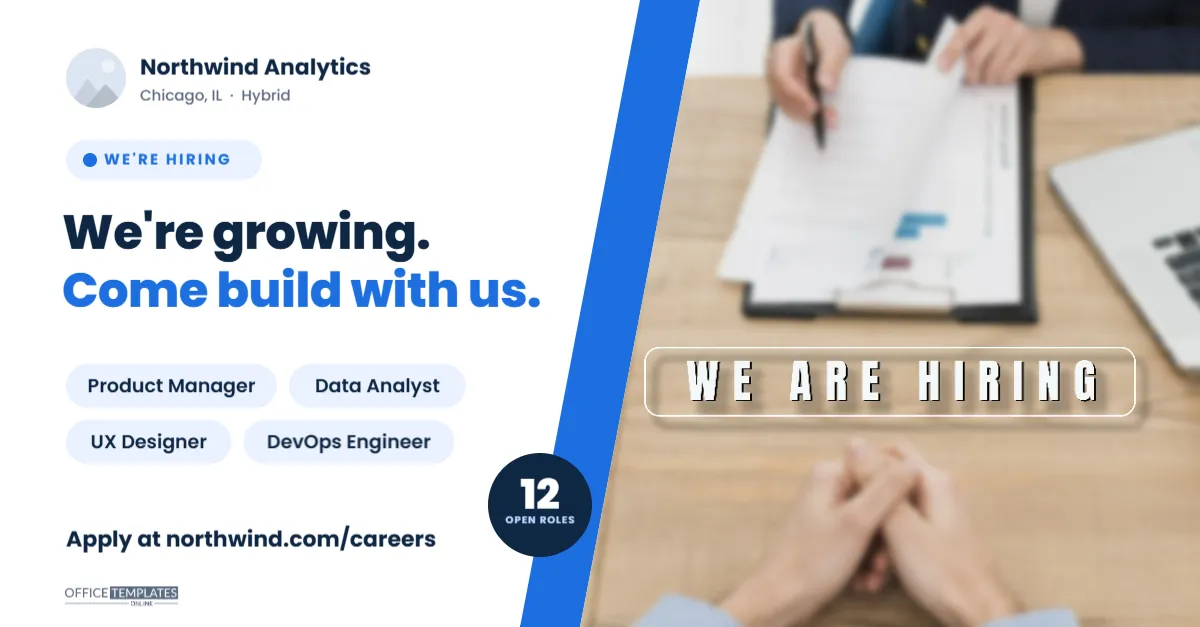
LinkedIn is where most professional hiring announcements happen, and the posts that travel furthest are the ones with a clear, professional image. This We’re Hiring LinkedIn Banner is sized at 1200 x 627 pixels, the landscape shape LinkedIn uses for link previews and one of the most reliable sizes for shared images in the feed. It pairs a confident headline, We’re growing.Come build with us, with the open roles as rounded pills, a count badge showing how many positions are open, and a team photo cut on a bold diagonal. It suits companies of every size announcing several openings at once, from growing startups to established firms opening a new office.
Anatomy of the 1200 x 627 Image
- Left side, on white: a round logo slot beside the company name, Northwind Analytics, with Chicago, IL · Hybrid underneath.
- A small pill in light blue with a blue dot and WE’RE HIRING in spaced capitals, the label that tells the feed what this post is about.
- The headline in two lines of heavy Poppins: We’re growing. in dark navy and Come build with us. in bright blue.
- Four role pills in two rows: Product Manager, Data Analyst, UX Designer, and DevOps Engineer, dark text on pale blue.
- A navy count badge reading 12 OPEN ROLES, tucked against the blue stripe.
- The call to action:Apply at northwind.com/careers in bold, and our small logo below it.
- Right side: a large team or office photo whose left edge is cut on a diagonal, with a solid blue stripe running along the cut to separate the photo from the text.
Where This Image Size Works
A 1.91:1 landscape image is the shape social networks use for link previews, which makes this template useful well beyond one platform:
| Placement | Recommended size | How this template fits |
|---|---|---|
| LinkedIn feed post (single image) | 1200 x 627 px or similar landscape | Upload as is |
| LinkedIn link preview for a careers page | 1200 x 627 px | Set as your careers page’s share image |
| Facebook link preview | 1200 x 630 px | Displays with negligible cropping |
| X (Twitter) summary card with large image | 1200 x 628 px | Displays with negligible cropping |
| Email newsletter header | 600 px wide at 2x | Scales down cleanly |
If you set this image as the Open Graph share image on your careers page, every time someone shares that page, it appears automatically.
Sample Post Copy to Pair With It
The image does the eye-catching; the post text does the convincing. A structure that works on LinkedIn: a short opening line, why you are hiring, the roles, and one clear call to action.
We’re growing, and we’d love your help building what comes next. Northwind Analytics is hiring for 12 roles across product, data, design and engineering, hybrid from our Chicago office. If you enjoy turning messy data into decisions people trust, take a look: northwind.com/careers. Know someone who’d be a great fit? Tag them below.
Post it from your company page, then ask leaders and team members to share it from their personal profiles, where reach is usually much higher.
Updating Roles, the Badge and the Photo
- Photo: click the diagonal photo and choose Replace Image. A candid shot of your team or office works best; keep faces towards the right, away from the diagonal edge.
- Logo: replace the small round image at the top left.
- Company name and location: double-click to retype them.
- Headline: keep it short; two lines of three or four words each fit the space. Alternatives: Your next role is here. or Big goals. Small team. Join us.
- Role pills: each pill is a rounded shape with text on top. Change the title and adjust the pill’s width. Four pills fit; for more, list the top four and let the badge carry the total.
- Badge: change the number to your real count of open roles.
- Brand colour: recolour the blue stripe, second headline line, and pill dot to your brand colour.
Picking a Team Photo for the Diagonal Frame
The photo takes up almost half of the image, so it shapes the first impression of your company more than any headline. Candid beats posed: a small group working together at a whiteboard, a relaxed team lunch, or a bright office corner with people in it feels more genuine than a lineup of employees in front of a logo wall. Choose a landscape photo with the people towards its right half, since the diagonal edge trims the left side. Good natural light and a slightly lighter photo also help the dark navy headline and blue stripe stand out beside it. Always get consent from everyone recognisable in the photo before posting it publicly, and if you are hiring for a remote team, a collage-style screenshot of a friendly video call is a perfectly valid choice that tells candidates exactly how the team works.
Employer Branding Tips for Hiring Posts
A hiring image is also a brand asset, so keep it consistent: use your real brand colours and fonts where possible, and a genuine photo rather than stock imagery. Mention the work arrangement (remote, hybrid or on-site) in the image itself, because it is now one of the first filters candidates apply. If you are hiring across several departments, a single we’re growing post followed by individual role posts during the next few weeks keeps your page active without repeating the same message.
Export and Upload Notes
Download as PNG for crisp text and flat colours, or JPG if you need a smaller file for email. The canvas is already 1200 x 627 pixels, so upload it without resizing. LinkedIn compresses images, and a PNG with bold text survives that compression better than a detailed photograph alone. Preview the post on your phone before publishing, since most LinkedIn browsing happens on mobile.
LinkedIn Post Questions
Can I use this as my LinkedIn company page cover?
Company page covers use a much wider shape (1128 x 191 pixels), so this layout would be cropped heavily. Use it for posts and link previews instead.
Can I show a single role?
Yes. Replace the headline with the job title, delete three pills, and change the badge to the salary or Hybrid instead of a count.
Will the diagonal photo crop my image badly?
The slot keeps its shape and fills with your photo; the left edge is angled, so choose or crop a photo with the important part towards the right before uploading.
Open the template, add your team photo and open roles, write a two-line post, and share it from your company page this week.