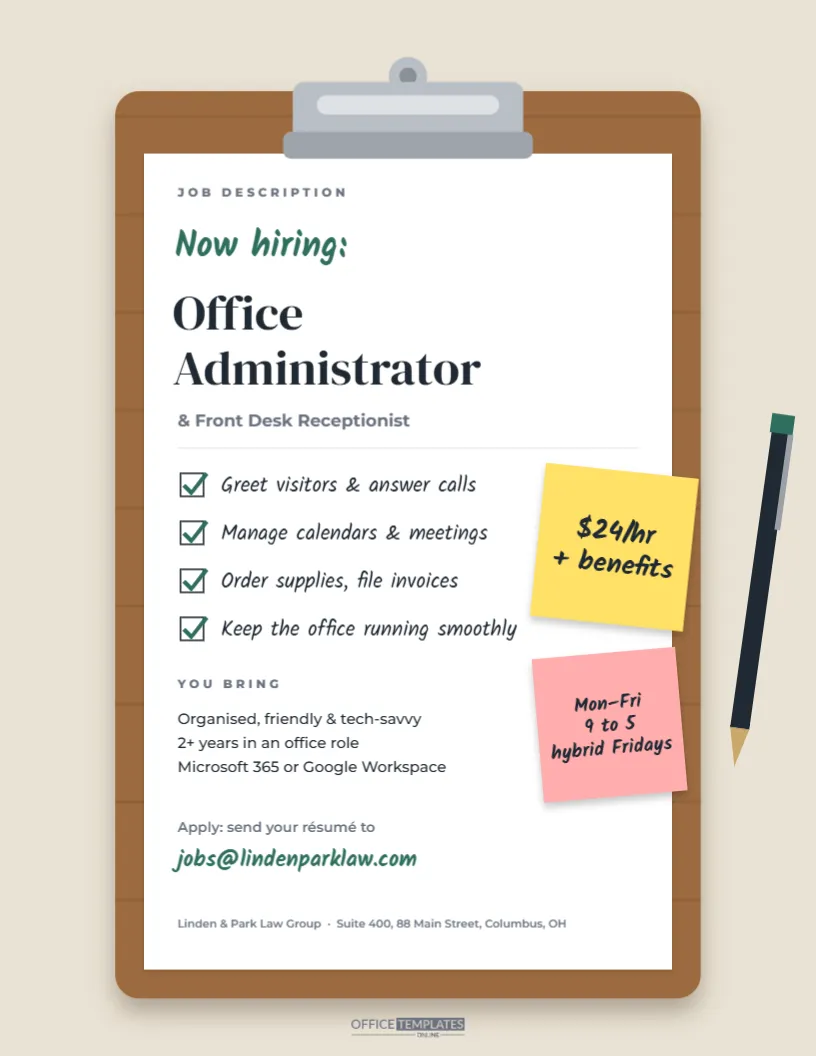
Every office has one person who keeps the whole place running: the one who knows where everything is, greets every visitor by name, and somehow makes the calendar work. Finding that person is worth a flyer that reflects how organised they are. This Office Administrator hiring flyer shows a wooden clipboard with a metal clip holding a crisp white job description. The duties are written as a handwritten checklist with green ticks, two sticky notes on the edge announce $24/hr + benefits and the hours, and a pen lies beside the board. It suits law firms, medical and dental offices, real estate agencies, accounting firms, schools, nonprofits, and any small business hiring an office administrator, receptionist, or office manager.
Why a Clipboard Suits Administrative Roles
The clipboard is the universal symbol of getting things done. It says checklist, tasks, and order, exactly the mindset of a strong administrator. The handwritten style keeps it friendly, while the clean white page and serif job title keep it professional enough for a law firm or a medical practice.
What’s Clipped to the Board
- The board: a warm wooden clipboard with subtle grain lines and a soft shadow on a sand-coloured background.
- The clip: a silver metal clip with a hanging hole and a pressure bar across the top of the paper.
- Job title:JOB DESCRIPTION in small capitals, Now hiring: in green handwriting, Office Administrator in large DM Serif Display and & Front Desk Receptionist beneath.
- Checklist: four ticked duties in handwriting: greet visitors and answer calls, manage calendars and meetings, order supplies and file invoices, and keep the office running smoothly.
- You bring: organised, friendly and tech-savvy; two or more years in an office role; Microsoft 365 or Google Workspace.
- Apply: an email address in green handwriting and the firm’s name and address in small print.
- Sticky notes: a yellow note with the hourly pay and benefits, and a pink note with Monday to Friday, 9 to 5, and hybrid Fridays.
- Pen: a dark pen with a green clip lying diagonally beside the board.
The flyer prints on US Letter paper (8.5 x 11 inches) in portrait.
Duties to List for Different Kinds of Offices
An office administrator in a dental practice does very different work from one in a real estate office. Tailor the four checklist lines to the setting, so candidates know exactly what the job involves:
| Office type | Checklist lines that fit |
|---|---|
| Law firm | Manage attorney calendars, prepare client files, handle court filing deadlines, greet clients. |
| Medical or dental office | Check patients in and out, verify insurance, schedule appointments, manage records. |
| Real estate agency | Coordinate showings, update listings, prepare closing paperwork, answer enquiries. |
| Accounting firm | Organise client documents, manage tax-season scheduling, process invoices |
| School or nonprofit | Welcome visitors, track attendance or donations, coordinate events, order supplies |
Editing the Clipboard Page
- Job title: double-click Office Administrator to change it, for example, to Office Manager, Receptionist, or Administrative Assistant.
- Checklist: each duty is a text box beside a drawn checkbox and tick. Keep lines short (about 30 characters) so they do not run under the sticky notes.
- Requirements: edit the YOU BRING lines with your real expectations, including specific software such as Clio, Dentrix, or QuickBooks.
- Sticky notes: double-click to change the pay and hours. The notes are tilted shapes with text on top; move them together if you rearrange the page.
- Contact details: change the email address, firm name, and address.
- Colours: the green handwriting and ticks can switch to your brand colour; the sticky notes can become any pastel.
Hiring for Personality as Well as Skills
For front-desk and administrative roles, attitude matters as much as experience. The person in this seat shapes every visitor’s first impression and keeps colleagues’ days on track. The flyer’s Keep the office running smoothly line hints at that. In your job posting and interviews, describe the pace of the office, the number of people the role supports, and whether the role includes bookkeeping, HR tasks, or event planning. Candidates who thrive on variety will be drawn in, and those who prefer a narrower role will know to look elsewhere, which saves time for everyone.
Being Clear About Hybrid and In-Office Days
Since remote work became common, many administrative candidates ask whether a role is fully on-site. Front desk work usually requires being present, but some offices allow one remote day for scheduling, invoicing, or filing. The pink sticky note on this flyer handles that with hybrid Fridays. If your role is fully in person, say In office, Monday to Friday so there are no surprises at the interview. If you offer flexibility around school pick-up times or a compressed four-day week, mention it on the note instead; it is one of the most attractive perks for experienced administrators, many of whom are balancing family commitments, and it costs the business very little.
Promoting the Opening in Your Community
- Your own reception area, where clients and visitors can refer someone.
- Community college business and administrative programmes.
- Local chamber of commerce newsletters and networking events.
- Coworking spaces and libraries.
- LinkedIn and local job groups, using the PNG download.
Printing the Clipboard Illustration
Print from the PDF download on white or light cream paper. The sand background and wooden board look warm on matte paper. The design uses moderate ink; a colour laser printer reproduces the wood tones evenly. For a reception-desk display, print on cardstock and place it in a frame or stand.
Office Manager Questions
Can I make it part-time?
Change the pink sticky note to your part-time hours, such as Tue-Thu, 9 am – 3 pm, and adjust the pay note if needed.
Can I add our logo?
Use the editor’s image upload and place your logo at the top of the white page, above JOB DESCRIPTION, or on the clipboard’s bottom edge.
Is the clip part of the background?
The metal clip is a single grouped drawing on top of the board, so you can move or recolour it independently.
Open the template, write your real duties on the checklist, stick your pay and hours on the notes, and find the organised, friendly person your office has been waiting for.