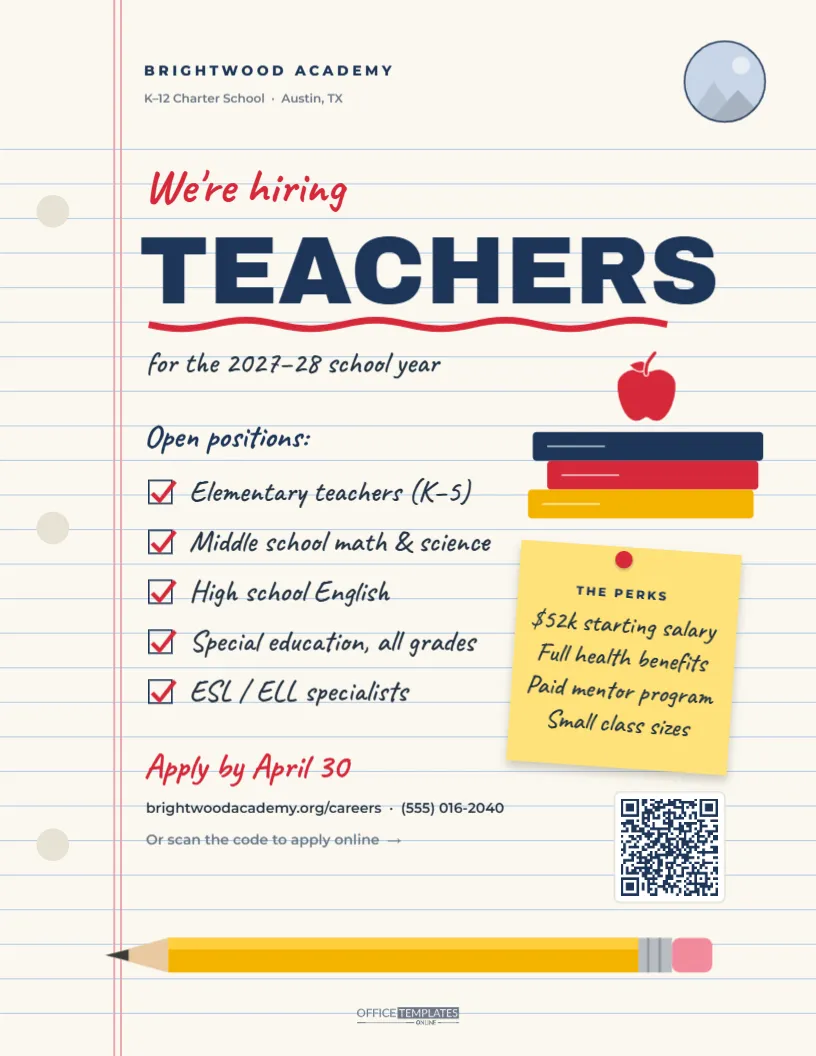
Schools compete for good teachers every spring, and the ones that stand out are the ones that feel like a place a teacher would actually want to work. This Teachers Wanted Flyer is designed as a page torn from a classroom notebook: pale blue ruled lines, a red double margin, three punched holes down the left edge, and a big navy TEACHERS headline underlined with a wavy red marker stroke. The open positions are written as a handwritten checklist with red ticks, the perks sit on a yellow sticky note pinned beside a stack of books topped with a red apple, and a long yellow pencil runs along the bottom. It suits public, charter and private schools, academies, tutoring centres and districts recruiting for the next school year.
Why a Notebook Page Speaks to Teachers
Teachers spend their days surrounded by lined paper, sticky notes and pencils. Seeing those familiar objects on a recruiting flyer creates an instant sense of recognition, and it also signals something about the school: approachable, organised and human. Compared with a corporate-looking job advertisement, the handwritten style feels like a note from a colleague, which is exactly the tone many teachers want from a future school.
What Sits on the Page
- Header: the school name, BRIGHTWOOD ACADEMY, with K-12 Charter School · Austin, TX underneath, and a round logo slot with a navy ring in the top-right corner.
- Headline:We’re hiring in red handwriting, TEACHERS in heavy navy Archivo Black, a red wavy underline, and “for the 2027–28 school year” in handwriting.
- Checklist: “Open positions:” followed by five ticked boxes: elementary teachers (K–5), middle school math and science, high school English, special education across all grades, and ESL / ELL specialists.
- Books and apple: three coloured book spines stacked on the right with a red apple on top, drawn as editable vectors and shapes.
- Sticky note: tilted slightly and pinned with a red pin: THE PERKS, a $52k starting salary, full health benefits, a paid mentor program, and small class sizes.
- Apply section: “Apply by April 30” in red handwriting, the careers web address and phone number, a note pointing to the QR code, and the code itself on a small white card.
- Footer: a yellow pencil with a pink eraser and a sharpened point, and our small logo.
The flyer is US Letter, 8.5 x 11 inches, in portrait orientation.
Matching Positions to the Credentials Teachers Look For
Experienced teachers scan a posting for the grade band and the credential it requires. If your checklist lines name the certification, candidates can tell in a second whether they qualify. Use this as a guide when rewriting the ticked items:
| Checklist line | Credential to mention | Helpful extra detail |
|---|---|---|
| Elementary teachers (K-5) | Elementary or early childhood certification | Self-contained or departmentalised classrooms |
| Middle school math & science | Subject-specific middle grades certification | Lab facilities, curriculum used |
| High school English | Secondary English/language arts | AP or dual-credit sections available |
| Special education | Special education endorsement | Inclusion, resource or self-contained setting |
| ESL/ELL specialists | ESL or bilingual endorsement | Languages spoken by your students |
If you accept candidates on an alternative certification route or with a pending licence, add that to the sticky note; it widens the pool considerably, especially for career changers.
Filling In Your School’s Details
- School logo: click the round placeholder in the top-right corner and choose Replace Image. The circle and ring keep their size.
- School name and location: double-click the header lines to retype them.
- School year: update the handwritten line under the headline.
- Positions: each checklist line is its own text box beside a drawn checkbox and red tick. Retype the lines; to remove one, delete its text, box, and tick together. Five lines fit comfortably.
- Perks: double-click the sticky-note text. Keep it to four short lines so the handwriting stays large enough to read.
- Deadline and contact details: change Apply by April 30, the web address, and the phone number.
- QR code: select it and paste your application link in its options panel, then scan a test print with a phone.
- Colours: the navy, red and yellow can switch to your school colours; recolour the headline, underline, tick marks and book spines.
When Schools Should Start Recruiting
Teacher hiring has a rhythm. Many teachers decide in late winter whether they will return; resignation deadlines often fall in March or April, and job fairs cluster in early spring. Schools that post in February and March see the widest choice of candidates; by July, the pool is much smaller. If you hire mid-year for a leave replacement, change the school-year line to the start date and mention the length of the assignment on the sticky note.
Where Teachers Will See the Flyer
- University education departments and student-teaching placement offices.
- Regional teacher job fairs and district recruitment events.
- Public libraries, community centres and coffee shops near campus.
- Your own staff room, to encourage current teachers to refer friends.
- Social media and teacher groups, using the PNG download.
Paper and Printer Tips for a Ruled-Paper Flyer
Download the PDF for printing. A bright white or very light cream paper keeps the ruled lines crisp and the red margin visible. The design is light, so it prints well on any office printer and uses little ink, which matters if you are printing dozens for a job fair. For a job fair table, print a copy at 11 x 17 inches; the handwriting and headline scale up cleanly.
Questions From School Administrators
Can we list support staff too?
Yes. Add lines such as Teaching assistants or Substitute teachers to the checklist, or make a second version with an added page for paraprofessionals, counsellors, and office staff.
Is the handwriting font easy to read?
The checklist uses Caveat, a clear handwriting typeface, at a large size. If you prefer a printed look, select the text and switch to a sans-serif font; the layout still works.
Can I remove the salary?
You can, but many states now publish salary schedules, and teachers compare them closely. Including the starting figure usually increases applications.
Open the template, tick off the positions you need, add your school logo, and have it pinned up at the next education job fair.