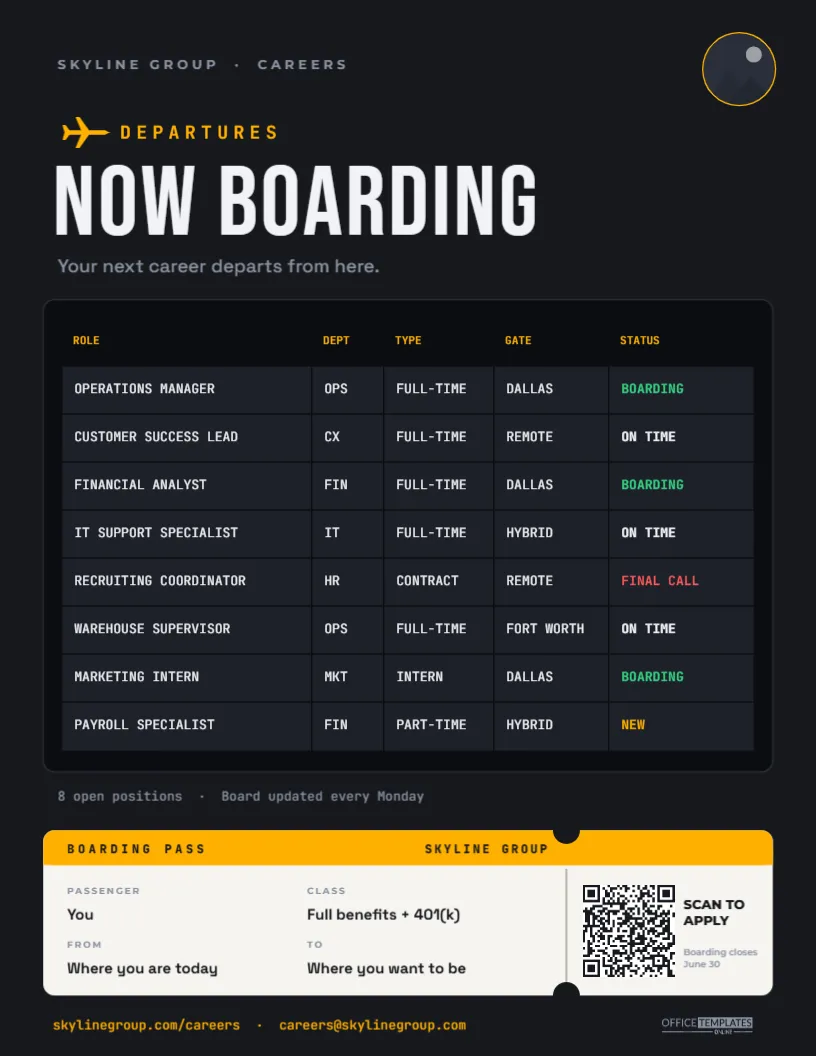
When a company has one opening, a simple poster does the job. When it has eight, across different departments, locations, and contract types, most flyers turn into a cramped bullet list nobody reads. This Multiple Job Openings Flyer solves the problem with a format everyone already knows how to scan: an airport departures board. Under the headline NOW BOARDING, each open role is a flight with its department, job type, location (the gate), and status, in amber and white on black. A boarding pass along the bottom carries a QR code to apply. It is ideal for growing companies, franchise groups, hospitals, universities, logistics firms and recruitment agencies with several roles open at once.
Your Open Roles, Posted Like Flights
A departures board is designed to be read in seconds by people in a hurry: find your row, check the gate, check the status. The same logic suits job seekers scanning a list of openings. The flyer is US Letter, 8.5 x 11 inches, portrait, on a near-black background:
- Header: SKYLINE GROUP · CAREERS in small-spaced grey capitals, a round logo slot with an amber ring on the right, and an amber airplane icon beside the label DEPARTURES.
- Headline: NOW BOARDING in tall white Bebas Neue, with Your next career departs from here. underneath.
- The board: a black panel holding a real table with columns for ROLE, DEPT, TYPE, GATE, and STATUS. Every cell is a dark grey tile separated by thin black gaps, like the flaps of a split-flap display, and all entries are in uppercase JetBrains Mono.
- Eight sample roles: Operations Manager, Customer Success Lead, Financial Analyst, IT Support Specialist, Recruiting Coordinator, Warehouse Supervisor, Marketing Intern, and Payroll Specialist, spread across Dallas, Fort Worth, remote, and hybrid.
- Below the board: 8 open positions · Board updated every Monday.
- Boarding pass: a cream ticket with an amber header strip, perforated stub and notched edges, holding the fields PASSENGER, CLASS, FROM and TO, and a QR code with SCAN TO APPLY.
- Footer: the careers web address and email in amber, and our small logo.
What Each Status Means
The STATUS column is colour-coded, just like an airport board. Use the statuses consistently so candidates learn to read them:
| Status | Colour | Use it when |
|---|---|---|
| BOARDING | Green | The role is actively interviewing; apply now |
| ON TIME | White | Open and accepting applications on the normal schedule |
| FINAL CALL | Red | Closing soon; the last week of applications |
| NEW | Amber | Just posted this week |
You could add DELAYED for roles on hold or GATE CHANGE for a role whose location has moved, though for a printed flyer it is usually better simply to remove paused roles.
Updating the Board: Rows, Columns and Colours
The board is the editor’s real Table object, not a set of loose text boxes, which makes it easy to keep current:
- Edit the entries: double-click the table (or choose Edit Table Data) and type directly into the cells.
- Add a role: use + Row. Eight rows fit the board comfortably; for nine or ten, reduce the row height a little in the table settings.
- Paste a list from a spreadsheet: if you keep open roles in Excel or Google Sheets, export them as CSV and use Import CSV to fill the table in one go.
- Change a column: rename GATE to LOCATION or TYPE to SALARY if that is more useful for your roles.
- Status colours: each status cell has its own text colour. After changing a status, set its colour to match the legend above.
- Header details: replace SKYLINE GROUP and the logo (click the circle and choose Replace Image).
The Boarding Pass Footer
The ticket at the bottom turns the call to action into a small piece of storytelling. Its fields read PASSENGER: You, CLASS: Full benefits + 401(k), FROM: Where you are today, and TO: Where you want to be. The stub on the right holds the QR code, SCAN TO APPLY, and Boarding closes June 30. Change the CLASS field to your standout benefit, the closing date to your real deadline, and the QR code’s link (in its options panel) to your careers page or a job board listing all the roles. Scan a test print before you print a batch.
Using the Board at Career Fairs and in Lobbies
- Career fair tables: print it at 18 x 24 inches on foam board so candidates can read the board from the aisle, and keep letter-size copies to hand out.
- Office lobbies and break rooms: a weekly refreshed printout encourages internal moves and employee referrals.
- Job centres and university career offices: one sheet covers all your roles, which staff there appreciate.
- Online: download a PNG for LinkedIn and your careers page; the dark board stands out among white job listings.
- Email: attach the PDF to recruiter outreach or a talent newsletter.
Printing Dark Pages With Small Type
The table text is fairly small, so print from the PDF download for the sharpest lettering. Use bright white paper; the black background and amber text reproduce best on a laser printer, which also avoids the banding some inkjets show across large dark areas. If you print many copies, a print shop is more economical for a full-colour dark design. For large formats, the table scales cleanly and remains readable from a distance.
Frequently Asked at the Gate
How many roles can the board hold?
Eight fit with generous spacing. Up to about twelve fit if you reduce the row height and font size slightly; beyond that, split the roles across two pages with Add Page, for example by department.
Can I add salaries?
Yes. Add a column in Edit Table Data and narrow the ROLE column to make room, or replace the DEPT column with SALARY.
Does it work for a single company with one location?
It does. Use the GATE column for the department or shift instead, such as DAYS, NIGHTS, or WEEKENDS.
Open the template, load your current openings into the board, set the statuses, and print it for Monday morning. Boarding is now open.