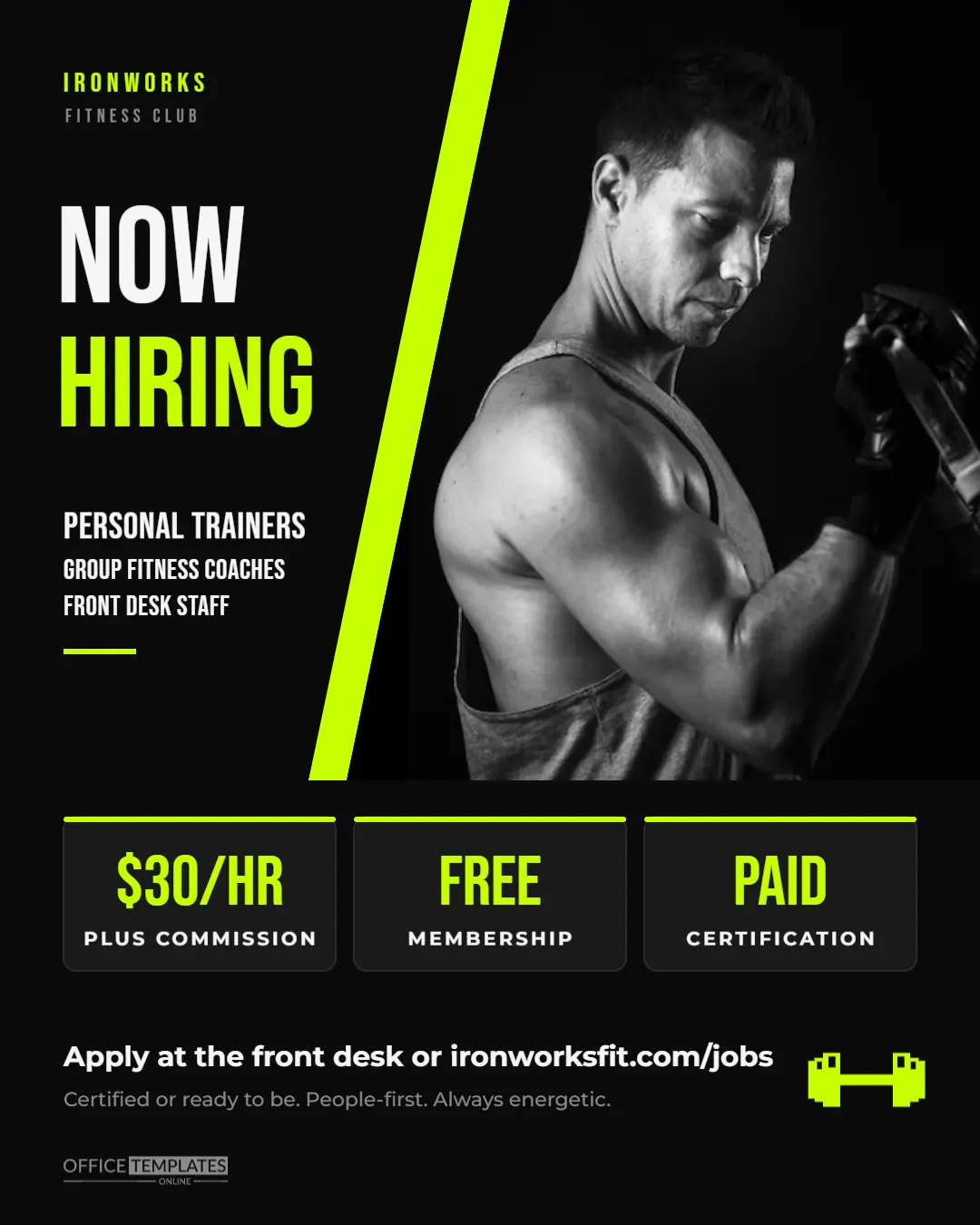
Gyms sell energy, and a gym hiring post should have plenty of it. This Fitness Trainer Hiring Post is black with electric lime accents: a trainer photo cut on a slant beside a lime slash, NOW HIRING stacked in huge condensed letters, the roles listed underneath, and three scoreboard-style stat blocks that show the pay, the free membership, and paid certification. It is built at 1080 x 1350 pixels, the tall 4:5 portrait size that takes up the most screen space in an Instagram feed, and it works just as well on Facebook, LinkedIn, and gym TV screens. Use it for gyms, boutique studios, CrossFit boxes, climbing gyms, martial arts studios, and fitness clubs hiring trainers, coaches, and front desk staff.
Why the 4:5 Portrait Size Beats a Square
A 1080 x 1350 image is 25% taller than a square post, so it fills more of the phone screen as people scroll. For a recruiting post, that extra height gives room for a real photo, a big headline, and the details, without anything feeling cramped. Instagram displays 4:5 images uncropped in the feed; the grid on your profile shows a slightly cropped version, so the key message sits in the middle band of the design.
Built Like a Scoreboard
- Top left: IRONWORKS in lime and FITNESS CLUB in grey, both in Bebas Neue.
- Photo: the right side of the post is a photo slot with a slanted left edge, separated from the black by a lime slash.
- Headline: NOW in white and HIRING in lime, each around 140 pixels tall.
- Roles: PERSONAL TRAINERS, GROUP FITNESS COACHES, and FRONT DESK STAFF, with a short lime underline.
- Stat blocks: three dark rounded panels with lime top edges: $30/HR (plus commission), FREE (membership), and PAID (certification).
- Bottom:Apply at the front desk or ironworksfit.com/jobs, the line Certified or ready to be. People-first. Always energetic, a lime dumbbell icon, and our small logo.
Stat Block Ideas for Different Fitness Businesses
The three blocks are the quickest way to sell the job. Swap them to match your business:
| Business | Block 1 | Block 2 | Block 3 |
|---|---|---|---|
| Big-box gym | $30/HR + commission | FREE membership | PAID certification |
| Boutique studio | $45 per class | UNLIMITED classes | FLEXIBLE schedule |
| CrossFit box | $35/HR coaching | FREE L1 course | OWN your class |
| Climbing gym | $20/HR | FREE climbing | GEAR discounts |
| Martial arts studio | SALARY + bonus | FREE training | BELT progression |
Customizing the Post in the Editor
- Photo: click the slanted photo area and choose Replace Image. An action shot of a trainer coaching a client, or a wide shot of your gym floor, works well. Keep faces toward the right, away from the slanted edge.
- Gym name: double-click IRONWORKS and FITNESS CLUB to type your own name and tagline.
- Headline: NOW HIRING can become JOIN THE TEAM, or WE WANT YOU; keep it to two short words per line.
- Roles: list up to three roles; longer titles can use the smaller size of the second and third lines.
- Stat blocks: each block has a big value and a label; edit both.
- Brand colour: recolour the lime slash, HIRING, the block edges and the values to your brand colour. Neon orange, electric blue and hot pink all work on black.
What Great Trainers Want to Know
Experienced personal trainers weigh a few things before they switch gyms: how they are paid (hourly, per session or a percentage of training packages), whether the gym brings them clients or expects them to build their own, and whether they can run their own programming. Newer trainers look for certification support and mentoring. If your gym offers a floor-hours guarantee, a training budget, or a clear path to master trainer, include it in your caption or on the stat blocks. Front desk candidates, meanwhile, care most about shift times and the free membership, which is why that block is so prominent.
Writing the Caption
Pair the image with a caption that sounds like your gym: short sentences, energy, and a clear call to action. For example: Our team is growing. We’re hiring personal trainers, group fitness coaches, and front desk crew. $30/hr + commission, free membership, and we’ll pay for your next certification.Apply at the front desk or through the link in bio. Tag your gym’s location so local fitness professionals see it, and ask your current trainers to share it to their stories.
Recruiting From Your Own Members
Some of the best gym employees are already walking through your doors every day. Regular members know your culture, your classes, and your equipment, and many are passionate enough to want to work in fitness. Post this graphic on the TV screens and at the front desk as well as online, and add a line to your caption such as: Members welcome to apply. Front desk roles in particular suit members who are students or looking for part-time work, and the free membership block becomes a savings they can calculate immediately. For trainer roles, members who have trained with you for years often make coaches who clients trust, especially if you offer to pay for their first certification.
Exporting for Feeds and Gym Screens
Download a PNG for the sharpest lime and white text on black. The canvas is exactly 1080 x 1350 pixels, ready for an Instagram or Facebook feed post. For gym TVs, place the PNG on a black 1920 x 1080 slide; the dark background blends seamlessly.
Gym Owner Questions
Can I use it as a story?
Stories are 1080 x 1920 pixels. Resize the canvas in the editor and move the stat blocks lower; the black background fills the extra height naturally.
Is the dumbbell editable?
It is an editable vector icon, so you can recolour or resize it, or swap it for a kettlebell from the editor’s elements.
Can I print it?
It is designed for screens, but a print shop can print it as a poster; ask for about 8 x 10 inches, which matches the 4:5 shape.
Open the template, add a photo of your floor, set your stat blocks, and post it before tonight’s peak hour.