Free Excel CRM Template for Small Businesses and Freelancers
Leads and customers scattered across email threads, sticky notes, and memory are the fastest way to lose a sale you already had. A prospect goes quiet for three weeks, nobody notices, and by the time someone follows up, they have already signed with a competitor. This Excel CRM template solves that specific problem: it gives you one place to record every lead and customer, one place to log every call, email, and meeting, and a dashboard that tells you - every time you open it - exactly who needs a follow-up today.
It is built for freelancers, consultants, and small sales teams who need real contact management without the cost, setup time, or learning curve of a subscription CRM platform. There is nothing to install and no account to create. You open the workbook, enter your leads, and start logging conversations.
Unlike a deal-pipeline spreadsheet built around forecasting revenue, this template is relationship-first: its job is to make sure no person you have spoken with ever falls through the cracks. A built-in follow-up cadence and automatic OVERDUE/DUE SOON/OK flag do the remembering for you.
Key Features
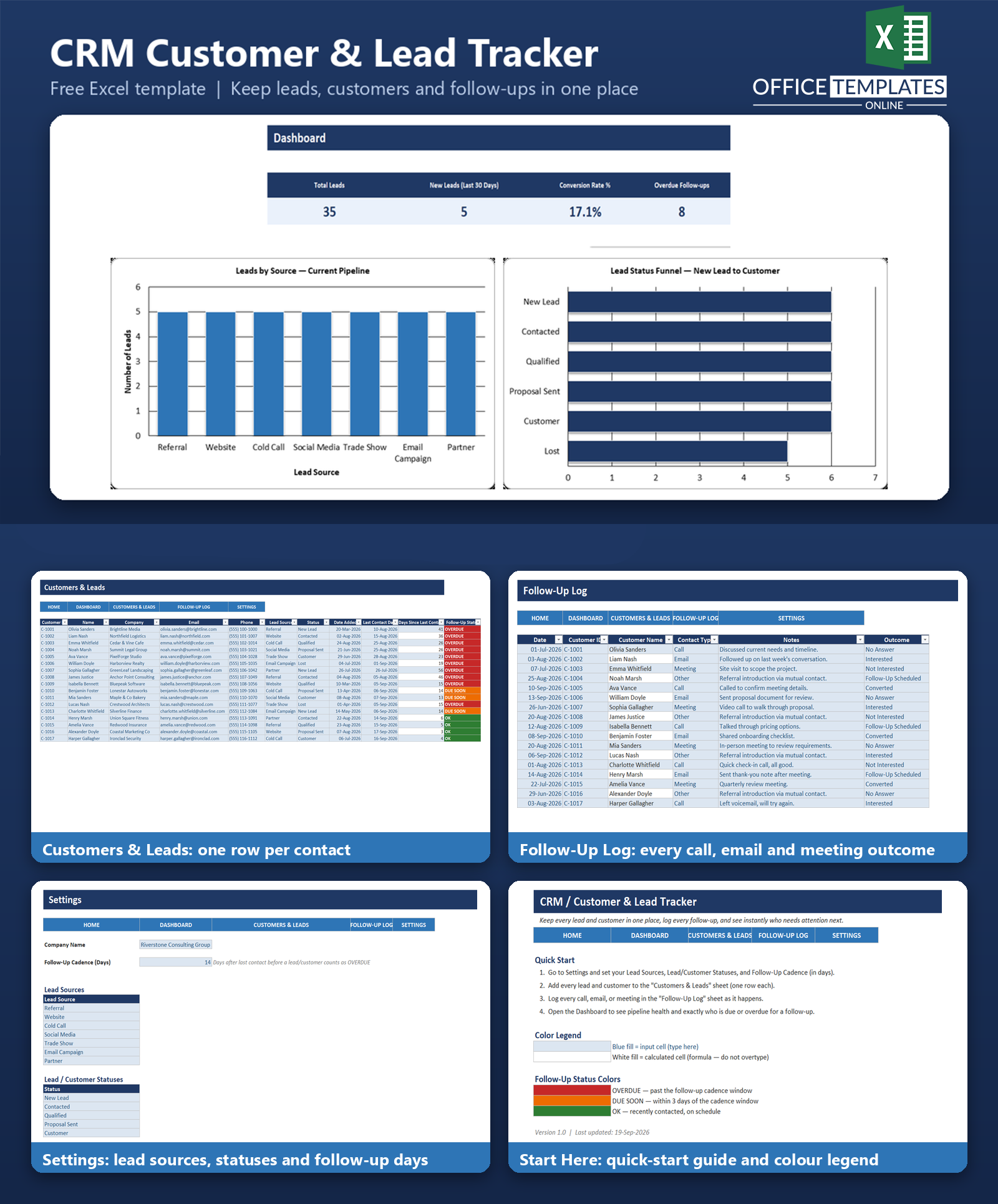
- Central lead and customer database - a single Excel Table holds every contact with their source, status, and full contact history in one row each.
- Automatic follow-up alerts - a "Days Since Last Contact" formula and a configurable cadence (default 14 days) automatically flag each record as OVERDUE, DUE SOON, or OK.
- Full interaction history - a dedicated Follow-Up Log records every call, email, and meeting, linked back to the right customer automatically by Customer ID.
- Visual pipeline dashboard - KPI cards, a Leads by Source chart, and a Status Funnel chart give you an at-a-glance read on pipeline health.
- A live overdue list - the Dashboard automatically pulls in everyone who is currently due or overdue for a follow-up, built entirely from formulas, so it always reflects your current data.
- Consistent dropdown lists - Lead Source, Status, Contact Type, and Outcome are all controlled from a single Settings sheet, so your data stays clean and consistent.
- Color-coded design system - blue input cells, white calculated cells, and red/amber/green status colors make the workbook easy to use without a manual.
What You Can Track
- Lead and customer contact details - name, company, email, phone
- Lead source (Referral, Website, Cold Call, Social Media, Trade Show, and more)
- Pipeline status (New Lead, Contacted, Qualified, Proposal Sent, Customer, Lost)
- Date added and date of last contact for every record
- Days since last contact and current follow-up status, calculated automatically
- Every follow-up interaction: date, contact type (Call, Email, Meeting, Other), notes, and outcome
Dashboard & Reports
The Dashboard sheet is built to answer one question in under ten seconds: "who do I need to talk to today?" Four KPI cards show Total Leads, New Leads added in the last 30 days, Conversion Rate, and the number of Overdue Follow-ups. Below that, a Leads by Source bar chart shows where your pipeline is actually coming from, and a Status Funnel chart shows how many contacts sit at each stage from New Lead through to Customer. A dedicated, formula-driven list then surfaces every contact that is currently due or overdue for a follow-up, color-coded red for overdue and amber for due soon, so there is never any doubt about where to focus next.
Who Is This Template For
- Freelancers who need to keep every inbound inquiry from going cold
- Consultants managing a personal outreach cadence across referrals and cold prospects
- Small sales teams sharing one workbook who need a shared source of truth
- Anyone who has ever lost a sale because a follow-up simply never happened
How to Use the Template
- Open the Settings sheet and set your Lead Sources, Statuses, and Follow-Up Cadence.
- Add every current lead and customer to the Customers & Leads sheet - one row each.
- Log every call, email, or meeting on the Follow-Up Log sheet as it happens, and update the Last Contact Date on the Customers & Leads sheet.
- Open the Dashboard whenever you plan your day to see who is overdue and where your pipeline stands.
Benefits
- Time saved - no more scrolling through email or notebooks to remember where a conversation left off; everything about a contact lives in one row.
- Fewer missed follow-ups - the automatic OVERDUE/DUE SOON flag means you no longer have to remember cadence manually - the spreadsheet remembers for you.
- Better visibility - a two-minute look at the Dashboard replaces a mental inventory of "who have I not talked to in a while?"
Excel Requirements
This template contains no macros or VBA - it is a standard .xlsx file that opens safely with macros disabled. It uses Excel Tables, standard formulas (SUMIFS, COUNTIFS, INDEX/MATCH, IFERROR), conditional formatting, and data validation dropdowns. It works in modern desktop Excel (Excel 2016 and later, and Microsoft 365). It has not been designed for Google Sheets or older Excel versions, and results may vary if opened there.
FAQ
Do I need any add-ins or plugins to use this template?
No. It is a standard Excel workbook with formulas, Tables, and conditional formatting - all native Excel features. Nothing to install.
Can I use this with a team, or is it for one person only?
It works well for a small team sharing one file (for example, on a shared drive), but it does not support simultaneous multi-user editing the way a hosted CRM platform does.
How does the template know when a follow-up is overdue?
You set a follow-up cadence in days on the Settings sheet (14 days by default). The workbook compares that cadence to the number of days since each contact's last recorded contact date and flags the record OVERDUE, DUE SOON, or OK automatically.
Can I add more lead sources or statuses than the ones already in the template?
Yes. Add or edit rows in the lists on the Settings sheet, and the dropdowns and reports will pick them up.
Does this template forecast revenue or weighted deal value?
No - this template is intentionally focused on relationship and follow-up management, not deal-value forecasting. If you need a weighted sales pipeline forecast, that is a different tool built for that purpose.
Is there sample data in the file?
Yes, the Customers & Leads and Follow-Up Log sheets both ship with realistic sample data so you can see how the formulas and dashboard work before you enter your own records. Instructions for clearing it are in the included README.
Will this work on Mac as well as Windows?
Yes, as long as you are using a modern desktop version of Microsoft Excel, the template works the same way on both platforms.
What happens if I add a lot more leads than the sample data?
New rows added directly below the existing table are automatically included in the Table and inherit its formatting and formulas. The dropdown lists are pre-extended well beyond the sample rows and can be extended further at any time through Excel's Data Validation settings.

← Previous Article
Shopping Gift Voucher Template (CR80)Next Article →
Free Excel Sales Dashboard Template for Small BusinessesYou may also like