Visitor Pass ID Card Template (MS Word)
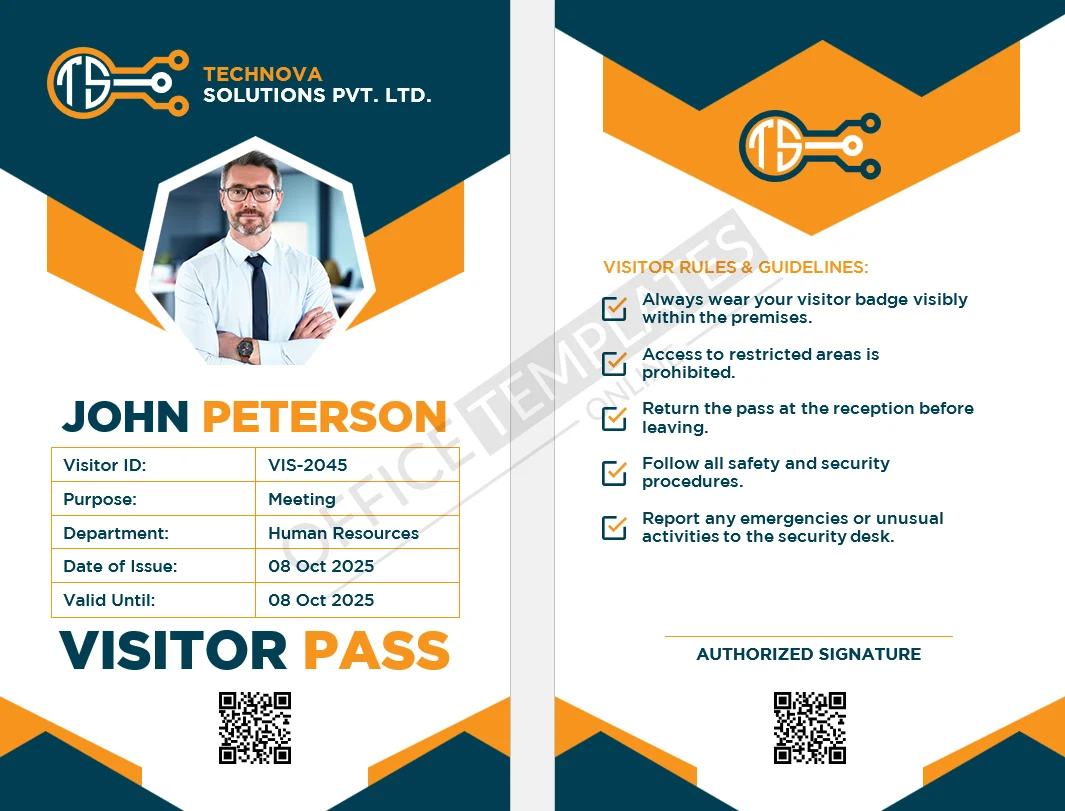
Welcome visitors professionally with a clean, print-ready Visitor Pass ID Card template designed in Microsoft Word. This template helps you issue visitor badges quickly at reception, improve security, and keep visitor details consistent across your organization.
Best for
Offices, corporate buildings, factories, schools, hospitals, and gated facilities
Front-desk teams and security desks that need fast visitor badge issuance
Advertisement
What you get
A Word (DOCX) visitor pass template in CR100 ID card size
Space for visitor photo, Visitor ID, name, purpose of visit, department, issue date and valid-until date
A visitor rules/guidelines area to set expectations clearly
Why this saves time
Instead of creating a badge layout from scratch every time, you just type the details, insert a photo, and print. The rules section is already formatted, so your team doesn’t have to rewrite instructions repeatedly.
How to edit
Open the file in MS Word (or Google Docs), replace the sample text, and insert the visitor photo/logo. You can also change colors to match your brand.
Download includes
A ZIP file containing the DOCX template and the fonts used in the design.