Mechanical Engineer Resume Template with Blueprint Header
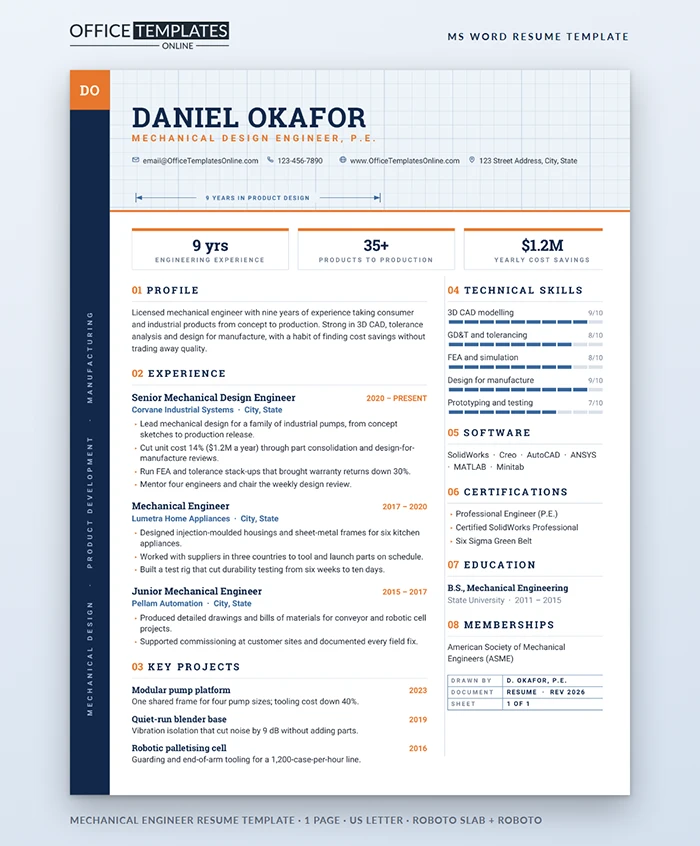
Engineers read documents the way they read drawings: header first, then the critical dimensions, then the detail. This resume is laid out in exactly that order, and it borrows the visual language of an engineering drawing so the page feels at home in a design office.
Specification Sheet
| Item | Value |
| Page | One US Letter sheet, Word document |
| Header | Pale blue blueprint grid with an orange base rule |
| Edge strip | Navy, with orange initials block and vertical specialism text |
| Typefaces | Roboto Slab for headings, Roboto for body text |
| Colors | Navy, steel blue, and safety orange |
| Signature detail | Dimension line with arrowheads under the contact row |
Bill of Materials: What Each Part Does
Name block. Your name in bold Roboto Slab with your discipline and license in spaced orange capitals, followed by four contact items with outline icons.
Spec tiles. Three boxed figures with orange top edges: years of experience, products taken to production, and yearly cost savings. Replace them with your own three strongest numbers, such as patents, test hours, or scrap reduction.
Numbered sections. Every heading carries an orange number, 01 to 08, and a fine rule, just like callouts on a drawing. The left column holds profile, experience, and key projects; the right column holds technical skills, software, certifications, education, and memberships.
Skill gauges. Five skills, each with a ten-segment bar and a score out of ten.
Title block. A small boxed table at the end of the right column reads Drawn by, Document, and Sheet 1 of 1. It is a wink to anyone who has signed off a drawing, and you can delete it in one click.
Writing Bullets an Engineering Manager Trusts
Lead with the measurable change, then the method. Cutting unit cost 14% ($1.2M a year) through part consolidation and design-for-manufacture reviews shows judgment as well as skill. Name the analysis you ran (FEA, tolerance stack-up, DOE) and the standard you worked to when it matters for the role. Avoid listing every tool you have opened; the software line covers that.
Revising the Drawing in Word
- The grid, edge strip, initials block, specialism text, dimension line, and divider are shapes in the page header. Double-click near the top of the page to reach them.
- Change DO and the vertical specialism line by clicking into their text boxes in the header.
- Each gauge is a ten-cell table; shade or clear cells in Table Design to set a level, and edit the score text next to the skill.
- Spec tiles are table cells, so the numbers and labels are ordinary editable text.
Tolerances: Keeping It to One Sheet
The layout fits three roles and three projects comfortably. With more experience, shorten the earliest role to two bullets and cut the projects to two before reducing font size. Graduates can swap the projects section for capstone and co-op work, and replace 9 yrs with internship months or a design competition result.
Other Engineering Disciplines
The blueprint styling suits any field that works from drawings. A civil engineer can change the specialism strip to structures, site design and drainage, and swap the spec tiles for projects delivered, budget managed and years licensed. Electrical and controls engineers might rate PLC programming, schematic design, and panel layout in the gauges. Manufacturing engineers often lead with scrap reduction, uptime, and cycle time. Only the words change; the grid, numbering, and title block carry over.
Fonts and Output
Roboto and Roboto Slab are free from Google Fonts. Install both, edit, and export a PDF for applications so the grid and dimension lines arrive exactly as designed. Printed on bright white paper, the pale grid stays light enough not to distract.












