Free Excel Reorder Point Template: Low-Stock Alerts and Purchase Lists
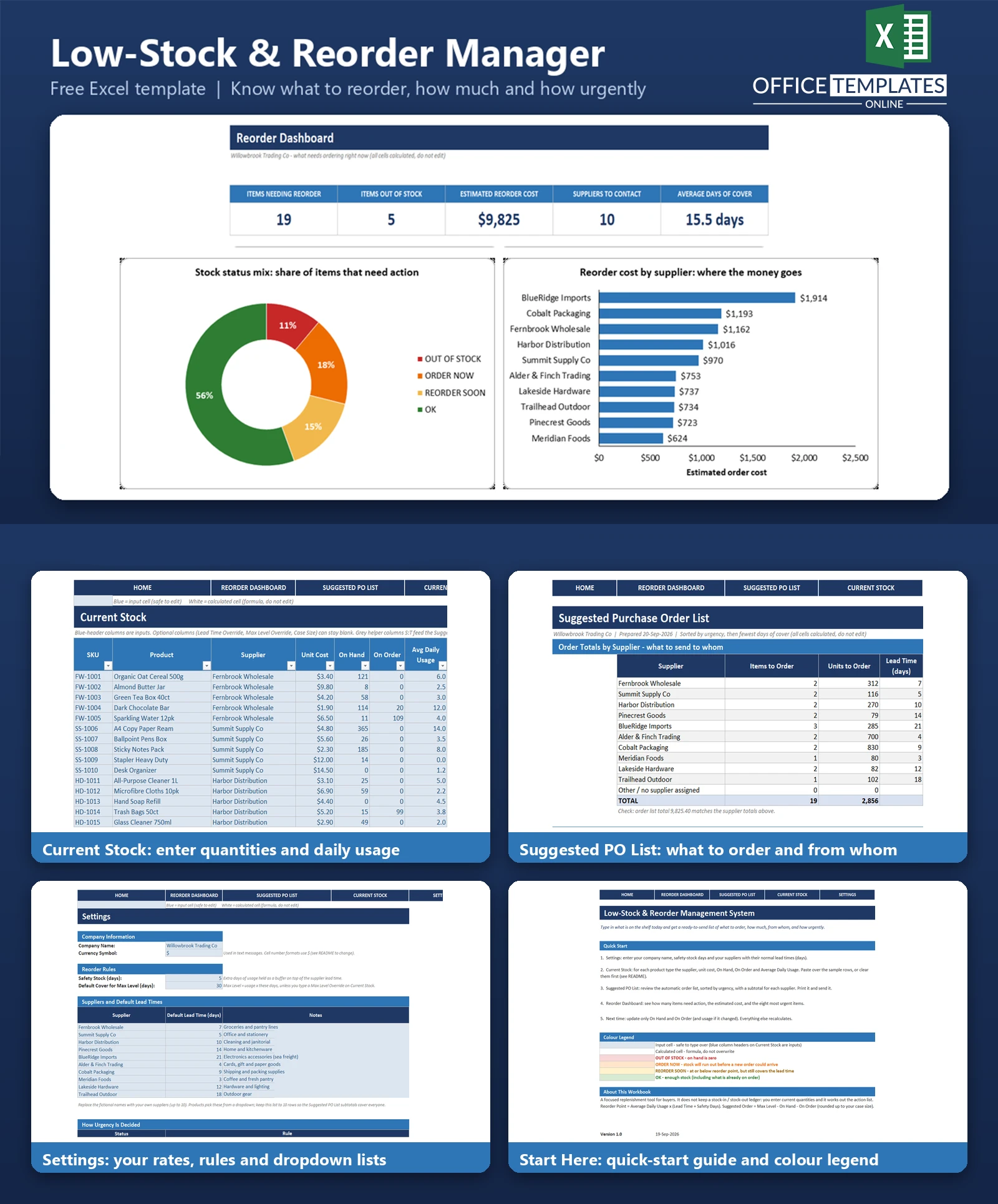
Stockouts rarely happen because a buyer did not care. They happen because nobody noticed a fast-moving product was running low until the shelf was empty, and by then the supplier lead time made it too late. Retailers and small warehouses that reorder by memory or by walking the aisles know the problem well.
This Low-Stock & Reorder Management System is an Excel reorder point template built for buyers. You type in what is on hand, what is already on order, and the average daily usage for each product. The workbook works out each product's reorder point from the supplier lead time and your safety-stock days, flags every item as OUT OF STOCK, ORDER NOW, REORDER SOON, or OK, and calculates how much to order and what it will cost.
A Suggested PO List sorts everything that needs ordering by urgency and adds a total for each supplier, so you know what to send to whom. A dashboard shows the numbers at a glance. It is a focused action-list tool: there is no stock-in/stock-out ledger to maintain, and no macros.
Key Features
- Reorder point = average daily usage x (lead time + safety days), rounded up
- Four clear statuses with colour coding: OUT OF STOCK, ORDER NOW, REORDER SOON, OK
- Stock already on order counts, so covered items are not flagged
- Suggested order quantity up to a max level, rounded up to an optional case size, with order cost
- Supplier dropdowns with default lead times, plus optional per-product lead time and max level overrides
- Auto-sorted Suggested PO List with supplier subtotals, ready to print
- Dashboard with five KPIs and three charts
- 45 fictional sample products across 10 suppliers, plus 15 spare rows
What You Can Track
- SKU, product, supplier, and unit cost
- On-hand and on-order quantities
- Average daily usage
- Supplier lead times in days and a company-wide safety-stock buffer
- Days of cover for every product
- Suggested order quantity and cost per item and per supplier
Dashboard & Reports
The Reorder Dashboard shows five KPI cards: Items Needing Reorder, Items Out of Stock, Estimated Reorder Cost, Suppliers To Contact, and Average Days of Cover.
- Stock status doughnut chart showing the percentage of items that are OUT OF STOCK, ORDER NOW, REORDER SOON, and OK.
- Bar chart of reorder cost by supplier, largest first
- Bar chart of the items closest to a stockout, comparing days of cover with supplier lead time
- A top-8 urgent items table taken from the Suggested PO List
The Suggested PO List adds a supplier subtotal block (items, units, lead time, cost, and share of the total) and a full list of items to order, with a print area and repeating header row.
Who Is This Template For
- Retail shop owners and store managers who reorder stock every week
- Small warehouses and distributors with a handful of suppliers
- E-commerce sellers who hold their own inventory
- Purchasing assistants who need a simple order list rather than a full inventory system
How to Use the Template
- Open Settings and enter your company name, safety-stock days, and your suppliers with their lead times.
- Go to Current Stock and enter each product with its supplier, unit cost, on hand, on order, and average daily usage. Clear the sample rows first (see the README).
- Optionally add a lead time override, a max level override, or a case size for products that need them.
- Open Suggested PO List to see what to order, in urgency order, with a total for each supplier. Print it or copy it into your order emails.
- Check the Reorder Dashboard for KPIs and charts. Next time, update only on hand and on order.
Benefits
- Reorder before you run out, not after
- See which items will run out before a new order could arrive
- Avoid over-ordering by counting stock already on the way
- Turn a stock count into supplier-ready order totals in minutes
- No macros, no add-ins, and nothing to install
Excel Requirements
A standard .xlsx workbook for desktop Excel 2010 or later, including Microsoft 365. It contains no macros and uses only long-established functions such as INDEX, MATCH, SUMIFS, and SMALL, so no dynamic arrays are needed. It has not been tested in Excel for the web or mobile apps.
Frequently Asked Questions
What is a reorder point?
It is the stock level at which you should place a new order. In this template, it equals average daily usage multiplied by the supplier lead time plus your safety-stock days.
How does the template decide between ORDER NOW and REORDER SOON?
Both apply when on hand plus on order is at or below the reorder point. ORDER NOW is used when days of cover is shorter than the lead time, meaning you will run out before an order arrives. Otherwise, the item is REORDER SOON.
Does stock that is already on order count?
Yes. On order quantity is added to on hand for the reorder test and is subtracted when working out the suggested quantity, so covered products are not flagged.
How is the order quantity calculated?
Max level minus on hand minus on order, never below zero, rounded up to the case size if you entered one. Max level defaults to usage times your default cover days unless you override it.
Can I use different lead times for different products?
Each product takes its supplier's default lead time from Settings. You can type a lead time override on any product.
Do I have to record every stock movement?
No. This is not a ledger. You only enter current quantities and average daily usage.
How many products and suppliers does it hold?
The sheet has 60 product rows (45 with sample data) and 10 suppliers. The order list shows up to 60 items.
Are macros required?
No. The workbook contains no macros.












