Cleaning Services Proposal Template in Word with Cover Page
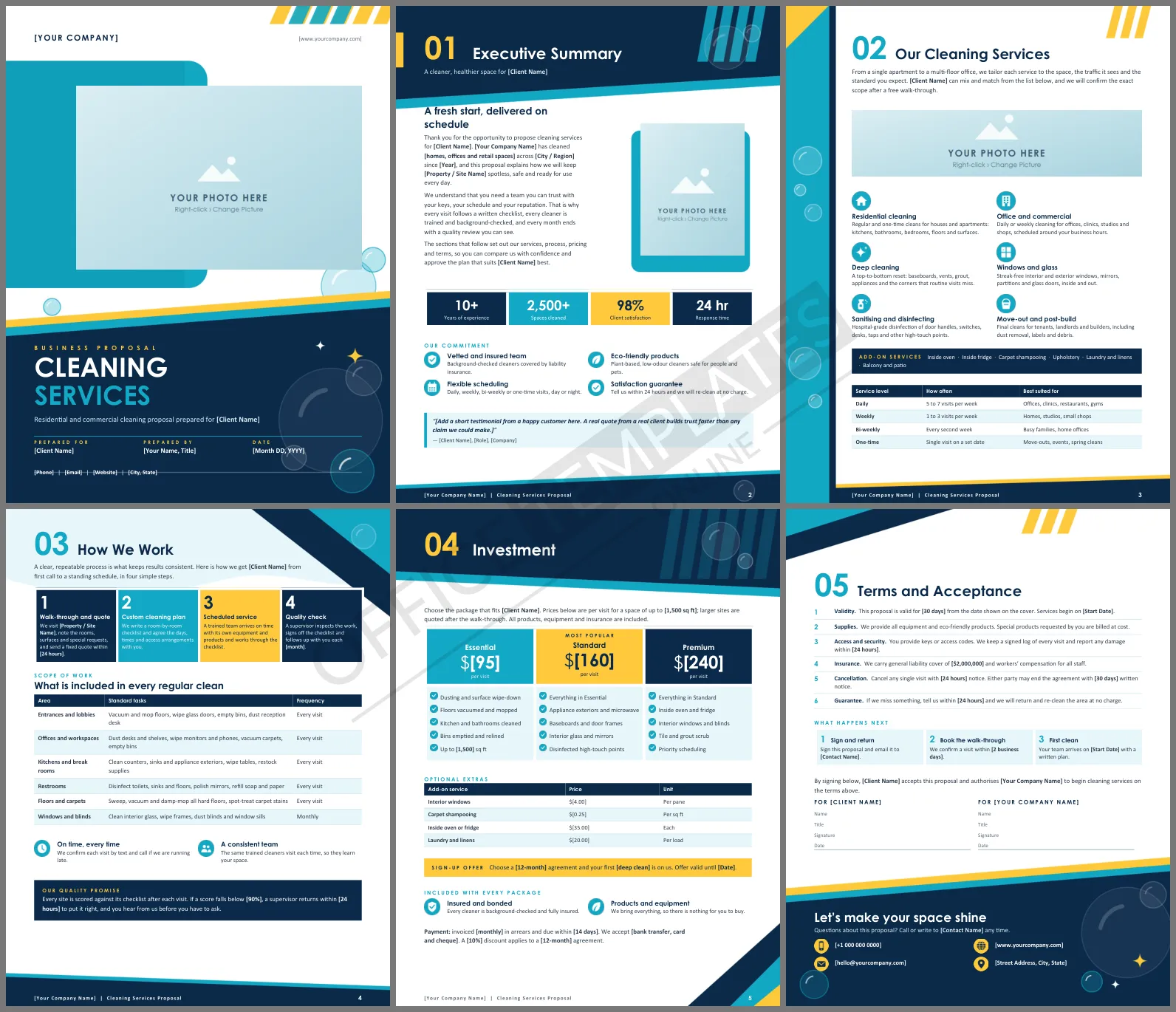
Winning a cleaning contract rarely comes down to who has the cheapest mop. It comes down to who looks the most dependable on paper. This Cleaning Services Proposal Template gives a cleaning company, maid service, or janitorial contractor a six-page Word document that already looks like it was made by a design agency, with the wording, tables, and price packages a client expects to see before signing.
What the Cleaning Services Proposal Template Includes
The document is built for US Letter paper in portrait, and it runs to six pages. Each page has its own layout, so the proposal feels like a short brochure instead of a plain letter.
| Page | Section | What it covers |
| 1 | Cover | Photo frame, title, prepared for, prepared by, date and contact line |
| 2 | Executive Summary | Welcome text, four stat tiles, four commitments and a testimonial panel |
| 3 | Our Cleaning Services | Six services, add-ons and a table of service levels |
| 4 | How We Work | Four-step process, scope-of-work table and quality promise |
| 5 | Investment | Three price packages, optional extras, sign-up offer and payment terms |
| 6 | Terms and Acceptance | Six terms, next steps, signature block and contact details |
A Fresh Look in Aqua, Navy and Yellow
The colors were chosen to say clean without looking clinical. Aqua and navy carry the page backgrounds, while sunny yellow stripes and tabs add energy. Soap-bubble circles and small sparkles repeat from the cover to the contact panel on the last page, so the whole proposal reads as one design. Headings use Century Gothic and the body text uses Calibri, and both come with Microsoft Office, so nothing needs to be installed.
Who Can Use This Proposal
The wording is written for general cleaning work, so it fits many kinds of businesses:
- Residential and maid services pitching to homeowners and landlords
- Office and commercial cleaners bidding for regular contracts
- Janitorial companies serving clinics, schools, gyms and shops
- Move-out, deep-clean and post-construction specialists
- Freelance cleaners who are growing into a registered company
How to Customize It in Word
Every piece of text is normal Word text, so there is nothing locked or hidden. Replace each bold [bracketed placeholder] with your own details: company name, client name, prices, dates, and contact information. The stat tiles, the service-level table, the scope-of-work table, and the price extras are real Word tables, so you can type over the figures and add or delete rows.
The photo frames on the cover and on pages two and three are picture placeholders. Click a frame, choose Picture Format, then Change Picture, and add a photo of your team, your equipment, or a finished job. Keep the same frame size, and the layout stays intact. The page artwork sits in each page's header, so it cannot be dragged around by accident while you edit.
Tips for Winning More Cleaning Contracts
A good template saves time, but the content still has to convince. A few habits make a proposal stronger:
- Visit the site first and mention something specific, such as the number of restrooms or the type of flooring. It shows you looked.
- Replace the sample statistics with real ones, even small ones. A true figure such as 120 homes cleaned beats a vague claim.
- Add a genuine testimonial to the panel on page two. Ask a happy client for one sentence.
- Price the packages so the middle option looks like the best value. Most clients choose it.
- Send the proposal as a PDF within a day of the walk-through, while the visit is still fresh in the client's mind.
Frequently Asked Questions
Can I use this for both homes and offices?
Yes. The services, scope table, and packages are general. Delete the rows that do not apply and rename the packages to suit your clients.
Can I change the colors?
You can change all text colors and table colors in Word. The page backgrounds are pictures in the header, so a full recolor means replacing those pictures.
How do I remove a page I do not need?
Select the content on that page and delete it. Each page is its own section, so the other pages keep their design.
Is the template ready to print?
Yes. It is set up for US Letter paper, and the color backgrounds print best on a color printer. Saving to PDF before sending keeps the layout exactly as designed.












