Customer Service Representative Resume Template with Chat Bubbles
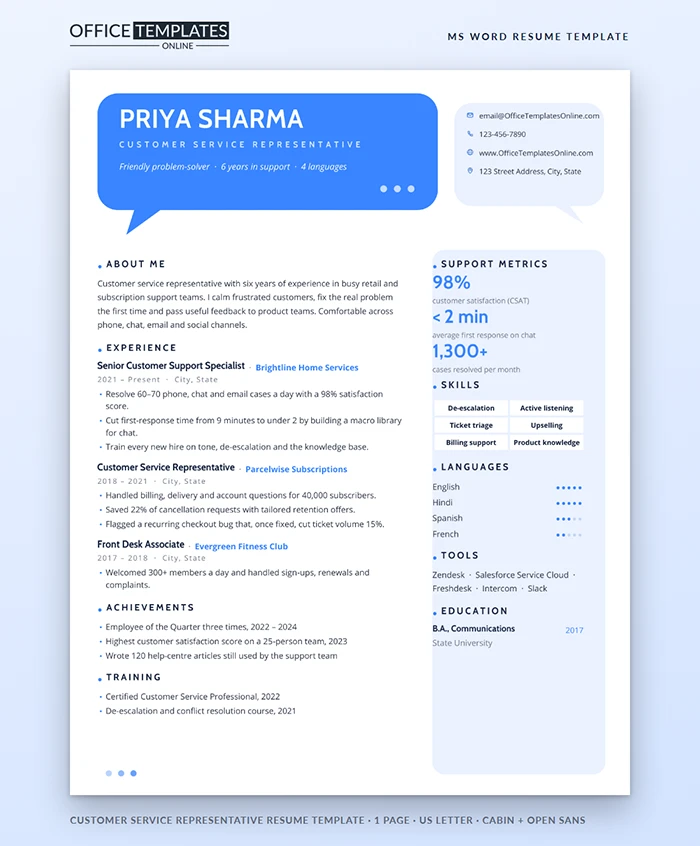
Good support people make customers feel heard in the first ten seconds. Your resume should do the same for a hiring manager. This template opens with a big blue speech bubble that introduces you like a friendly greeting, then backs it up with the numbers support leaders care about.
A Header That Starts the Conversation
A bright blue rounded speech bubble, complete with a tail and three typing dots, holds your name in bold white Cabin, your job title in spaced pale-blue capitals, and a one-line italic introduction. Beside it, a pale blue bubble with its own tail holds your email, phone, website, and address with small outline icons. It reads like the first two messages in a chat.
Below, the main column lists your experience, achievements, and training. A rounded pale blue panel on the right shows support metrics in large blue figures, skills as chips, languages with five-dot ratings, tools, and education.
Support Metrics, Explained
| Metric | What it means | Good figure to show |
| CSAT | Share of customers who rated the help as good | 90% or higher |
| First response time | How fast a customer gets a first reply | Minutes for chat, hours for email |
| First contact resolution | Cases solved without a follow-up | 70% or higher |
| Cases per month | Volume you handle | Compare with your team average |
| Saves | Cancellations turned around | A percentage of requests |
Use the three that make you look strongest, and only figures your manager would confirm.
Practice the Answer Behind the Bubble
The italic line in the bubble is your elevator pitch, and you will be asked to expand it in the interview. A simple answer to Tell me about yourself might sound like this:
I've spent six years helping customers in retail and subscription businesses, mostly on chat and phone. I'm the person my team hands the angry calls to, because I stay calm and fix the real problem. Last year I cut our chat response time from nine minutes to under two by building a library of replies. I'd like to bring that mix of patience and process to your team.
Turning Everyday Duties into Results
Most support resumes list the same duties: answered calls, resolved issues, updated tickets. Recruiters skip those lines because every applicant writes them. Instead, describe what changed because you were there. Did you shorten a queue, save cancellations, write help articles that cut repeat questions, or spot a product bug? Each of those is a story with a number. Aim for one result per bullet, keep the verbs active, and leave the routine tasks for the interview, where you can describe your day in detail.
Showing Your Languages Well
Multilingual agents are in demand, so the panel gives languages real space. Use five dots for native or professional fluency, three for conversational, and two for basic. Be honest: you may be asked to take a call in any language you list.
Editing the Bubbles in Word
- The bubbles, tails, typing dots, and side panel are shapes in the page header. Double-click near the top of the page to select one, then use Shape Fill to change its color.
- All the text inside the bubbles is normal in table cells, so just click and type.
- Skill chips sit in a two-column table; type over a chip or press Tab in the last one to add a row.
- Language dots are characters; select the dots and change the font color to switch them on or off.
Who This Design Suits
Call-center agents, chat and email support specialists, help-desk staff, front-desk associates, and client success coordinators. Cabin and Open Sans are free from Google Fonts. The page is one US Letter sheet; save a PDF when you apply.












