Free Excel Appointment Scheduler Template with Double-Booking Alerts
If your booking book lives in a paper diary or a loose spreadsheet, it is only a matter of time before two customers are booked with the same stylist at the same hour. Double-bookings, forgotten reminders, and unrecorded no-shows quietly cost small service businesses money every week, and they are hard to spot when every appointment is just a line in a list.
This Excel Appointment & Booking Scheduler is built for salons, spas, clinics, consultants and other appointment-based businesses. You log each booking once, and the workbook checks every appointment against the rest of that staff member's day, flags real-time overlaps, tracks no-shows and cancellations, and shows who is coming up next.
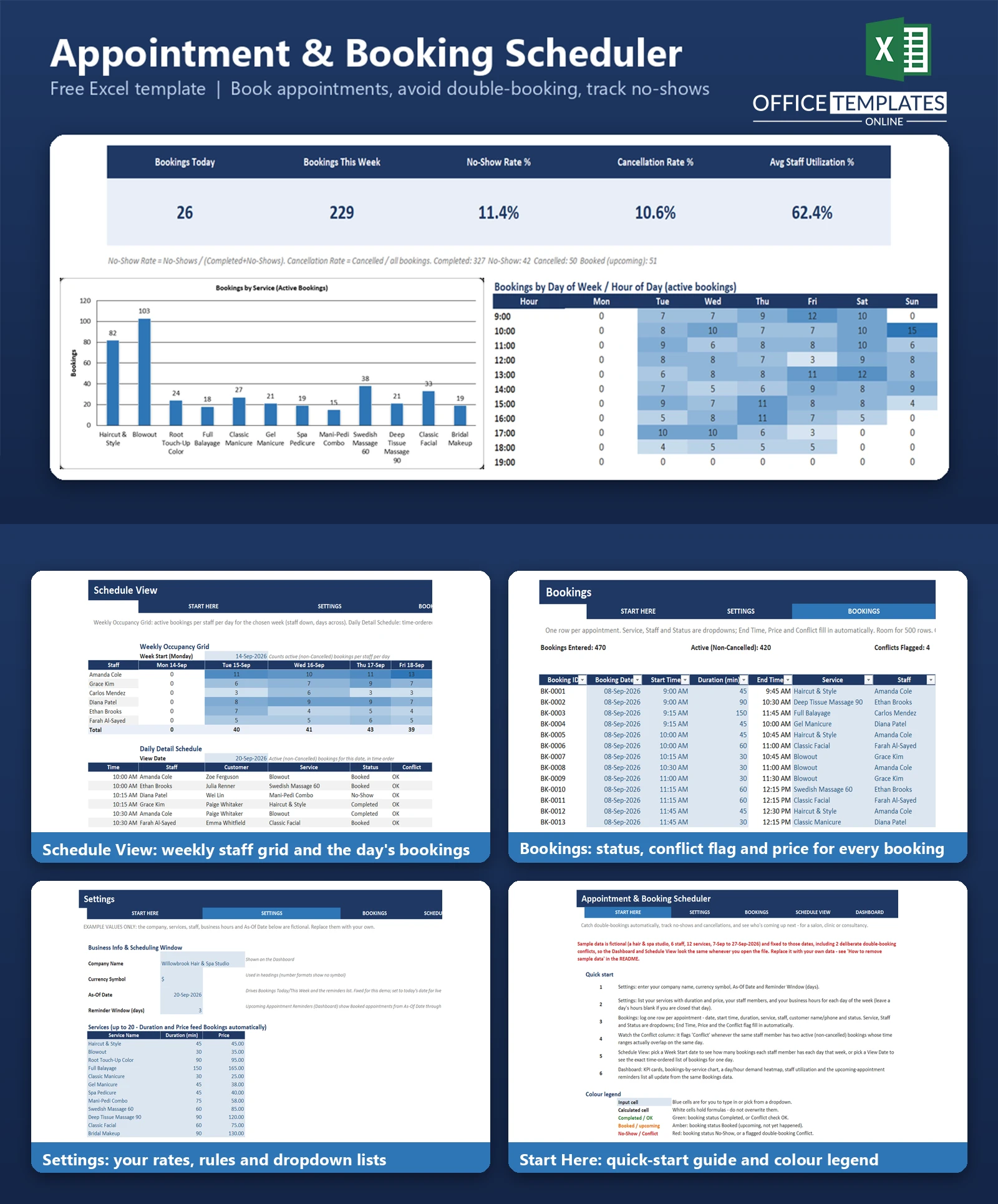
It is a plain Excel file with no macros: a Settings sheet for services, staff, and opening hours, a Bookings table, a weekly and daily Schedule View, and a Dashboard with KPIs, a chart, and a demand heatmap. Sample data for a fictional hair and spa studio is included so you can see everything working before you enter your own.
Key Features
- Automatic double-booking flag using true interval overlap (not just matching start times), applied to both bookings in a clash
- No-show rate and cancellation rate, with counts
- Upcoming-appointment reminders list for the next N days (Booked status only)
- Weekly staff-by-day occupancy grid and a time-ordered daily schedule list
- Dropdowns for service, staff, and status; end time and price calculated automatically
- Dashboard with KPI cards, bookings-by-service bar chart, day-and-hour heatmap and staff utilization
- Room for 500 bookings, 20 services and 16 staff members
What You Can Track
- Booking date, start time, duration, and calculated end time
- Service, staff member, customer name and phone
- Status: Booked, Completed, No-Show or Cancelled
- Price per booking, looked up from your service list
- Business hours for each day of the week, including closed days
Dashboard & Reports
The Dashboard shows Bookings Today, Bookings This Week, No-Show Rate %, Cancellation Rate % and Average Staff Utilization %. Below them are a bar chart of bookings by service and a colour-scaled heatmap of bookings by day of the week and hour of the day, so you can see your busiest slots. A utilization table shows booked hours against available business hours for each staff member, and the reminders list shows upcoming booked appointments with phone numbers. The heatmap is built with conditional formatting rather than a chart object.
The Schedule View sheet gives a weekly grid (staff down, days across) for any week you choose, and a daily list of appointments in time order for any date.
Who Is This Template For
- Hair salons, barbershops and beauty studios
- Massage, physiotherapy and wellness practices
- Small clinics and consultants who book time slots
- Any service business that assigns appointments to individual staff
How to Use the Template
- Open Settings and enter your business name, currency symbol, As-Of Date, and reminder window.
- List your services with duration and price, your staff, and your opening hours.
- Add one row per appointment on the Bookings sheet.
- Check the Conflict column and fix any flagged overlaps.
- Use Schedule View to review a week or a single day.
- Review the Dashboard for rates, utilization, and reminders.
Benefits
- Catch double-bookings before the customer arrives
- See your no-show and cancellation rates instead of guessing
- Have a ready call list for appointment reminders
- Understand which services and time slots are busiest
- Works in Excel you already own, with no subscription
Excel Requirements
Works in modern desktop Excel on Windows or Mac. The workbook contains no macros. Formulas use standard functions such as SUMPRODUCT, COUNTIFS, and INDEX/MATCH. The As-Of Date is an input you set (it is not tied to today's date), so update it when you use the file live.
Frequently Asked Questions
How does the double-booking check work? It compares each booking's start and end time with every other active booking for the same staff member on the same date. Overlapping ranges are flagged as a conflict on both rows. Cancelled bookings are ignored.
How is the no-show rate calculated? No-shows divided by Completed plus No-Shows. Cancelled and future booked appointments are excluded from that rate.
Can I use it for more than one location?: The template has one set of business hours and one staff list, so it suits a single location. You could keep one copy per location.
How do I remove the sample data? Clear the blue input cells on the Bookings sheet, then replace the sample services, staff, and hours on Settings. The README explains each step.
Does it handle individual staff shifts or days off?: No. Utilization assumes every staff member is available for all business hours.
How many appointments can it hold? 500 bookings as delivered. The formulas are already in place for those rows.
Do the reminders send messages?: No. It lists upcoming booked appointments and phone numbers so you can contact customers yourself.

← Previous Article
Free Excel Billable Hours & Client Billing Tracker TemplateYou may also like