Before accounting software, most businesses bought from suppliers with a pad of three-part purchase order forms. The buyer wrote the order once, the carbon paper copied it through, and each coloured sheet went to a different desk. The system worked because everyone involved held the same record. This Standard Purchase Order Template keeps that idea and puts it in an editor, so you can type a clean, professional PO, print it or send it as a PDF, and still know exactly who should hold each copy.
A Top Sheet With Its Copies Showing
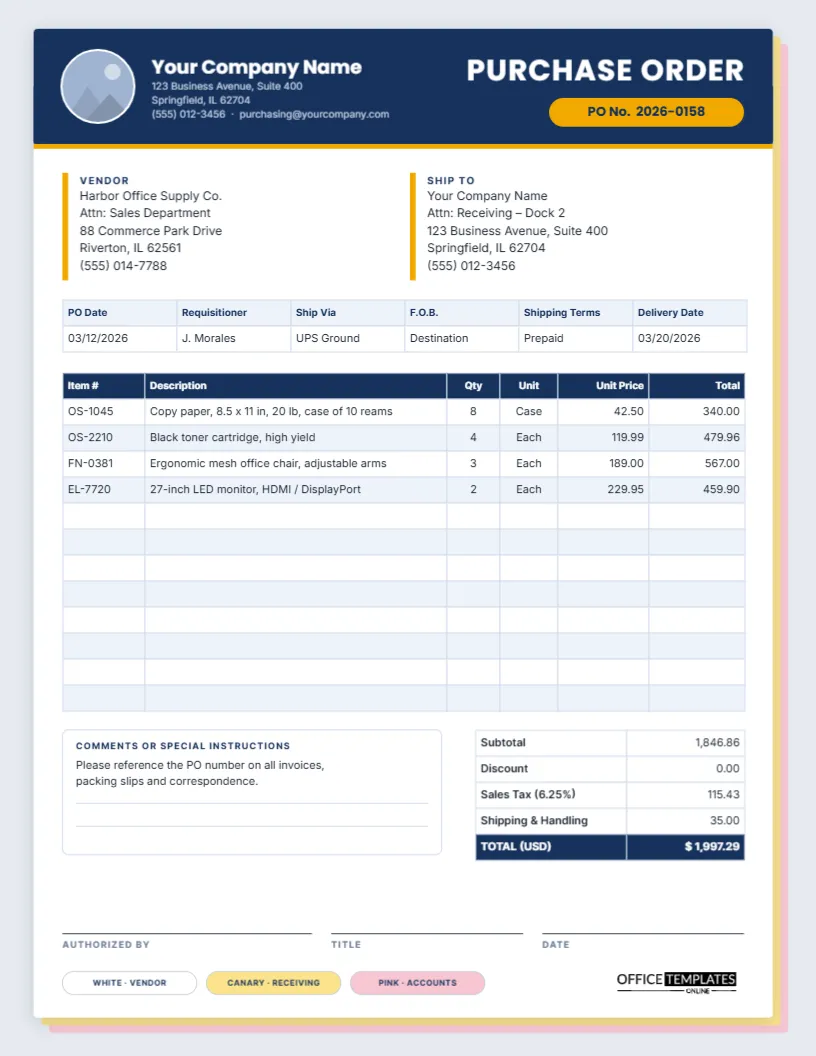
The template is US Letter portrait, 8.5 x 11 inches. The page is drawn as the top sheet of a triplicate set: a white form sits on a soft grey-blue background, with a canary-yellow sheet and a pink sheet peeking out from behind its lower right edge. It is a small visual cue, but it tells everyone at a glance that this is an official buying document.
A navy header band runs across the top of the sheet, finished with a thin amber stripe. On the left is a round logo placeholder, then your company name in bold Poppins, with the address, phone number, and purchasing email underneath. On the right, PURCHASE ORDER is set in white capitals above an amber pill that holds the PO number. The body text uses Inter, a very readable sans-serif that stays crisp at small sizes.
Below the header, you will find:
- Vendor and Ship To blocks, each marked with a short amber bar.
- A shipping details table: PO Date, Requisitioner, Ship Via, F.O.B., Shipping Terms, and Delivery Date.
- A 12-line item table with Item #, Description, Qty, Unit, Unit Price, and Total.
- A Comments or Special Instructions box beside a totals table for Subtotal, Discount, Sales Tax, Shipping & Handling, and a navy TOTAL row.
- Signature lines for Authorized by, Title, and Date.
- Three colour-coded chips at the bottom: WHITE · VENDOR, CANARY · RECEIVING and PINK · ACCOUNTS.
Who Keeps Which Copy
The coloured chips are more than decoration. They describe a simple distribution routine that still works for small and mid-sized businesses, whether you print three copies on coloured paper or save three PDFs into different folders.
| Copy | Goes to | What they use it for |
|---|---|---|
| White | The vendor | Picking, packing and invoicing against your PO number |
| Canary | Receiving/the loading dock | Checking the delivery against what was ordered |
| Pink | Accounts payable | Matching the supplier’s invoice before paying it |
If your team works digitally, rename the chips to suit, for example PDF · Vendor email, Shared drive · Receiving, and Accounting system. Each chip is an ordinary shape with editable text.
The Three-Way Match Behind Every Standard PO
Accountants talk about the three-way match: before a bill is paid, three documents should agree. The purchase order says what you agreed to buy and at what price. The receiving record (the canary copy, or a signed delivery note) says what actually arrived. The supplier’s invoice says what they are charging. When quantities and prices line up across all three, the invoice is approved; when they do not, someone investigates before money leaves the business.
This is why the details on a standard PO matter. A vague description such as printer supplies makes matching impossible, while Black toner cartridge, high yield, item OS-2210, qty 4 at 119.99 makes it quick. Use the Item # column for the supplier’s catalogue number, write descriptions a stranger could understand, and always state the unit (each, case, box, ream) so there is no argument over whether 8 means eight reams or eight cases.
Completing the Form, Top to Bottom
- Header: replace Your Company Name and the contact lines with your own details. Click the round logo slot and choose Replace Image to add your logo; it stays inside the circle.
- PO number: edit the text in the amber pill. Use a numbering pattern you can sort, such as year plus sequence (2026-0158, 2026-0159…).
- Vendor and Ship To: type the supplier’s name, contact person, and address, and where the goods should be delivered. Mentioning a dock, floor, or contact name saves drivers a phone call.
- Shipping details: fill in who requested the purchase, the carrier or service, the F.O.B. point (Origin or Destination), whether freight is prepaid or collect, and the delivery date you need.
- Line items: double-click the item table to open Edit Table Data, where you can type into each cell. If you have more than twelve lines, select the table and use the + Row button, or reduce the text size to fit more.
- Totals: type the subtotal, any discount, the sales tax at your local rate, shipping, and the final total. The table holds text, not formulas, so work the figures out on a calculator or in a spreadsheet first.
- Sign-off: the person with purchasing authority signs and dates the order before it goes out.
Reading the Sample Order
The sample shows a typical office restock: copy paper by the case, toner cartridges, three ergonomic chairs, and two monitors. The subtotal is 1,846.86, sales tax at 6.25% adds 115.43, shipping is 35.00, and the order total is $1,997.29. Replace every figure with your own; the sample simply shows how a finished order should read, with each line priced as quantity times unit price.
F.O.B., Ship Via and Other Terms on the Form
The shipping details table uses a few abbreviations that are worth getting right:
- F.O.B. (Free On Board): in everyday US purchasing, F.O.B. Destination usually means the seller is responsible for the goods until they reach you, while F.O.B. Origin means responsibility passes to you when the goods leave the seller. Agree on the meaning with your supplier and use the same wording on every order.
- Ship Via: the carrier or service, such as UPS Ground, LTL freight, courier, or Vendor truck.
- Shipping Terms: usually Prepaid (the seller pays freight, sometimes adding it to the invoice) or Collect (you pay the carrier).
- Requisitioner: the person who asked for the purchase, useful when questions come up later.
Printing a Triplicate Set From One Template
You do not need carbonless paper to keep the three-copy habit. Download the finished order as a PDF and print it three times: once on white paper for the vendor, once on canary-yellow copy paper for receiving, and once on pink for accounts. Choose Actual size on US Letter; the grey-blue page edge prints as a light tint, so if you prefer pure white margins, select the background rectangle in the editor and change its colour to white before downloading. For email, the PDF keeps the text sharp, and a PNG or JPEG is handy for pasting into a chat or a procurement portal.
Adapting the Standard Layout
- Change the colours: select the navy band and pick your brand colour; update the amber stripe, pill, and bars to a matching accent.
- Add terms and conditions: put short terms in the comments box, or add a second page with your full purchasing conditions.
- Remove the Discount row if you never use it: open Edit Table Data on the totals table and delete the row.
- Import lines from a spreadsheet: the Edit Table Data window includes Import CSV, which is quicker than retyping a long list.
Standard PO Questions
Is a purchase order legally binding?
Once the supplier accepts it, a purchase order generally forms the basis of the agreement between you, which is why prices, quantities and terms should be accurate. For contracts of real significance, ask your adviser about the wording you need.
Can I use this for services as well as goods?
You can, but a service order usually needs hours, rates, and milestones. The Service Purchase Order in this collection is built for that.
What paper size is it?
US Letter, 8.5 x 11 inches, portrait. It also prints on A4 if you choose Fit to page in the print dialogue.
Does the logo circle crop my logo?
Your image fills the circle, so a square logo with some space around it looks best.
Start Your Next Order
A clear purchase order prevents most supplier disputes before they start. Add your logo, set up your numbering, fill in the vendor and items, and send an order that everyone, from the warehouse to accounts, can check against the same record.