Schools spend public money, so their purchases need a clear trail. A teacher asks for supplies, a principal approves, the business office checks the budget, and a purchase order goes to the vendor. Each step has to be recorded, and the order must show which budget account pays and that the school is exempt from sales tax where that applies. This School Purchase Order is laid out for exactly that process, with a friendly design that still looks official.
Who This Form Is For
- Teachers and department heads requesting classroom supplies, books, science equipment, or art materials.
- School secretaries and office managers who prepare and send orders.
- Business offices and district purchasing staff checking budget codes and approvals.
- Private schools, charter schools, preschools, and tutoring centres that want a professional order form.
- Parent-teacher associations buying for events or classroom gifts.
A Ruler Down the Side
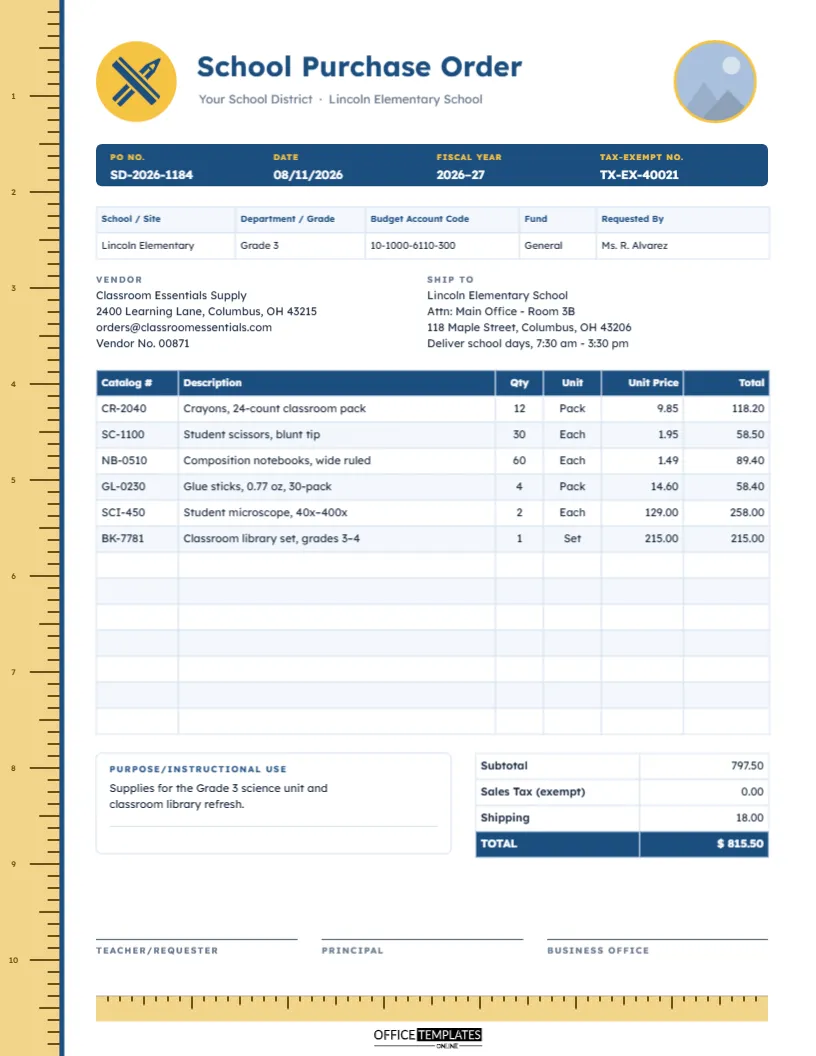
The template is US Letter portrait, 8.5 x 11 inches. A wooden ruler runs down the full left edge of the page, with inch numbers from 1 to 10 and fine tick marks, bordered by a navy line. In the header, a sunny yellow circle holds a crossed pencil and ruler icon beside the title School Purchase Order in Lexend, a typeface designed for easy reading. The district and school name sit beneath, and a round crest placeholder on the right, ringed in yellow, waits for your school logo.
Below the header, you will find:
- A navy bar with PO No., Date, Fiscal Year, and Tax-Exempt No.
- A table for School/Site, Department/Grade, Budget Account Code, Fund, and Requested By.
- Vendor and Ship To blocks, with delivery hours on school days.
- A 13-row order table: Catalog #, Description, Qty, Unit, Unit Price, Total.
- A Purpose/Instructional Use box and totals, with sales tax shown as exempt.
- Three approvals: Teacher/Requester, Principal, and Business Office.
- A horizontal ruler strip at the bottom, above our logo, echoing the one down the side.
Anatomy of a Budget Account Code
School districts usually charge every purchase to an account code made of several segments. Formats differ between states and districts, but many follow a pattern like the sample’s 10-1000-6110-300:
| Segment | Sample | Often represents |
|---|---|---|
| Fund | 10 | The pot of money, such as the general fund or a grant |
| Function | 1000 | The activity, for example, instruction |
| Object | 6110 | What is being bought, such as supplies or equipment |
| Location | 300 | The school or department |
Ask your business office for the exact code before you order. A wrong segment can charge the purchase to the wrong school or grant, and fixing it later takes far more time than checking first.
How Approval Usually Flows
- The teacher lists what is needed and why, in the Purpose/Instructional Use box.
- The principal signs to confirm the purchase supports the school’s plans.
- The business office checks the account code and available budget, confirms the tax-exempt number and signs.
- The PO is sent to the vendor, and a copy goes to the main office so deliveries can be matched when boxes arrive.
Some districts add further steps for large purchases or specific funds. Add more signature lines if yours does.
The Sample Classroom Order
The sample supplies a Grade 3 classroom: crayons, blunt-tip scissors, composition notebooks, glue sticks, two student microscopes, and a classroom library set. The subtotal is 797.50. Sales tax is shown as 0.00 because many public schools are exempt when they provide an exemption certificate, and shipping adds 18.00, for a total of $815.50. Exemption rules differ, so confirm your school’s status and number.
Editing for Your School
- Click the round crest and choose Replace Image to add your school or district logo.
- Update the district and school name, the PO number, fiscal year, and tax-exempt number in the navy bar.
- Double-clicking the site table opens it for editing; do the same for the order table to type catalog numbers, items, and prices. Import CSV helps if you copied items from a vendor’s online catalogue.
- Calculate totals before typing them, since the tables do not add up automatically.
- The pencil and ruler icon is an editable vector. Recolour it or the yellow circle to your school colours.
Timing Orders Around the School Year
Orders placed in the last weeks of summer compete with every other school in the country. If you can, send supply orders in late spring for delivery before the new year starts, and check whether your vendor delivers during school holidays. Remember too that many districts close ordering well before the end of the fiscal year; the Fiscal Year field on the form reminds everyone which budget year the order belongs to.
Printing and Audit Copies
Print on US Letter at actual size, or fit to page on A4. The ruler strips use a light wooden colour, so the page is inexpensive to print. Keep a copy of the signed PO with the packing slip and invoice; auditors of school spending often ask to see all three together.
Writing a Useful Purpose Statement
Business offices and auditors want to see why public money was spent, so the Purpose/Instructional Use box deserves a sentence or two of real detail. Link the purchase to teaching: Microscopes for the Grade 3 life science unit on plant cells, shared between two classes, says far more than science equipment. If the order is paid from a grant, mention the grant name and the activity it supports, because grant rules often limit what can be bought. For replacement items, say what is being replaced and why; for example, replaces scissors worn out after three years of use. A clear purpose line speeds up approval and saves the principal from chasing the teacher for an explanation.
School Office Questions
Can PTAs and booster clubs use it?
Yes. Replace the budget code fields with your organisation’s details, or delete the site table.
Can I order books and technology on the same form?
Yes, although some districts require technology purchases to go through IT; check your policy.
What if we are not tax exempt?
Edit the Tax row label and type in the tax amount.
Supplies in Classrooms, Paperwork in Order
From the teacher’s request to the business office’s signature, this school purchase order keeps each approval and budget code where auditors and vendors can see it. Add your crest and send your next order.