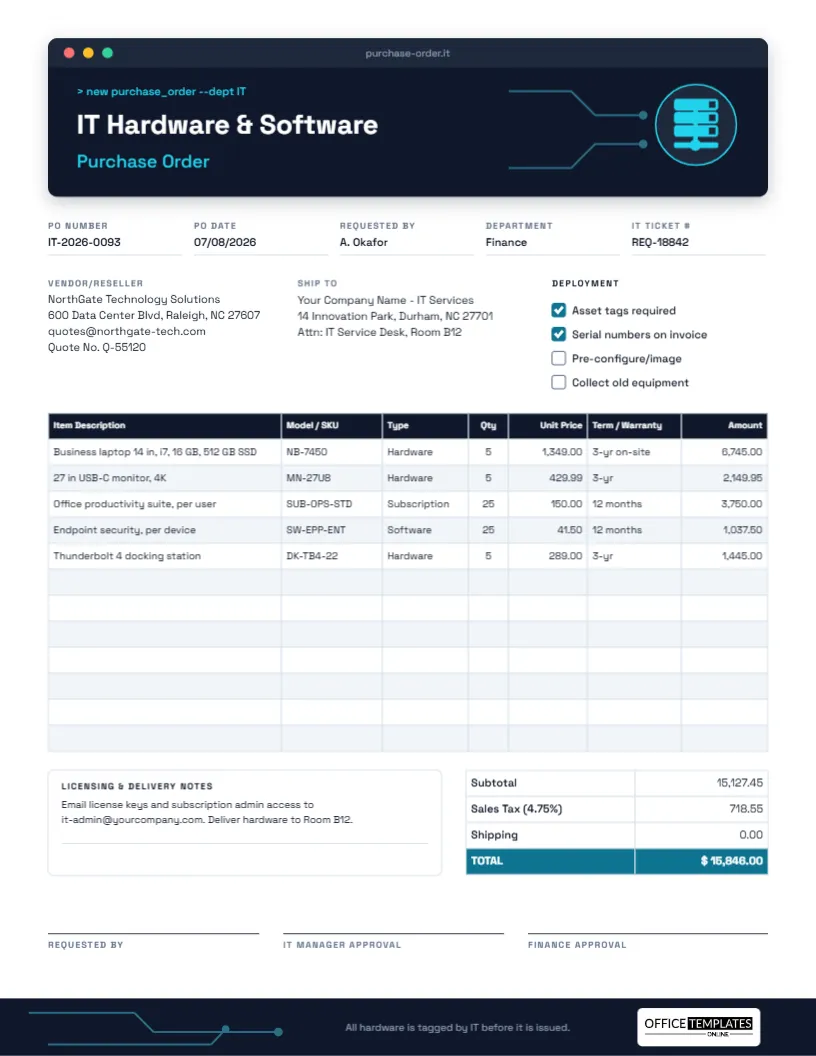
Technology purchases are rarely just a laptop. Each order mixes physical hardware that needs asset tags and warranties with software and subscriptions that renew, expire, and are counted per user. When an IT team buys without a clear record, licences lapse unnoticed, warranties go unused, and nobody knows which laptop belongs to whom. This IT Purchase Order keeps hardware and software on one page, with the details your IT and finance teams need later.
A Terminal Window for a Header
The template is US Letter portrait, 8.5 x 11 inches. Its header is drawn as a dark navy terminal window, complete with red, yellow, and green window buttons and a tab reading purchase-order.it. Inside, a cyan command line reads > new purchase_order –dept IT, followed by the title IT Hardware & Software in white and Purchase Order in cyan, all set in Space Grotesk. On the right, thin circuit traces run into a server rack icon inside a glowing cyan ring. The traces return in the navy footer, where our logo sits on a white plate.
The form includes:
- PO Number, PO Date, Requested By, Department, and IT Ticket #, so the purchase links back to the original request in your helpdesk.
- Vendor/Reseller details with a quote number, and a Ship To block.
- A Deployment checklist: Asset tags required, Serial numbers on invoice, Pre-configure/image, collect old equipment.
- A 12-row table: Item Description, Model/SKU, Type, Qty, Unit Price, Term/Warranty, and Amount.
- A Licensing & Delivery Notes box and totals with a dark teal TOTAL row.
- Three sign-offs: Requested by, IT Manager Approval, and Finance Approval.
Hardware, Software, or Subscription: Filling In the Type Column
The Type column is the small detail that saves the most trouble later. Each type is handled differently after the purchase:
| Type | Examples | What to put in Term/Warranty | After delivery |
|---|---|---|---|
| Hardware | Laptops, monitors, docks, printers, network gear | Warranty length and level, e.g., 3-year on-site | Tag, record serial number, assign to a user |
| Software | Perpetual licences, security tools, specialist apps | Licence or maintenance period | Store keys securely, record seat count |
| Subscription | Cloud productivity suites, SaaS tools, hosting | Billing period, e.g., 12 months | Diary the renewal date, assign seats |
| Service | Setup, imaging, installation, training | Delivery date or hours | Confirm completion before paying |
In the sample, five business laptops, five 4K monitors, and five docking stations are hardware with three-year warranties, while 25 productivity suite seats and 25 endpoint security seats run for twelve months. Product names in the sample are generic; enter the exact model numbers from your reseller’s quote.
An Asset Tagging Routine That Works
Ticking Asset tags required and Serial numbers on the invoice sets up a simple process for when the boxes arrive:
- IT receives the delivery in the room named on the PO and checks it against the order.
- Each device gets an asset tag, and its tag number, serial number, model, and warranty end date go into your asset register.
- If Pre-configure/image is ticked, devices are set up before they are issued.
- Each device is assigned to a named user, who signs for it.
- If Collect old equipment is ticked, the replaced devices are wiped and returned or recycled.
The footer puts it in one line: all hardware is tagged by IT before it is issued.
Working Through the Sample Figures
The laptops come to 5 × 1,349.00 = 6,745.00, the monitors to 2,149.95, the suite seats to 25 × 150.00 = 3,750.00, security to 1,037.50, and the docks to 1,445.00. The subtotal is 15,127.45; sales tax at 4.75% is 718.55, and shipping is zero, giving a total of $15,846.00. Tax rules on software and cloud subscriptions differ between places, so confirm how yours are taxed. The editor’s table does not calculate, so work these figures out before typing them in.
Customizing the IT Order
- Change the command line text if you like; it is ordinary editable text. > new purchase_order –dept Finance is a fun touch for the department that is buying.
- Type your details into the fields and blocks. Use the IT Ticket # field for your helpdesk reference.
- The line table opens for editing in Edit Table Data when you double-click it. Add rows with + Row, or paste a reseller quote exported as CSV using Import CSV.
- The server icon is an editable vector: recolour it from its colour swatch or replace it with another icon.
- Use the notes box for where licence keys should be sent, preferred delivery times, and any configuration instructions.
Licensing Records Worth Keeping
A PO is often the only proof of how many software seats you bought and when. Save the PDF with the vendor’s invoice and licence confirmation in one folder named by PO number. When an auditor, a software vendor, or your own finance team asks how many licences you own, the answer is on this page. The sample asks for licence keys and admin access to go to a shared IT mailbox rather than an individual, which avoids losing them when someone leaves.
Printing and Approvals
Print on US Letter at actual size, or send the PDF around for approval. Because the header and footer are dark navy, printing in greyscale still looks sharp. The three approval lines reflect a common policy for technology purchases: the requester, IT (to confirm the kit is compatible and supportable), and finance (to confirm the budget).
Planning Renewals Before They Surprise You
Subscriptions bought on a PO today will renew on their own in a year unless someone acts. When the order is approved, add each subscription line to a renewals calendar with a reminder about sixty days before the end of the term. That gives you time to count how many seats are actually in use, remove leavers, negotiate the price, and raise a new purchase order before the old one lapses. Hardware warranties deserve the same treatment: a reminder a few months before a three-year warranty ends is the moment to decide whether to extend it or plan a replacement, and the Term/Warranty column on this order tells you exactly when that is.
IT Buying FAQs
Should subscriptions and hardware be on separate POs?
Some finance teams prefer that, because subscriptions renew and hardware is a one-off. This template handles both; split them if your policy requires it.
Can I add a column for the assigned user?
Yes. Add a column in Edit Table Data, or record users in your asset register after delivery.
Buy Tech You Can Track
Record the model, the type, the warranty, and the approvals on one page, and every laptop and licence you buy can be traced from purchase to retirement.