Print jobs go wrong in predictable ways: the wrong paper weight, a missing fold, colours that do not match the brand, or 2,500 brochures arriving the day after the event. Almost every one of those mistakes can be traced back to an order that left something unsaid. A Print Purchase Order Template that spells out the finished size, stock, colours, and finishing for every item, and says how proofs will be approved, removes the guesswork for the printer and for you.
The Language of the Print Shop
Printers use a compact vocabulary, and this template’s columns follow it. If you are new to ordering print, this glossary explains what each entry means:
| Term | Meaning | Example on the form |
|---|---|---|
| Finished size | The size after trimming and folding, or the flat size before folding if stated | 11 x 8.5 in flat; 3.5 x 2 in |
| Stock | The paper or material, usually with its weight and finish | 100 lb gloss text; 16 pt silk |
| Text vs. cover | Lighter, flexible paper (text) vs. heavier card (cover) | 100 lb gloss cover for posters |
| 4/4, 4/0 | Full colour on both sides, or on one side only | Brochure 4/4; poster 4/0 |
| Bleed | Artwork extending past the trim line so colour runs to the edge | 0.125 in bleed |
| Finishing | Work after printing: folding, scoring, trimming, coating | Score & fold; spot UV logo |
| Overs and unders | The small surplus or shortfall allowed in a print run | Within 5%, billed at the unit rate |
A Press Sheet as a Page
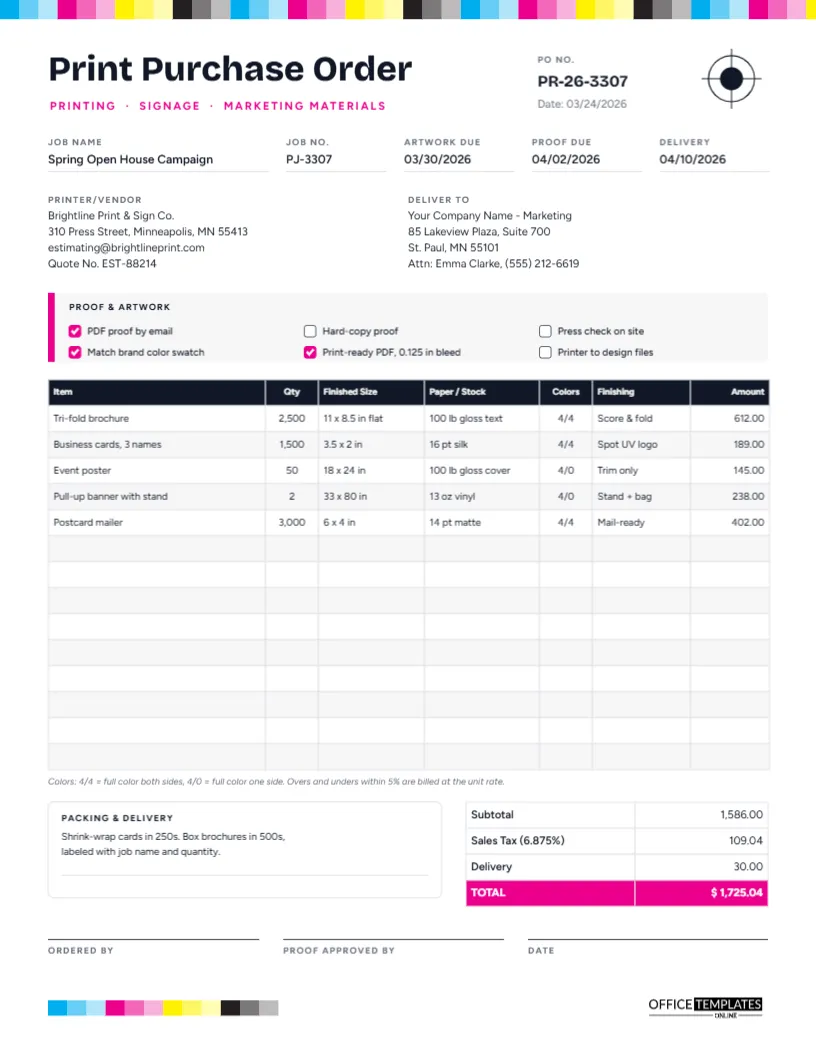
The design borrows the marks that appear on a real press sheet. A colour-control strip of cyan, magenta, yellow, and black squares at three strengths runs along the top edge, thin crop marks sit in each corner, and a registration target, the crosshair printers use to line up colours, sits at the top right. The template is US Letter portrait, 8.5 x 11 inches.
Print Purchase Order is set large in Bricolage Grotesque, with Printing · Signage · Marketing materials in magenta capitals beneath. The PO number and date sit beside the registration mark. The rest of the page, set in Figtree, includes:
- Job Name, Job No., Artwork Due, Proof Due and Delivery dates.
- Printer/Vendor details with a quote number and a Deliver To block.
- A Proof & Artwork panel with a magenta edge and six options.
- A 14-row job table: Item, Qty, Finished Size, Paper/Stock, Colors, Finishing, and Amount, with a note under it explaining 4/4 and 4/0
- A Packing & Delivery box, totals with a magenta TOTAL row, and signatures for the person ordering and the person approving the proof.
- A small colour bar at the bottom left echoing the header, and our logo at the bottom right.
Proof Approval, Step by Step
The proof is your last chance to catch a mistake before thousands of copies are printed. The Proof & Artwork panel records how it will work for this job:
- Supply artwork by the artwork due date, usually as a print-ready PDF with 0.125 in bleed, as ticked in the sample. If the printer is designing the piece, tick Printer to design files instead.
- Receive the proof. A PDF proof by email is standard; a hard-copy proof shows real colour and paper; a press check means you attend the press run.
- Check everything: spelling, phone numbers, dates, prices, images, folds and the brand colour. The sample asks the printer to match a brand colour swatch.
- Approve in writing by the proof due date. The Proof approved by signature on this PO records who gave the go-ahead.
- Print, finish and deliver by the delivery date.
Work backwards from your event or mailing date when setting these dates, leaving time for a second proof if the first needs corrections.
One Campaign, Five Print Items
The sample order supplies a spring open house campaign: 2,500 tri-fold brochures, business cards for three staff, 50 event posters, two pull-up banners with stands, and 3,000 postcard mailers. Print jobs are normally quoted as a total per item rather than a unit price, so the table shows one amount per line: 612.00, 189.00, 145.00, 238.00, and 402.00. The subtotal is 1,586.00, sales tax at 6.875% is 109.04, delivery is 30.00, and the total is $1,725.04. Type in the figures from your own printer’s quote; the table does not calculate them.
Preparing Your Print Order
- Name the job clearly, because the printer will use that name on proofs, boxes and invoices.
- Enter the printer’s details and quote number, so the price on the PO matches the price they quoted.
- Tick the proof and artwork options. Filled magenta boxes are ticked; change a box’s fill to white to untick it.
- Double-clicking the job table lets you fill in each print item in the Edit Table Data window, and + Row adds items.
- Say how the job should be packed in the Packing & Delivery box. The sample asks for cards shrink-wrapped in 250s and brochures boxed in 500s, labelled with the job name and quantity.
Restyling the Press Marks
The colour strips and crop marks are grouped, so each can be moved, resized, or deleted as one object. The registration target is grouped too. If you would prefer a calmer look, delete the crop marks and keep the colour strip; if you want to emphasise your own brand, recolour the magenta accents.
Printing Your Print Order
It is fitting to print this one well. Use US Letter at actual size on a colour printer so the CMYK strip shows its true colours; A4 works with Fit to page. For most jobs, though, a PDF emailed with your artwork files is all the printer needs.
Print Buyer Questions
Can I order signage and large-format print?
Yes. The banner line in the sample shows how: give the size, material (such as 13 oz vinyl), and any hardware, like a stand.
What if I need several versions of one item?
Use one line per version, for example, three business card names, or describe the versions in the Item column.
Should I include a proof date if the printer designs the piece?
Yes, and allow extra time for design changes before the proof.
Send a Job the Printer Can’t Misread
Size, stock, colours, finishing, proofs and dates: when every print item is specified this clearly, what arrives matches what you pictured. Fill in your campaign and send it to press.