Office Supplies Purchase Order Template rarely feels important until the printer runs out of toner on the morning of a big presentation. Most offices restock in small, frequent orders, often placed by an office manager or administrator juggling several departments. A tidy purchase order keeps those small orders under control: it shows who asked for what, which budget pays, and what the vendor should deliver to which desk. This template makes that routine a little more cheerful, too.
Sticky Notes on the Page
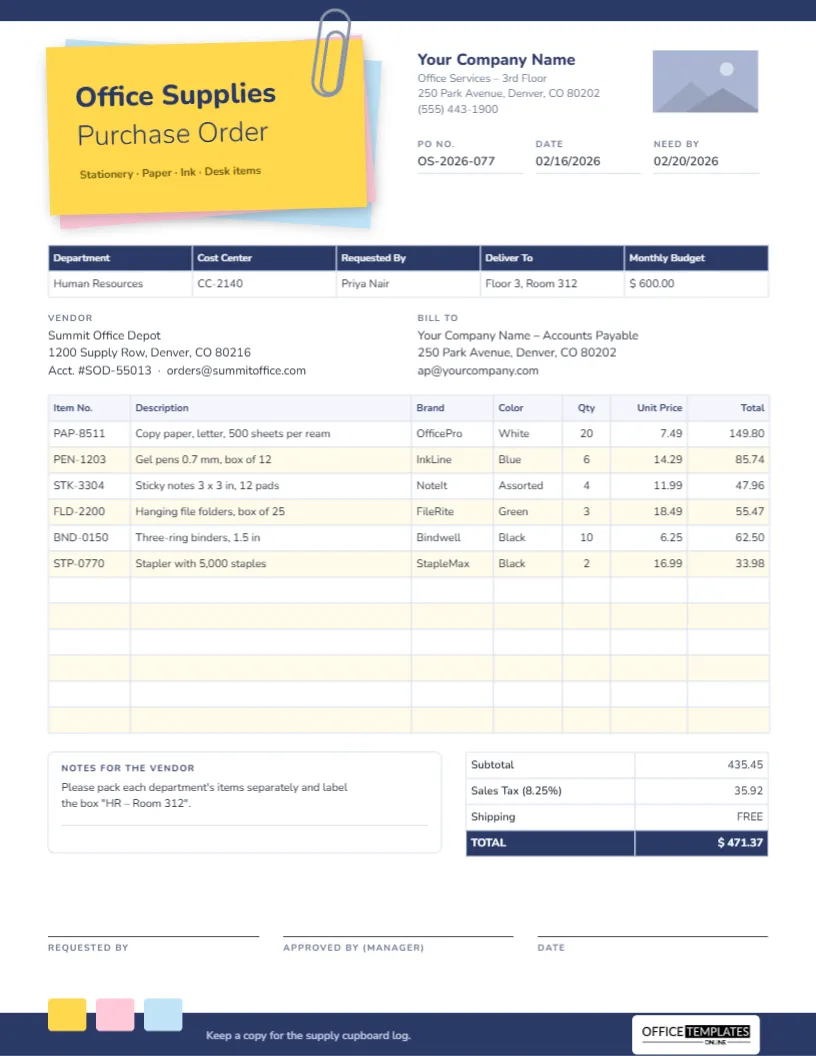
The template is US Letter portrait, 8.5 x 11 inches. The title is written on a stack of three sticky notes in the top left corner, a yellow note on top with pink and pale blue notes peeking out at different angles beneath it. A grey paper clip holds the stack together at the top. On the yellow note, Office Supplies is set in extra-bold Nunito with Purchase Order underneath in a light weight, and a small line reads Stationery · Paper · Ink · Desk items.
To the right are your company name and office address, a rectangular logo placeholder, and three fields for PO No., Date, and Need By. A thin navy bar runs along the top edge of the page, and a navy footer returns at the bottom with three small sticky-note tabs in yellow, pink, and blue, so the page begins and ends with the same idea.
Below the header, the form includes:
- A department table with a navy header: Department, Cost Center, Requested By, Deliver To, and Monthly Budget.
- Vendor and Bill To blocks.
- A 12-row order table with Item No., Description, Brand, Color, Qty, Unit Price, and Total, striped in pale yellow.
- A Notes for the Vendor box, and totals for Subtotal, Sales Tax, Shipping, and TOTAL.
- Signature lines for the requester, the approving manager, and the date.
A Starter List of What Offices Reorder Most
If you are setting up a regular supplies order for the first time, it helps to think in categories. This list covers what most small and mid-sized offices buy again and again:
| Category | Typical items | How often |
|---|---|---|
| Paper | Copy paper, envelopes, labels, notepads | Monthly |
| Writing | Ballpoint and gel pens, highlighters, markers, pencils | Monthly or quarterly |
| Filing | Folders, hanging files, binders, dividers, archive boxes | Quarterly |
| Desk items | Staplers and staples, tape, scissors, sticky notes, paper clips | Quarterly |
| Printing | Toner, ink cartridges, drum units | As needed |
| Breakroom | Coffee, cups, paper towels, dish soap | Weekly or monthly |
Keep a copy of your standard list in the template with quantities left blank. At the start of each month, walk around the supply cupboard, fill in what you need, and send the order.
Staying Inside a Monthly Supplies Budget
The department table includes a Monthly Budget cell for a reason. Office spending leaks away in small amounts, and a visible budget on every order makes people think twice before adding a luxury desk organiser. A few simple practices keep costs down:
- Order on a schedule: One consolidated order a month usually reaches free-delivery thresholds and saves time.
- Standardise brands and colours: Choosing one pen and one folder style lets you buy in larger packs at lower unit prices.
- Charge to the right cost center: When several departments share one order, split it into separate POs, or note the cost center per line, so each budget carries its own spending.
- Track what arrives: Keep a copy of each order in the supply cupboard log, as the footer suggests, to spot items that are used faster than expected.
In the sample, the HR department’s order of paper, gel pens, sticky notes, hanging folders, binders, and a stapler comes to 435.45 before tax. Sales tax at 8.25% adds 35.92, shipping is free, and the total of 471.37 sits comfortably within the 600.00 monthly budget. The brand names in the sample are placeholders; replace them with the brands you actually buy.
Filling In Your Supplies Order
- Replace the company name and address, and click the logo rectangle to use Replace Image with your own logo.
- Type the PO number, the date, and the date you need the delivery.
- Complete the department table: department, cost center, the person requesting, the exact delivery point (floor and room), and the monthly budget.
- Enter the vendor’s details and your billing address.
- Double-click the order table to open Edit Table Data and type each item with its code, brand, colour, quantity and price. Select the table and click + Row if you need more than twelve lines.
- Work out the line totals, subtotal, tax and total, and type them in; the table does not calculate them for you.
- Ask the manager to sign the approval line before the order is placed.
Notes That Make Deliveries Easier
The Notes for the Vendor box is small, but it can save a lot of hunting through boxes. Useful instructions include: Pack each department’s items separately; label boxes with the room number; deliver to reception, not the loading dock; or Call before substituting any item. The sample asks the vendor to pack the HR items separately and label the box for Room 312.
Making the Design Your Own
Each sticky note is a simple rectangle you can recolour: try mint, lilac and peach for a softer look, or your brand colours. The paper clip is made of two outlined shapes grouped, so it moves and recolours as one piece. If a department prefers a plainer form, delete the pink and blue notes and keep just the yellow one.
Printing and Filing Tips
Print on US Letter at actual size or fit to A4. The colours are light, so the page is economical to print. For email, download a PDF; for a quick message to a colleague, a PNG image is easy to paste into chat. File completed orders by month so you can compare spending over the year.
Questions From Office Managers
Can one order cover several departments?
Yes. Add a Department column to the order table, or use one PO per department if each has its own budget.
Can I remove the Brand and Color columns?
Yes. Delete them in Edit Table Data, and the Description column can be widened.
Restock Before You Run Out
Add your office details, set up your standard list and budget, and ordering supplies becomes a five-minute job each month rather than a last-minute scramble.