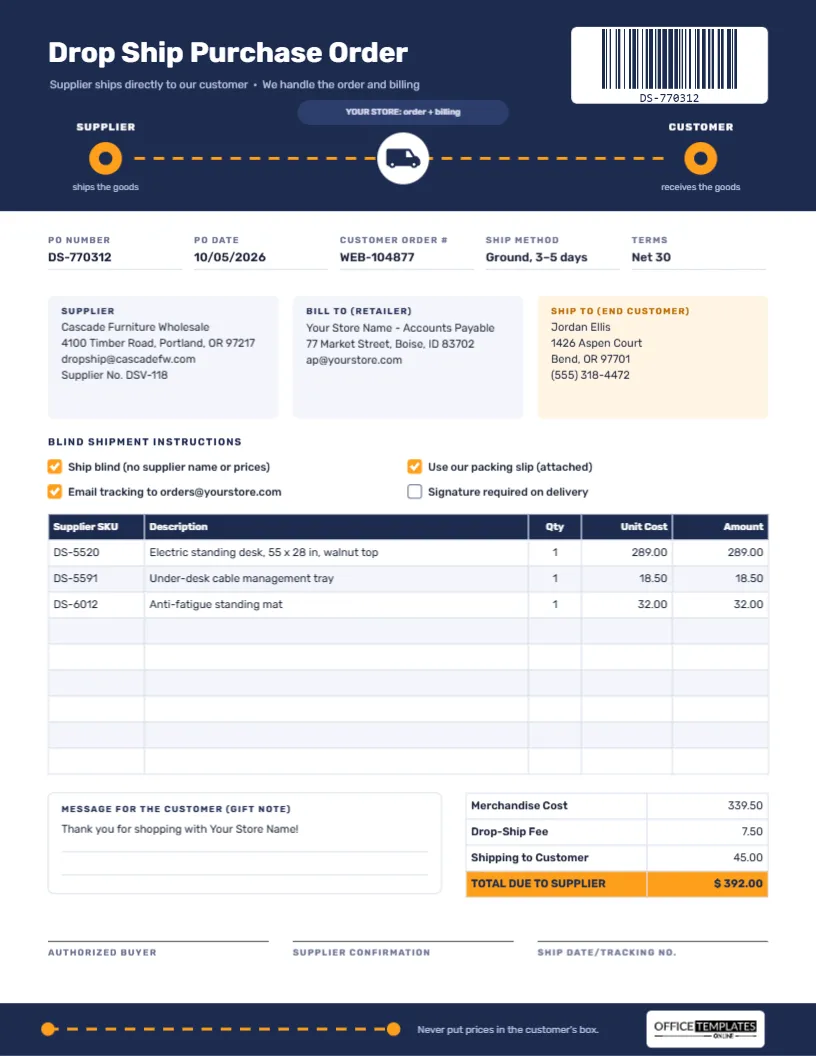
Drop shipping lets an online store sell products it never holds. The customer buys from you, you pass the order to your supplier, and the supplier ships directly to the customer’s door. It keeps stock and storage costs low, but it only works if the supplier gets three things exactly right: the customer’s address, your branding (not theirs) in the parcel, and the tracking details back to you. A Drop Ship Purchase Order carries all of that in one message.
How a Drop Ship Order Moves
- The customer orders from your store and pays you. Note their order number; it becomes the Customer Order # on the PO.
- You send this purchase order to the supplier, with the customer’s address in the Ship To box and your own packing slip attached.
- The supplier ships blind, meaning the parcel shows no supplier name or prices, only your packing slip and branding.
- Tracking comes back to you by email or through the supplier’s portal, and you forward it to the customer.
- The supplier invoices you, quoting your PO number, and you pay the total due to the supplier.
The template’s header draws this flow as a picture, so a new supplier understands the arrangement at a glance.
The Route Across the Header
The template is US Letter portrait, 8.5 x 11 inches. A deep navy header carries the title Drop Ship Purchase Order in Rubik, with the line Supplier ships directly to our customer · We handle the order and billing. Beneath it, an orange dashed route runs from a node labelled SUPPLIER (ships the goods) to a node labelled CUSTOMER (receives the goods). Halfway along, a delivery van sits in a white circle, and a small pill above it reads YOUR STORE: order + billing, showing that the goods skip your store while the paperwork goes through it.
At the top right, a white panel holds a real, scannable barcode of the PO number. The navy footer repeats a shorter orange route alongside the reminder Never put prices in the customer’s box and our logo. The body of the form includes:
- PO Number, PO Date, Customer Order #, Ship Method, and Terms.
- Three address cards: Supplier, Bill To (Retailer), and Ship To (End Customer), the last one highlighted in soft peach so it cannot be missed.
- Four Blind Shipment Instructions checkboxes.
- A 9-row item table: Supplier SKU, Description, Qty, Unit Cost, and Amount.
- A gift note box for a message to the customer, and totals ending in an orange TOTAL DUE TO SUPPLIER row.
- Signature lines for the authorised buyer, the supplier’s confirmation, and the ship date and tracking number.
Sample Email to Send With the PO
Most drop ship orders travel by email. A short, consistent message helps suppliers process them quickly:
Subject: Drop ship PO DS-770312 – customer order WEB-104877
Hello Cascade team,
Please find attached drop ship purchase order DS-770312 for one customer order. Please ship blind to the customer address on the PO, using our packing slip (attached) and no pricing or supplier branding in the parcel.
Could you reply with the ship date and tracking number, or email it to [email protected], as soon as it is dispatched?
Thank you,
Your name, Your Store Name
Blind Shipping Options Explained
- Ship blind: no supplier name, logo, or prices on the box, label, or contents.
- Use our packing slip: your branded slip goes in the parcel instead of the supplier’s.
- Email tracking: tells the supplier where to send tracking details.
- Signature required: useful for high-value items; tick it, and the supplier should book a signed service.
Confirm in advance that your supplier offers blind shipping; most dedicated drop ship suppliers do.
What the Sample Costs
A customer has bought an electric standing desk with a walnut top, a cable management tray and an anti-fatigue mat. Your costs from the supplier are 289.00, 18.50, and 32.00, for a merchandise cost of 339.50. The supplier adds a 7.50 drop-ship fee per order and 45.00 for shipping to the customer, so the total due to the supplier is $392.00. The difference between that and what your customer paid you is your margin. Type your own figures in; the table does not calculate them.
Customizing the Drop Ship PO
- Change the PO number in the fields and update the barcode to match by selecting it and editing its value.
- Fill in the three address cards. Copy the customer’s address exactly, including apartment numbers and the phone number for the courier.
- List the items by double-clicking the item table, which opens Edit Table Data.
- Write a gift note if the customer asked for one; otherwise add a simple thank-you from your store.
- The van is an editable vector: recolour it, or change the orange route to your brand colour.
Keeping Drop Ship Orders Organised
Use one PO per customer order, even when a customer buys from several suppliers; each supplier gets their own PO for their part of the order. Name each PDF with the PO number and the customer order number, and keep the supplier’s tracking reply with it. When a customer asks where their order is, you can answer in seconds.
Handling Returns on Drop Shipped Items
Agree on the returns process with each supplier before the first order, because the customer will contact you, not them. Decide where returned goods should go (back to the supplier’s warehouse or to you), who pays return shipping, and how the supplier will credit you. Keep the drop ship PO number on any return authorisation, so the credit can be matched to the original order and invoice without a long email chain.
Printing or Sending
This PO is almost always emailed as a PDF. If a supplier prefers paper, print on US Letter at actual size. The navy header prints well in greyscale.
Drop Shipping FAQs
Should the customer’s phone number go on the PO?
Yes, if the customer agreed to share it for delivery. Couriers use it for missed deliveries.
Can I include several customers on one PO?
It is better not to. One customer per PO keeps shipping, tracking, and returns clear.
Is the barcode necessary?
No, but suppliers that scan orders into their warehouse systems find it handy.
Ship Direct, Stay in Control
The goods go straight from supplier to customer, and your brand, your prices and your tracking stay under your control. Fill in the three addresses and send the order.