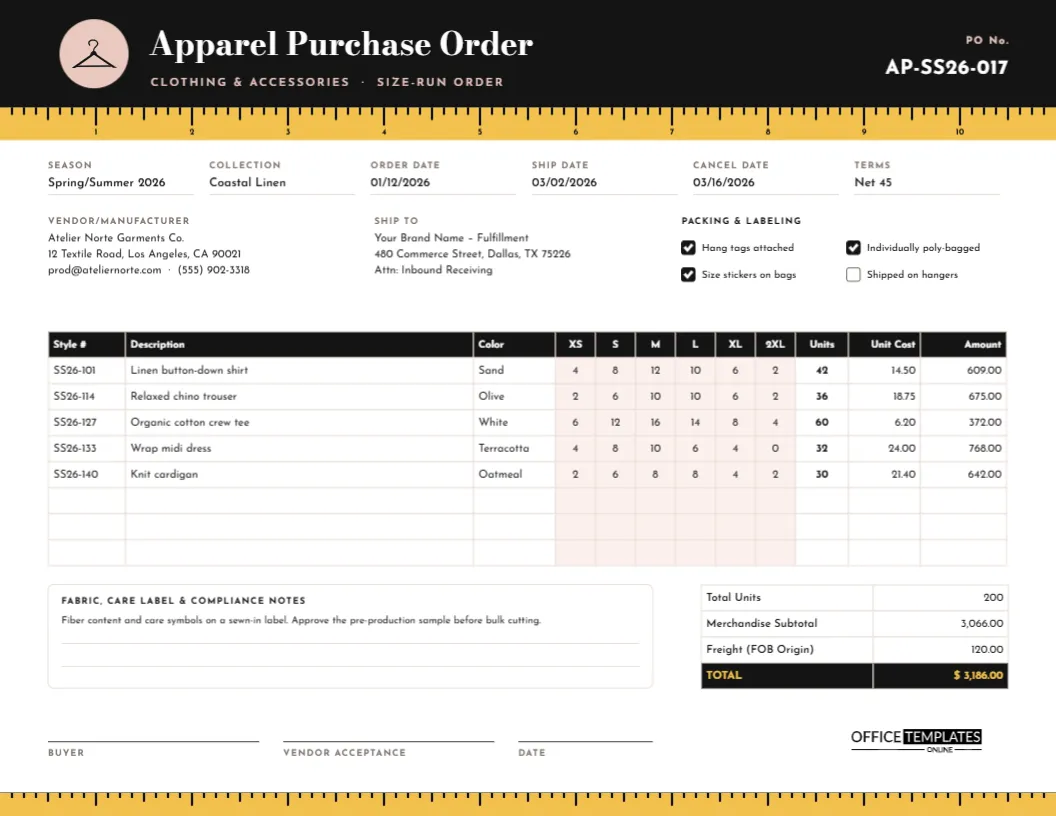
Clothing is ordered in a way almost no other product is. One style comes in several colours, and each colour in six or more sizes, so a single line on an apparel order can hide dozens of numbers. Fashion buyers, boutique owners, and brands that work with garment factories need a purchase order that shows every size clearly. This template gives each size its own column, so there is no doubt about how many mediums or extra-larges you have ordered.
Tape Measure, Hanger and Bodoni Type
The design is US Letter landscape, 11 x 8.5 inches. A black header band carries the title Apparel Purchase Order in Bodoni Moda, a high-contrast serif with the feel of a fashion magazine, and a line reading Clothing & accessories · Size-run order in spaced Josefin Sans capitals. On the left, a blush-pink circle holds a clothes hanger icon; on the right, the PO number stands out in white.
Directly under the header runs the design’s motif: a yellow tape measure stretched across the full width of the page, with inch marks, half-inch and eighth-inch ticks, and numbers from 1 to 10. A slimmer tape returns along the bottom edge, so the page is framed by the tools of the trade. Everything between is clean and white, with:
- Six fields: Season, Collection, Order Date, Ship Date, Cancel Date, and Terms.
- Vendor/Manufacturer and Ship To details.
- Packing & Labeling checks: Hang tags attached, individually poly-bagged, Size stickers on bags, shipped on hangers.
- The size-run table: Style #, Description, Color, then XS, S, M, L, XL, and 2XL in blush-shaded columns, followed by Units, Unit Cost, and Amount.
- A notes box for fabric, care label, and compliance details, and a totals table with Total Units, Merchandise Subtotal, Freight, and a black TOTAL row with yellow figures.
- Signature lines for the buyer, vendor acceptance, and date.
Reading a Size Curve
Buyers rarely order the same number of every size. Instead, they use a size curve, a ratio that reflects how their customers actually buy. Look at the organic cotton tee in the sample:
| XS | S | M | L | XL | 2XL | Total |
|---|---|---|---|---|---|---|
| 6 | 12 | 16 | 14 | 8 | 4 | 60 |
Medium and large carry the order, with fewer pieces at the extremes. That is a common pattern for basics, though every store is different: a surf shop might sell more small sizes, a workwear store more XL and 2XL. The wrap dress in the sample has no 2XL at all, which is a deliberate choice for that style. Build your curve from last season’s sales, not guesswork, and adjust it for each category.
A tip for small orders: many factories and wholesalers sell in prepacks, fixed-size assortments in one carton, such as 1 S, 2 M, 2 L, 1 XL. If your supplier works this way, write the prepack ratio in the Description column so the figures in the size cells are clearly multiples of it.
From Order to Delivery: The Apparel Timeline
The Ship Date and Cancel Date fields exist because clothing is seasonal. A typical sequence, whether you are ordering from a wholesaler or a factory, looks like this:
- Order placed, with styles, colours and sizes confirmed on this PO.
- Pre-production sample approved (for made-to-order goods), as the sample note requires, before any fabric is cut.
- Production and quality checks at the factory.
- Packing and labeling to your instructions: tags, poly bags, size stickers, hangers.
- Shipment on or before the ship date; if it has not shipped by the cancel date, you may cancel.
- Receiving, where your team counts units by style, colour, and size against the table.
How the Sample Adds Up
Each row’s Units figure is the sum of its size cells: the linen shirt has 4 + 8 + 12 + 10 + 6 + 2 = 42 pieces, and at 14.50 each the line comes to 609.00. Across five styles, the order totals 200 units with a merchandise subtotal of 3,066.00. Freight is shown as 120.00 because the order ships F.O.B. origin, and the total is $3,186.00. The editor’s table does not add up rows automatically, so total each row and the order yourself, then type the figures in.
Customizing the Order Form
- Change the season, collection, and dates, and replace the vendor and ship-to details with your own.
- Double-click the size-run table to open Edit Table Data. Type styles and quantities, or import them with Import CSV from your buying spreadsheet.
- Need numeric sizes instead of letters? Rename the size headers to 0, 2, 4, 6, 8, 10 or 28, 30, 32, 34, 36, 38. For kidswear, try 2T, 3T, 4T, 5, 6, 7.
- Add more rows with + Row for larger orders.
- The hanger is an editable vector. Select it to recolour it, or swap the blush circle for your brand colour.
- The tape measures are grouped shapes, so each one moves and recolours as a unit.
Care Labels and Compliance Notes
Use the notes box to spell out anything the factory must get right: fibre content and care symbols on a sewn-in label, country-of-origin labelling, the position of your woven brand label, and any testing required for your market. Clear instructions here prevent the costly mistake of receiving a full order with the wrong labels.
Printing and Sending
Print on US Letter in landscape at actual size, or fit to page on A4. The black header prints best on a laser printer. For email, a PDF keeps the table sharp enough for the factory to read every cell size.
Apparel Buyer Questions
Can I show more than one colour of a style?
Yes. Use one row per colour, repeating the style number, so each colour has its own size run.
Is there room for a style image?
You can upload a small image and place it next to the table, or attach a line sheet with photos to your email.
Does it work for accessories?
It does. For one-size items, put the quantity in a single size column or rename the size headers.
Get Every Size Right
With each size in its own column and a clear cancel date, this apparel purchase order keeps your buy, your factory, and your receiving team on the same page. Fill in your styles and send it.