A restaurant kitchen runs on deliveries. Too little stock and dishes come off the menu mid-service; too much and money spoils in the walk-in. Chefs and kitchen managers who order well do it the same way every time: they count what is on the shelf, compare it with a target level, order the difference, and check the delivery carefully when it arrives. This food and beverage purchase order builds that routine into one page.
Gingham, Chalkboard and a Place Setting
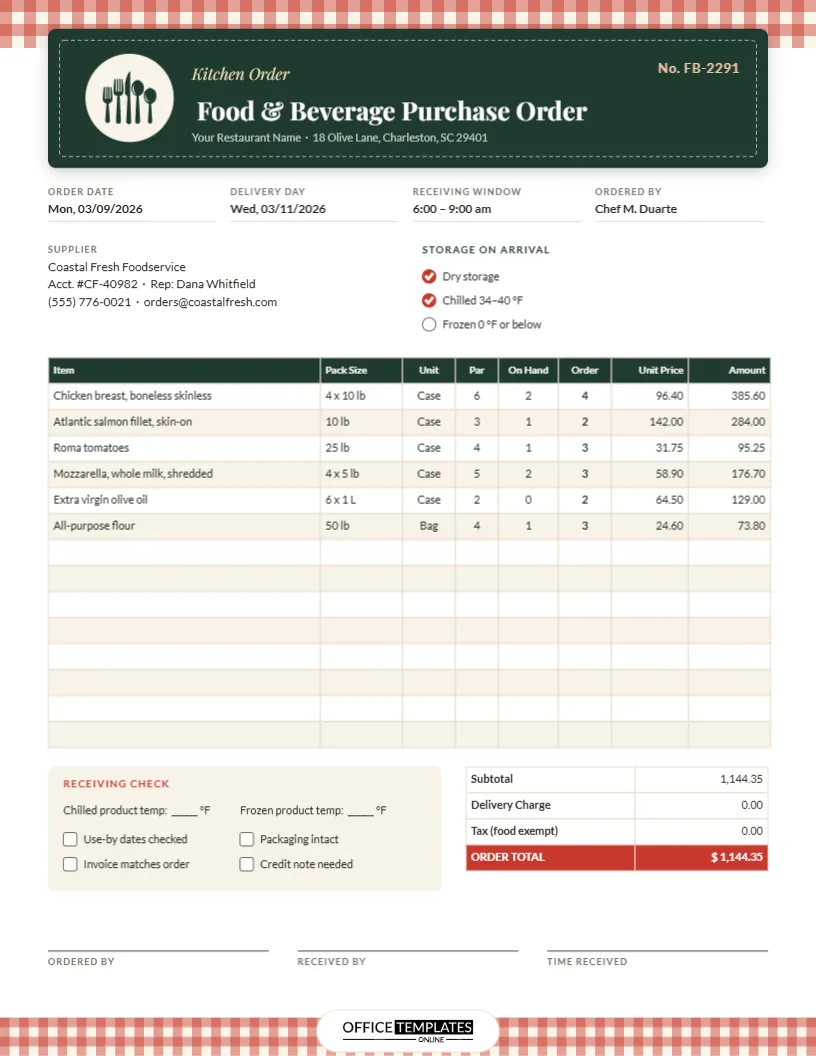
The template is US Letter portrait, 8.5 x 11 inches. A band of red-and-cream gingham runs across the top of the page like a bistro tablecloth and returns along the bottom edge. Over the top band sits a dark green title panel styled like a menu chalkboard, with a dashed inner border. On its left, a cream circle holds a knife, fork, and spoon set (an editable vector), and beside it, Kitchen Order appears in italic Playfair Display above the main title, Food & Beverage Purchase Order. The restaurant’s name and address run underneath, and the order number sits in soft peach at the top right.
The working part of the page uses Lato, an easy-to-read sans-serif, and includes:
- Order Date, Delivery Day, Receiving Window, and Ordered By.
- A Supplier block with account number and sales rep.
- Storage-on-arrival tick circles: Dry storage, Chilled 34–40 °F, Frozen 0 °F or below.
- A 14-row order table: Item, Pack Size, Unit, Par, On Hand, Order, Unit Price, Amount. The Order column is in bold so the supplier’s picker sees it first.
- A Receiving Check panel with spaces for product temperatures and four checks.
- Totals for Subtotal, Delivery Charge, Tax, and a red ORDER TOTAL, and signature lines for whoever orders and receives.
The Par-Level Formula, With the Sample Worked Out
A par level is the amount of an item you want on hand after each delivery to get you through until the next one. The template has a column for par, a column for what you counted on the shelf, and a column for the order. The rule is simple:
Order = Par ? On Hand (rounded up to whole packs).
| Item | Par | On hand | Order | Line amount |
|---|---|---|---|---|
| Chicken breast, 4 x 10 lb case | 6 | 2 | 4 | 4 × 96.40 = 385.60 |
| Salmon fillet, 10 lb case | 3 | 1 | 2 | 2 × 142.00 = 284.00 |
| Roma tomatoes, 25 lb case | 4 | 1 | 3 | 3 × 31.75 = 95.25 |
| Shredded mozzarella, 4 x 5 lb | 5 | 2 | 3 | 3 × 58.90 = 176.70 |
| Olive oil, 6 x 1 L | 2 | 0 | 2 | 2 × 64.50 = 129.00 |
| Flour, 50 lb bag | 4 | 1 | 3 | 3 × 24.60 = 73.80 |
Together, the lines come to 1,144.35. In the sample, delivery is free, and the tax line shows zero because unprepared food is exempt from sales tax in many places; check the rule where you are before relying on that.
Set pars from real usage. Look at how much of an item you use between deliveries on a busy week, add a small safety margin, and review the numbers every season. A summer menu heavy on salads needs a different par for tomatoes than a winter menu of braises.
Counting Stock Without Slowing the Kitchen
The On Hand column only works if the count is quick and honest. A few habits help:
- Count in the same order every time, following the shelves: dry store, walk-in, freezer.
- Count in the same units you order in. If you buy cheese by the case, count full cases plus a note for opened ones.
- Do the count at the same point in the day, ideally after the last service and before the order deadline.
- Print a blank copy of this order sheet with the items and pars filled in, then write the counts by hand during the walk-round and type the order afterwards.
Receiving the Delivery Safely
Most food safety problems can be stopped at the back door. The Receiving Check panel prompts the person signing for the goods to record a chilled temperature and a frozen temperature, and to confirm four things: use-by dates checked, packaging intact, invoice matches the order, and whether a credit note is needed for anything refused.
The storage line on the template shows chilled products at 34–40 °F and frozen at 0 °F or below. Health codes set their own limits (in the US, the FDA Food Code sets cold-holding at 41 °F or below), so edit these figures to match the rules and policies that apply to your kitchen. If a delivery arrives warm, refuse the affected items, note them on the supplier’s delivery ticket, and tick Credit note needed.
Setting Up Your Kitchen’s Version
- Replace Your Restaurant Name and the address in the chalkboard panel, and change the order number.
- Fill in your usual delivery day, the receiving window when someone is available to check goods, and who places orders.
- Enter your supplier’s details and your account number, which speeds up any phone calls about the order.
- Double-click the order table to open Edit Table Data. Enter your regular items, pack sizes, units, and pars. If your list lives in a spreadsheet, the Import CSV button brings it in at once.
- Save this version as your master order sheet. Each week, update only the On Hand, Order, and Amount columns and the totals.
The table stores text rather than formulas, so calculate the order quantities and amounts before typing them. With a regular list of twenty or so lines, it takes only a few minutes.
Changing the Look for Your Restaurant
The gingham bands are grouped patterns: select one to recolour the checks, for example blue and white for a seafood shack or green for a café. The chalkboard panel can be changed to your brand colour, and the cutlery is a vector, so it can be recoloured or replaced with another icon. Our logo sits in a small white pill in the bottom gingham band.
Printing for the Pass and the Office
Print on US Letter at actual size. The dark green title panel and the gingham bands print well on colour lasers; for a quicker, cheaper weekly count sheet, print in greyscale. Many kitchens keep the printed order on a clipboard by the back door so whoever receives the delivery can complete the Receiving Check on the spot.
Kitchen Ordering Questions
Can I use it for drinks and bar stock?
Yes. Change the pack sizes to cases, kegs, or bottles and the storage options to suit, such as Cellar or Back bar.
How many suppliers should one sheet cover?
One. Use a separate sheet for each supplier so each delivery can be checked against its own order.
Can I add a column for the item code?
Yes. In Edit Table Data, you can add a column and narrow the Item column to make room.
Order Smarter Before Tomorrow’s Service
Count, compare with par, order the difference, and check what arrives. Add your restaurant’s details and regular items once, and this sheet will speed up every order from now on.