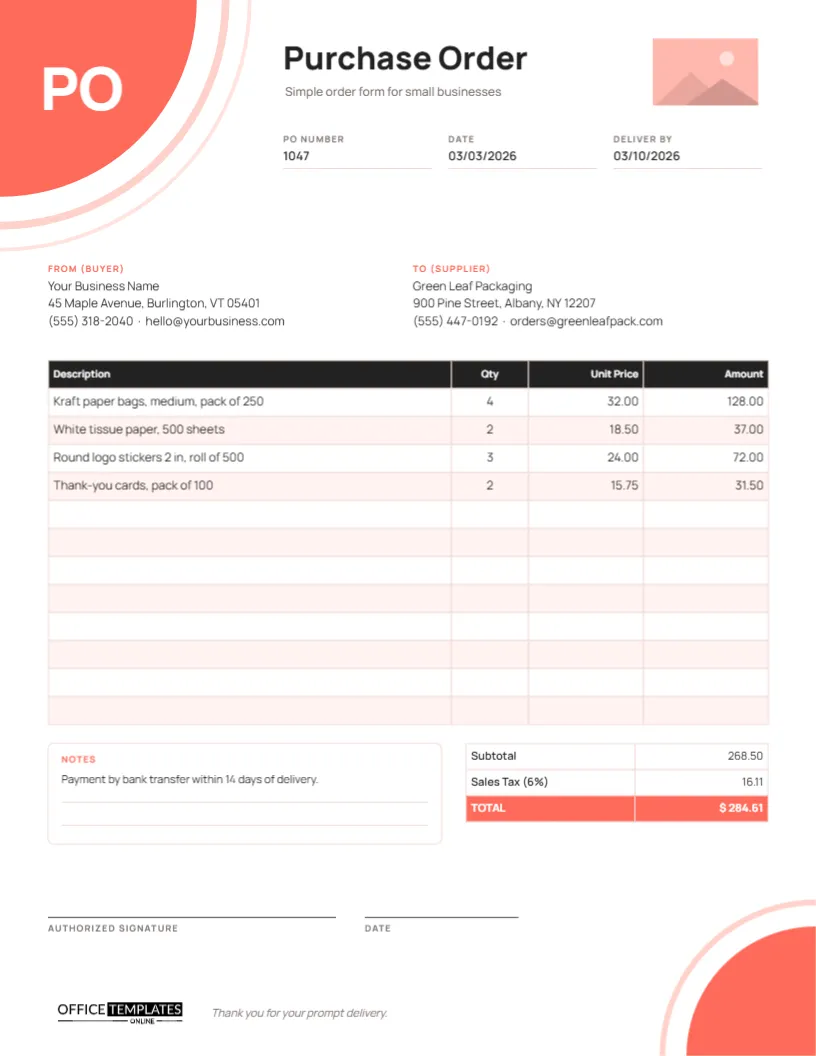
Not every business needs a purchasing department. A bakery ordering boxes, an Etsy seller restocking packaging, a salon buying products, or a freelancer ordering printed stationery just needs a clear, professional way to say Please supply these items at these prices. This Simple Purchase Order Template does exactly that, with nothing extra to fill in. It is quick to complete, easy for a supplier to read, and it still gives you a proper record of what you ordered.
Does My Small Business Need a PO?
Ask yourself these questions. If you answer yes to any of them, a simple purchase order is worth the few minutes it takes:
- Are you ordering from a supplier for the first time, or at a new price?
- Is the order large enough that a mistake would hurt your cash flow?
- Do you want the supplier to confirm quantities, prices and a delivery date in writing?
- Will you need to check the invoice against what you agreed?
- Does your accountant or bookkeeper ask for records of purchases?
A purchase order also makes a small business look organised, which suppliers notice when you ask for credit terms.
Clean Page, Bold Corners
The template is US Letter portrait, 8.5 x 11 inches. Its structure is simple but confident: a large coral quarter-circle fills the top left corner, with the letters PO in heavy white type inside it and two pale coral arcs curving around it. A smaller coral quarter-circle with its own arc balances it in the bottom right corner, so the page feels finished without any clutter.
Purchase Order is set in extra-bold Manrope next to the big corner, with Simple order form for small businesses beneath and a rectangular logo placeholder on the right. The rest of the page holds:
- PO Number, Date, and Deliver By.
- From (Buyer) and To (Supplier) details, labelled in coral.
- A 12-row item table with a black header and taller rows: Description, Qty, Unit Price, and Amount.
- A Notes box, and totals for Subtotal, Sales Tax, and a coral TOTAL row.
- Lines for an authorized signature and date, our logo, and a short thank-you line.
Fill It In in Five Minutes
- Minute one: click the logo rectangle and use Replace Image to add your logo, then type your business name and contact details in the From block.
- Minute two: add the supplier’s name, address, phone, and email in the To block.
- Minute three: set the PO number, today’s date, and the date you need the goods. A simple running number (1047, 1048…) is perfectly fine for a small business.
- Minute four: double-click the table and type your items, quantities, and prices.
- Minute five: type the subtotal, tax and total, add any notes, sign and download.
After the first order, save your version. Next time, only the supplier, items and totals need changing.
A Sample Small-Business Order
The sample shows a small shop restocking its packaging: four packs of medium kraft paper bags, two packs of white tissue paper, three rolls of round logo stickers and two packs of thank-you cards. The subtotal is 268.50, sales tax at 6% is 16.11, and the total is $284.61. The note asks for payment by bank transfer within 14 days of delivery. Replace all of it with your own order, and work out the figures before typing them, since the table does not calculate.
A Short Email to Send With It
Hi Green Leaf team,
Please find attached purchase order 1047 for packaging supplies. Could you confirm the prices and let me know if delivery by March 10 is possible?
Many thanks,
Your name, Your Business Name
Keep the email and the supplier’s reply with the PDF. Together they are your record of the agreement.
Keeping It Simple, Keeping It Yours
- Change the coral corners to your brand colour: each corner, and each arc, is a single shape.
- Edit or delete the tax row if you are not charged sales tax.
- Add a Shipping row in the totals table if your supplier charges delivery.
- Add more lines with the + Row button when you have a longer order.
- Change the thank-you line at the bottom to something in your own voice.
Mistakes to Avoid on a Simple PO
- Leaving out the unit:4 bags could mean four single bags or four packs of 250. Write the pack size in the description, as the sample does.
- Using a price from memory: Copy the unit price from the supplier’s latest price list or quote, so the invoice matches.
- No delivery date: Without a Deliver By date, soon means different things to you and your supplier.
- Forgetting delivery charges: If the supplier charges shipping, add a line for it so the total is realistic.
- Not keeping a copy: Save every PDF in one folder, named by PO number, so you can find it when the invoice arrives.
Avoid these five, and your simple purchase order will do everything a much longer form does.
Print or Email
Download a PDF to email, or print on US Letter at actual size (A4 with Fit to page). The page is mostly white with coral accents, so it prints quickly and cheaply. A PNG or JPEG is handy if your supplier takes orders by messaging app.
Numbering and Filing Your Orders
A simple system is all a small business needs. Start at any number you like, add one for every order, and never reuse a number, even if an order is cancelled. Save each finished PDF in a single folder with the number and supplier in the file name, for example, PO-1047 Green Leaf Packaging.pdf. When the invoice arrives, file it next to the order, and mark both as paid when the money goes out. At tax time, your bookkeeper will thank you.
Small Business PO Answers
Do I need a PO number?
Yes, even a simple one. It lets the supplier quote your order on the invoice, and lets you match the two.
Can a sole trader use this?
Absolutely. Put your own name as the business name if you trade under it.
Is it legally binding?
Once a supplier accepts your order, it usually forms part of your agreement, so check the details before sending.
Order Like a Pro, Without the Paperwork
One page, four columns, your logo, and your signature. This simple purchase order gives your small business a professional way to buy, in about the time it takes to write an email.