Accountant Resume Template on Ledger Paper
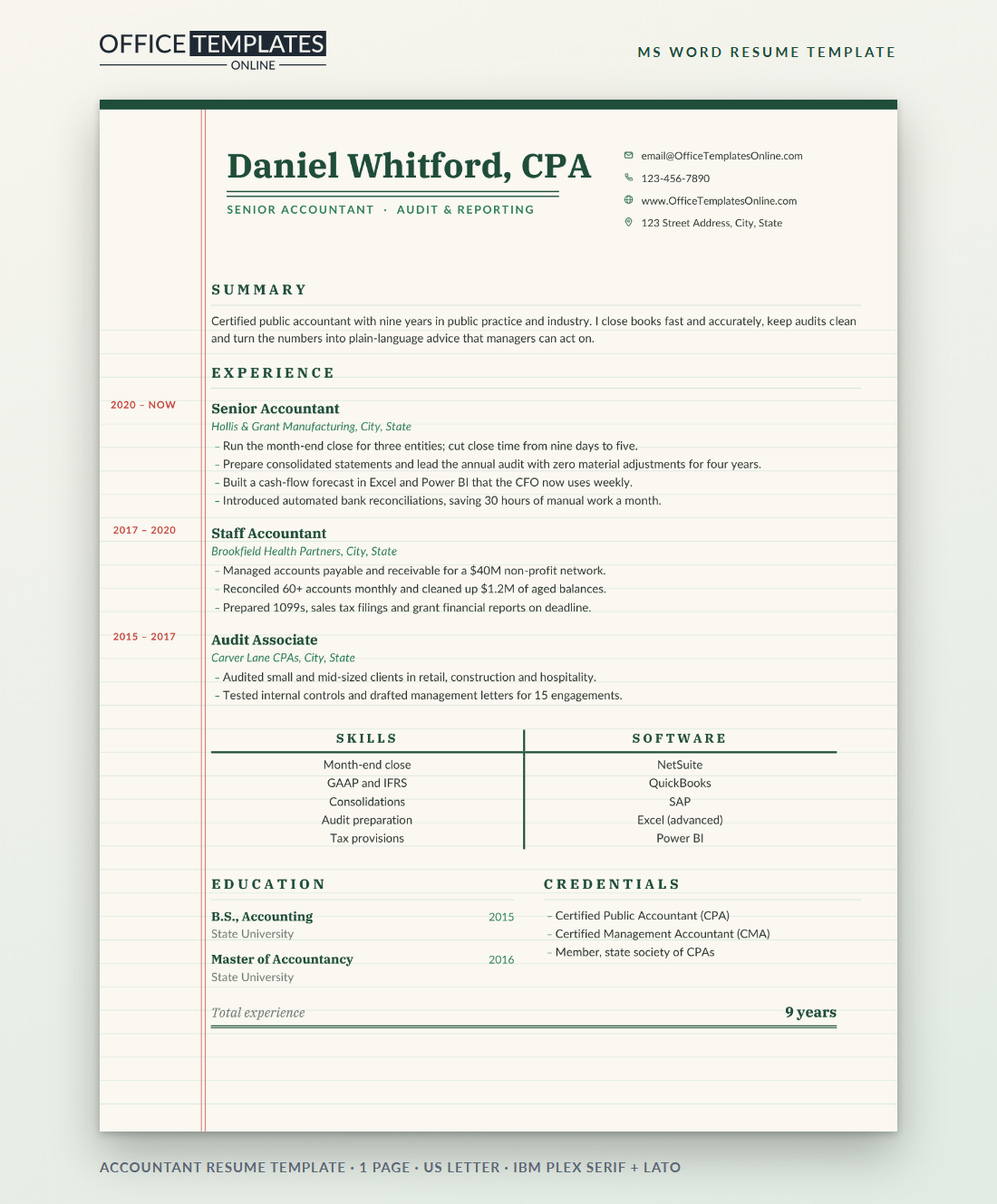
Accountants trust a page that is ruled, balanced, and footed. This resume is laid out like the ledger pads many of us learned on: faint green lines across a cream sheet, a red double margin line on the left and a double rule under the total at the bottom. It looks precise because it is precise, and every element is still plain, editable Word text.
Reading the Ledger Layout
Your name, with your CPA designation, is set in IBM Plex Serif in deep green and finished with a double rule underneath, the same mark you would put under a final balance. Your title follows in small, spaced green capitals, and your contact details sit in a neat column on the right with outline icons.
Down the left edge, inside the red margin, each job's dates are written in small red capitals, exactly where a bookkeeper would write the date column. The body text sits to the right of the margin, so your work history reads like a list of entries.
The T-Account Skills Block
Halfway down the page, two columns of skills sit under a classic T-account: a thick green line across the top with Skills on the left and Software on the right, split by a vertical rule. It is a small detail that every accounting manager will recognize. Five items per side keeps it balanced; list core competencies on the left and systems on the right.
Footing the Page
The last line is a Total experience row with the number of years aligned to the right and a double underline, so the page literally adds up. Change it to 9 years or 12 years, or use it for another figure that matters, such as Clean audits: 4 years. Whatever you choose, make sure it is a number you can explain in a sentence, because interviewers often start with the last line they read.
Entries That Reconcile: Writing Strong Bullets
| Weak entry | Reconciled entry |
| Responsible for month-end close | Cut month-end close from nine days to five for three entities |
| Helped with audits | Led the annual audit with zero material adjustments for four years |
| Did reconciliations | Reconciled 60+ accounts monthly and cleared $1.2M of aged balances |
| Used Excel | Built a cash-flow forecast the CFO reviews every week |
Adjusting Entries in Word
- The cream page, green ledger lines, red margin lines, top edge, and double rule under the name are shapes in the page header. Double-click near the top of the page to select them and recolor or delete them.
- Margin dates are text in the left cell of each experience row; type over them, and they stay right-aligned against the red line.
- The T-account is a small table with thick borders. Add a row from the Layout tab if you need a sixth skill.
- The total line uses a double bottom border on the paragraph; edit the words and the rule stays.
Variations for Different Accounting Roles
Staff accountants and new graduates can fill the margin with internship dates and replace the third job with a busy-season role or volunteer tax clinic work. Tax accountants should put returns prepared and filing deadlines met into their bullets. Controllers and finance managers can swap the T-account labels to Leadership and Systems and use the total line for team size. Bookkeepers can lead with the number of clients and the software they keep books in.
Paper, Fonts and Format
IBM Plex Serif and Lato are free from Google Fonts; install both before editing. The page is one US Letter sheet. The ledger lines are light enough to print on any office printer, but the cream background prints best with background colors turned on. For online applications, send a PDF so the rules stay perfectly aligned.












