IT Support and Managed Services Proposal Template for Word
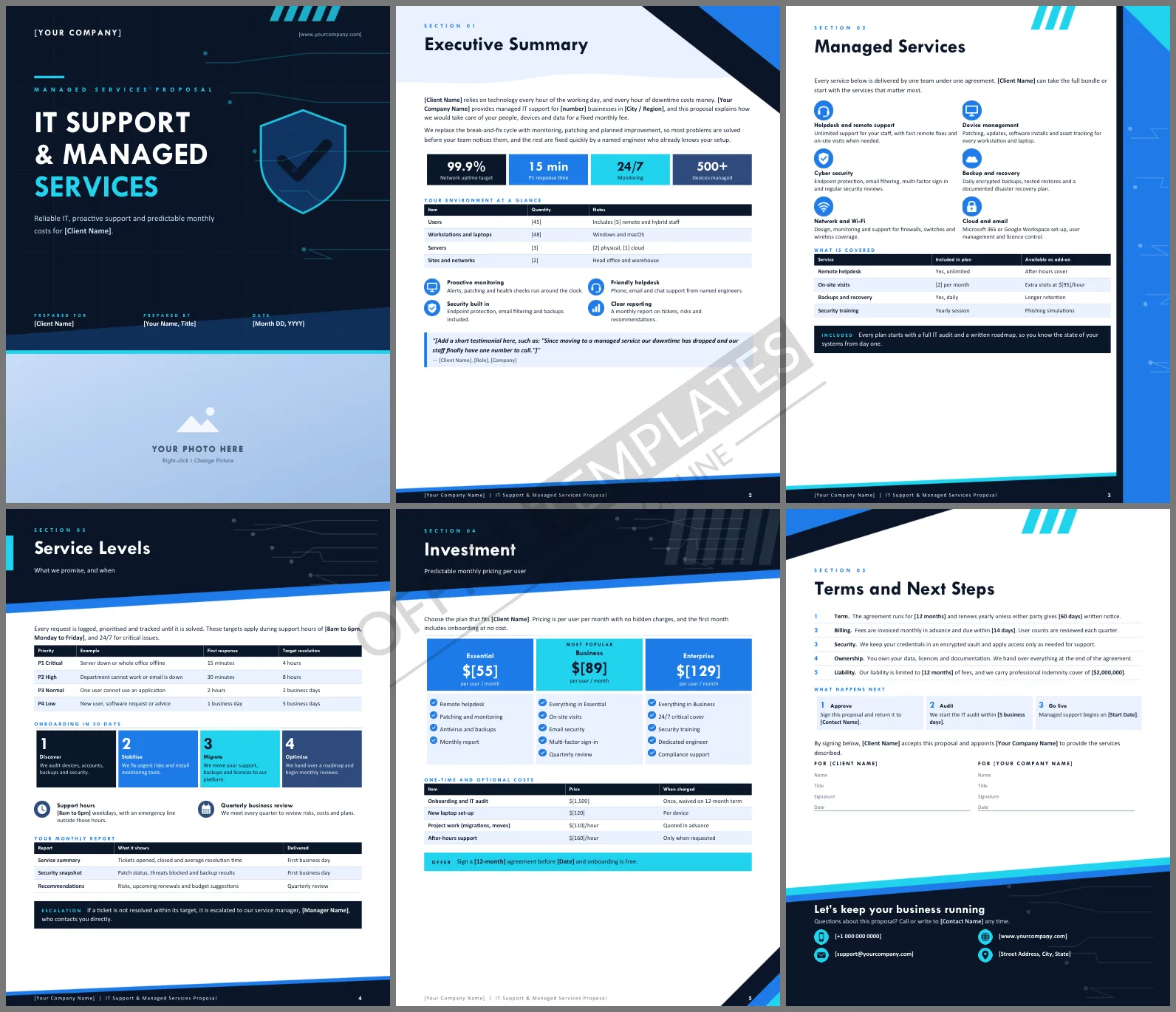
Managed service buyers are tired of vague promises. They have been burned by slow tickets and surprise invoices, so they read proposals looking for numbers: how fast you respond, what is covered, and what a user costs per month. This IT Support and Managed Services Proposal Template puts those answers on six designed Word pages, wrapped in a look that says, reliable technology partner.
The Pages and What They Prove
The cover sets the tone with prepared for, prepared by, and date. Page two is the executive summary, with four service tiles and a table of the client's environment, covering users, workstations, servers, and sites. Page three lists six managed services with icons and a table of what is included or sold as an add-on. Page four is the service level page, with a priority table, a four-step onboarding plan, and a monthly reporting table. Page five holds the three per-user plans, and page six closes with terms, next steps, and signature lines.
A Dark Cover with Circuit Lines
The cover is a full-bleed near-black navy with a faint grid, thin cyan circuit traces, and a large outlined shield. A wide photo strip runs across the bottom, ready for your office, your engineers, or a server room. Inside, electric blue and bright cyan highlight tiles and tables, and angled navy bands plus a blue side strip frame the headers. Headings use Tw Cen MT, a narrow geometric typeface that comes with Microsoft Office, and every section opens with a small spaced-out Section 01 label.
Service Level Cheat Sheet
If you have no written targets yet, start from this common four-tier structure and adjust to what your team can truly deliver:
| Priority | Typical issue | First response | Target fix |
| P1 Critical | Whole office offline | 15 minutes | 4 hours |
| P2 High | Email or a key system down | 30 minutes | 8 hours |
| P3 Normal | One user blocked | 2 hours | 2 business days |
| P4 Low | New starter or advice | 1 business day | 5 business days |
Never promise a target you cannot meet. A realistic number, met every month, builds more trust than an impressive one missed twice.
Pricing Per User Without Surprises
The three plans, Essential, Business, and Enterprise, are priced per user per month. Count users carefully before you quote, because that number drives the full price. State what happens when headcount changes, and keep one-time costs such as onboarding and laptop set-up in their own table so the monthly figure stays clean.
Customizing the Layout in Word
Type over any bold [placeholder] to add the client's name and your terms. The environment table is a normal Word table, so add a row for printers or cloud subscriptions. To replace the bottom photo strip on the cover, click it and choose Change Picture; the strip keeps its width and height. The page artwork sits in each page's header, so it will not shift while you edit.
FAQ for Managed Service Buyers
Can I use it for a break-fix business?
Yes. Delete the monitoring rows, rename the plans, and switch the pricing page to hourly rates.
Does it include a security section?
Security appears as a service tile, a plan feature, and a security snapshot in the monthly report. Add a longer security page if the client needs one.
What size is the paper?
US Letter, portrait, six pages.












