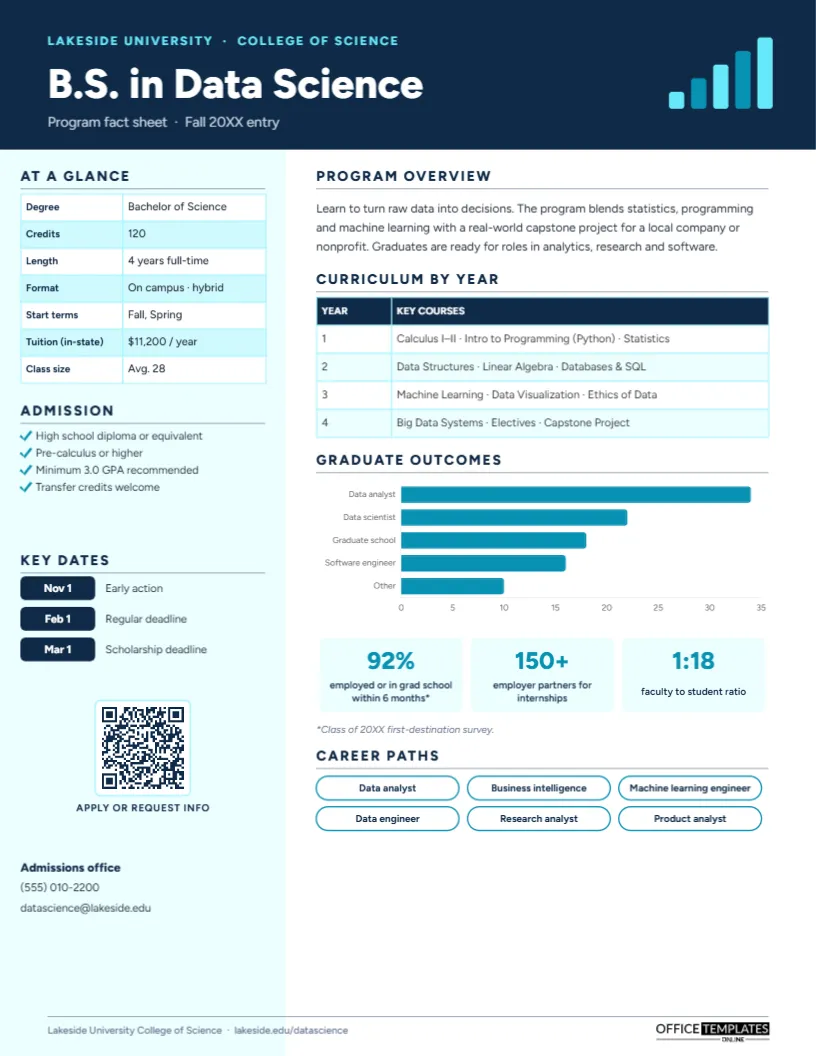
Prospective students compare dozens of programs before they apply, and they want the same facts from each: how long it takes, what it costs, what they will study, what they need to get in, and what graduates go on to do. Universities answer those questions with program fact sheets, handed out at college fairs and open days, emailed after inquiries, and posted on department pages. This University Degree Program Fact Sheet Template, shown for a B.S. in Data Science, presents a program clearly and persuasively on one page.
Questions Prospective Students Ask
- How many years and credits is it, and can I study part-time or online?
- How much is tuition?
- What will I actually study each year?
- What are the admission requirements and deadlines?
- What jobs do graduates get, and how many are employed?
- Who do I contact with questions?
Each question has a home on the page, so students (and their parents) can compare programs side by side.
Navy Header, Cyan Sidebar and a Bar-Chart Motif
A navy header carries a cyan line with the university and college name, the program title, B.S. in Data Science, in bold white Figtree, and Program fact sheet · Fall 20XX entry. On the right, five rising bars in cyan and pale cyan form a small bar-chart motif, fitting for a data program.
A pale cyan sidebar runs down the left side. It holds At a glance (degree, credits, length, format, start terms, in-state tuition and class size), Admission requirements with checkmarks, Key dates as navy date chips for early action, regular and scholarship deadlines, and a QR code labelled APPLY OR REQUEST INFO, followed by the admissions office’s phone and email.
The main column starts with a Program overview paragraph, then a Curriculum by year table listing key courses for years one to four. A Graduate outcomes horizontal bar chart shows where graduates go (data analyst, data scientist, graduate school, software engineer, and other), followed by three stat tiles for employment rate, employer partners, and faculty-to-student ratio, with a survey footnote. Career paths closes the page as six outlined pills with job titles. The page is portrait US Letter, 8.5 x 11 inches.
Writing the Curriculum Table
Students skim course lists, so choose the courses that define the program and group them by year. Use plain course names (Databases & SQL rather than DS 2140), and highlight distinctive experiences such as a capstone project, internship, study abroad, or research placement. The table is an editor Table: select it and choose Edit Data to change the courses, or use + Row for a fifth year or a separate row for electives.
Adapting the Template for Your Program
Retype the institution, program title, and entry term. Update the at-a-glance facts with Edit Data on that table; add rows for online tuition, out-of-state tuition, or accreditation. Rewrite admission requirements and change the key dates. The outcomes chart is an editor chart; select it, click Chart Options, then Edit Chart Data to enter your first-destination survey results. Retype the stat tiles and the career pills, and point the QR code, via the Barcodes & QR panel, at your program page or inquiry form. The small bar motif in the header can be recoloured or replaced with a subject icon, such as a flask for chemistry or a scale for law.
Outcomes Data: Report It Responsibly
Graduate outcomes are the most persuasive and most scrutinised numbers on a program fact sheet. Use data from a documented first-destination survey, state the class year and response rate if possible, and footnote how employed or in grad school is defined, as the template does. Avoid cherry-picking a small, successful cohort. Where regulations apply to advertised outcomes, such as for career programs in some jurisdictions, follow them exactly.
Program Comparison Worksheet for Students
Admissions teams can hand this worksheet out alongside fact sheets at college fairs, so students can compare programs systematically. Here it is filled in for three sample programs:
| Question | Program A | Program B | Program C |
|---|---|---|---|
| Length and credits | 4 years, 120 credits | 3 years, 90 credits | 2 years, 60 credits |
| Annual tuition | $9,800 | $14,500 | $4,200 |
| Hands-on project or internship? | Required internship | Optional placement | Capstone project |
| Average class size | 28 | 18 | 22 |
| % employed within 6 months | 91% | 87% | 84% |
| Application deadline | January 15 | March 1 | Rolling |
Writing an Overview That Sounds Like a Person
The program overview is the only paragraph on the page, so make it count. Start with what students will be able to do, not with the department’s history. Mention one distinctive feature, such as the capstone project for a real organisation on the sample, and end with where graduates go. Read it aloud; if it sounds like a brochure written by committee, cut the adjectives and add a concrete detail, such as a lab, a partner company, or a travel opportunity.
Recruitment Uses
Recruiters bring program fact sheets to college fairs, high school visits, and graduate school fairs. Admissions offices email them after inquiries and include them in admitted-student packs. Departments hand them out at open days and give them to current students who act as ambassadors. Keep one sheet per program, all in the same layout, so the university’s offerings feel coherent.
Graduate, Online and Certificate Programs
The layout works for master’s degrees (replace years with semesters or terms), online programs (add technology requirements and time commitment per week), certificates and bootcamps (shorter curriculum table, stronger career emphasis), and community college programs (add transfer pathways). Professional schools can add licensure pass rates to the outcome tiles.
College Fair Printing
Print on bright white 80 lb or 100 lb silk paper for fairs and open days; the navy and cyan look crisp and professional. Bring the PDF on a tablet too, so students can scan the QR code and request information on the spot.
Admissions Office FAQs
Can I add a student testimonial?
Yes. Replace the career pills with a short quote and a small circular photo slot for the student.
Should tuition include fees?
State clearly what the figure includes, and link to the full cost of attendance via the QR code.
Can the sidebar go on the right?
Yes. Move the sidebar group and the main column; the layout is symmetrical enough to flip.
Open the template, add your program’s details, curriculum, and outcomes, and give prospective students the clear answers they are looking for.