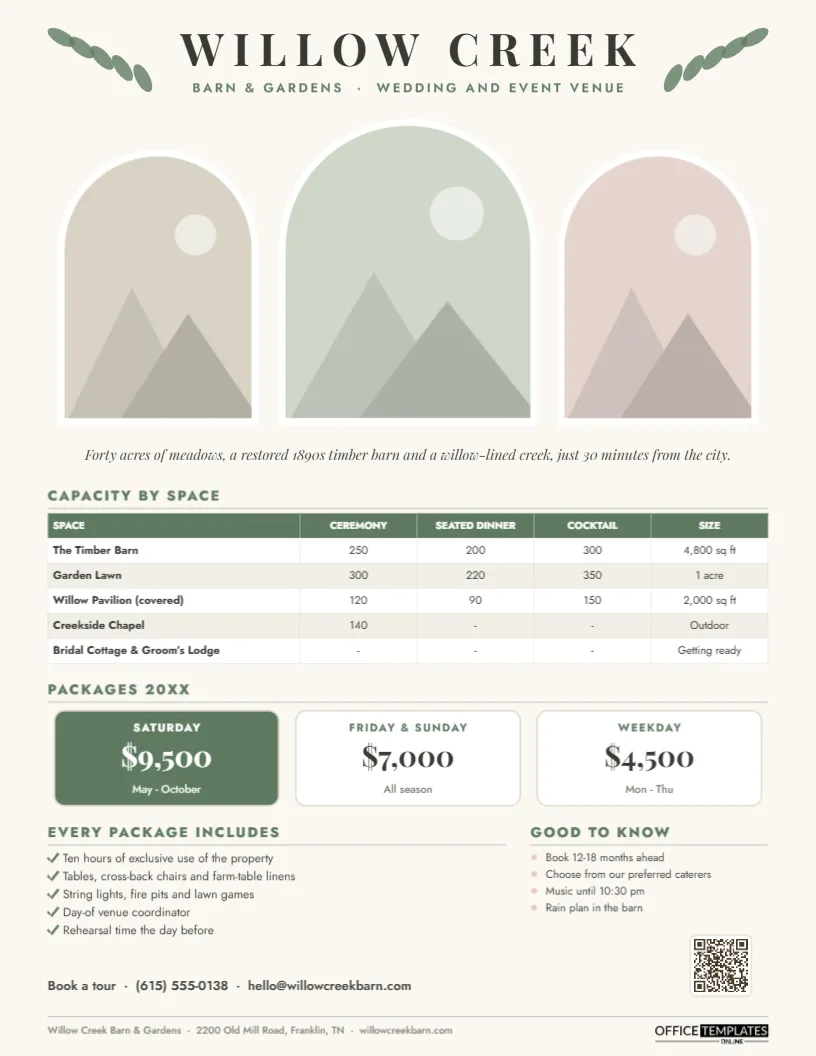
Couples shortlisting wedding venues want three answers before they book a tour: will our guests fit, what does it cost, and what is included? Venue coordinators answer those questions dozens of times a week by email and phone. A Wedding Venue Fact Sheet answers them once, beautifully, and invites the couple to see the place in person. This template, designed for a rustic barn and garden venue, balances romance with the practical details couples need.
Three Arched Windows Onto the Venue
The page opens with the venue name, WILLOW CREEK, in spaced Playfair Display, flanked by two small sprays of sage-green leaves, with Barn & Gardens · Wedding and Event Venue in sage beneath. Below are three arched photo windows, like the tops of chapel windows, each framed with a white border: a smaller arch on each side and a taller one in the middle. They are ready for your three best photographs, typically the ceremony site, the reception space, and a detail shot. An italic serif line under the arches sums up the setting in one sentence.
The rest of the page is organised and calm. A Capacity by space table lists each area (the barn, the garden lawn, a covered pavilion, a creekside chapel and the getting-ready suites) with ceremony, seated dinner and cocktail capacities and size. Packages 20XX are shown as three cards: Saturday in solid sage with white text, and Friday & Sunday and Weekday in white with sage type, each with a price and season. Below, every package includes a list of five inclusions with checkmarks, and Good to know gives four practical notes with blush-pink bullets. A booking line and a QR code sit above the footer with the venue’s address. The page is a portrait US Letter layout, 8.5 x 11 inches.
Questions Couples Ask First
| Question | Where the fact sheet answers it |
|---|---|
| Will all our guests fit? | Capacity by space |
| How much does it cost? | Package cards |
| What is included? | Every package includes |
| What if it rains? | Good to know (rain plan) |
| Can we bring our own caterer? | Good to know (preferred caterers) |
| How late can the music go? | Good to know |
| How far ahead should we book? | Good to know |
Choosing Photos for the Arches
Arched frames crop the top corners of every picture, so choose images with space above the subject: a ceremony arch against open sky, a barn interior with high rafters, a table setting shot from a low angle. Portrait-orientation photos work best. Click each arch and use Replace Image; the frame keeps its shape, and you can reposition the photo inside it. Use professional images from real weddings at your venue if photographers have given permission, and credit them on your website.
Editing the Willow Creek Template
Retype the venue name and tagline, and the italic description line. The capacity grid is an editor Table: select it, choose Edit Data, and enter your spaces and numbers; use + Row for extra areas or – Row if you have fewer. The package cards are grouped shapes with text on top, so you can change names, prices, and seasons directly; delete one card if you only offer two options. Rewrite the inclusions and practical notes, then update the booking line, footer address, and QR code (in the Barcodes & QR panel) so it links to your tour booking page.
Pricing Packages Clearly
Couples are wary of hidden costs. State what the package price covers, and say plainly what it does not, such as catering, bar service, security or cleaning fees. If there is a minimum spend or guest count, list it in the Good to Know section. Venues that show prices up front tend to receive fewer but better-qualified inquiries. The three-card layout also shows the value of off-peak dates, which helps fill Fridays, Sundays, and weekdays.
The Good to Know List Prevents Awkward Surprises
The short blush-bulleted list on the right is where you set expectations that often cause disappointment later: how far ahead dates fill, whether couples must use a preferred caterer, when the music has to stop, and what happens if it rains. Stating these early saves you from difficult conversations after a contract is signed. Other policies worth listing include candle rules, confetti or sparkler restrictions, whether pets can take part in the ceremony, and when vendors can arrive for setup.
Beyond Weddings
The same fact sheet works for corporate retreats, holiday parties, milestone birthdays, anniversary celebrations, fundraisers, and photo shoots. Make a version with corporate language and weekday packages, and send it to event planners and HR teams in nearby cities. Venues such as wineries, estates, lodges, gardens, historic homes, and restaurants with private rooms can all use the layout.
Following Up After the Fact Sheet
A fact sheet opens the door; the tour closes the sale. When you email it, invite the couple to a specific tour slot, mention a detail they told you about their plans, and include availability for their preferred dates if you know them. After the tour, send the fact sheet again with a short personal note and any quote you prepared.
A Sample Venue Tour Invitation
Hi Sam and Priya, thank you for reaching out about Willow Creek! I’ve attached our venue fact sheet with capacities and 20XX packages. Your October date is still open, and our garden lawn would comfortably seat your 160 guests with the barn as a rain plan. Would Saturday at 11 am or Tuesday at 4 pm work for a tour? I’d love to show you the creekside chapel in person.
Print Finishes Couples Notice
For bridal shows, print on a heavy matte or felt-textured paper; the sage and cream palette looks elegant on a soft finish. The PDF is ideal for inquiry replies and your website.
Venue Owner FAQs
Can I show capacities with a dance floor?
Add a column in the capacity Table for Dinner with a dance floor, which planners appreciate.
Can the arches become rectangles?
Yes. Delete an arch frame and add a rectangular photo slot, but the arches are what give this design its character.
Open the template, add your photos, spaces, and packages, and give every couple a beautiful reason to book a tour.