Engineers, specifiers, installers, and purchasing managers all read technical data sheets, and they all read them the same way: they look for one number and leave. Is the voltage right? Will it fit? Is it rated for outdoor use? What is the part number? A Good Technical Data Sheet (TDS), sometimes called a product specification sheet or spec sheet, makes each of those answers easy to find. This template, shown with an LED floodlight, gives manufacturers a rigorous, industrial-looking page that can hold a complete specification without looking crowded.
Who Reads a Spec Sheet and What They Need
Charcoal, Safety Yellow and a Blueprint Drawing
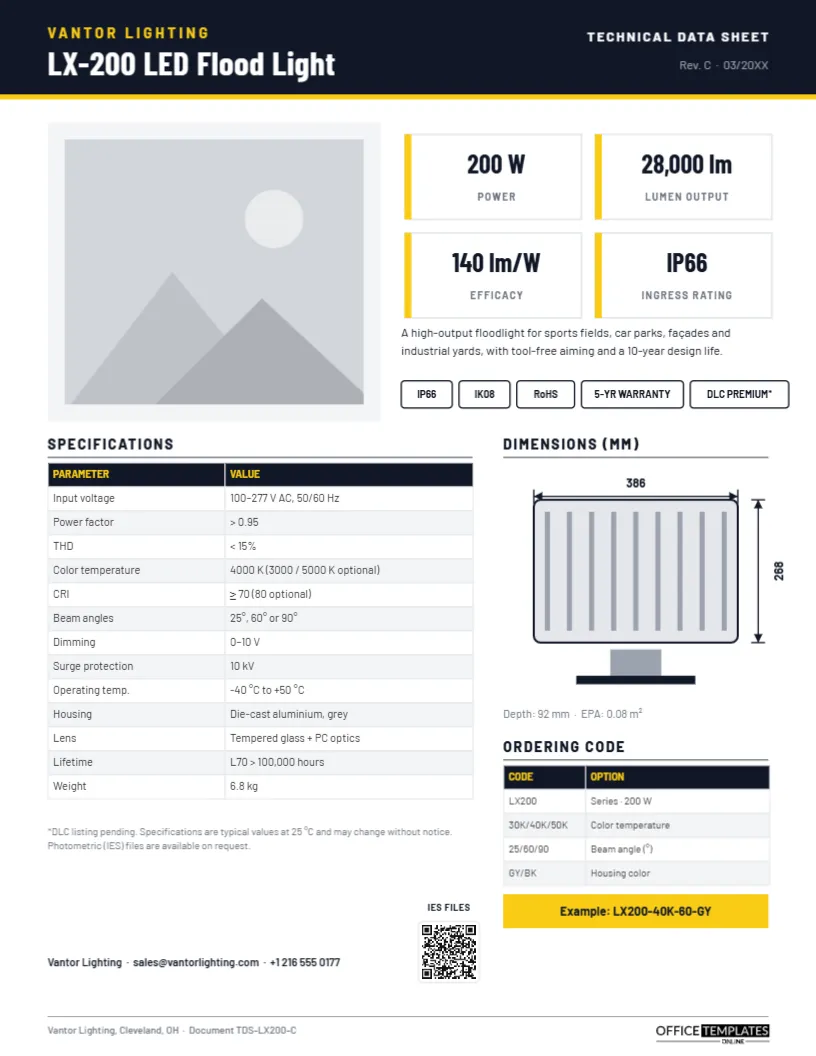
The design borrows from industrial documentation. A charcoal header with a thin safety-yellow rule carries the brand, VANTOR LIGHTING, in spaced yellow capitals, and the product name, LX-200 LED Flood Light, in Barlow Condensed. The right side of the header says TECHNICAL DATA SHEET with a revision code and date, which is essential for anyone who needs to know they are reading the current version.
Below, a large product photo sits on a light grey panel. Beside it, four white tiles with yellow edge markers show the most important values: power, lumen output, efficacy, and ingress rating. A one-sentence description and a row of outlined certification tags (IP66, IK08, RoHS, 5-year warranty and DLC Premium) complete the top half.
The lower half is technical. On the left, a Specifications table with a charcoal header and yellow column titles lists thirteen parameters, from input voltage and power factor to operating temperature, housing, lifetime, and weight, with alternating grey rows. On the right, a Dimensions drawing shows the fixture front-on with its heat-sink fins, mounting bracket, and dimension lines for width and height, plus a line for depth and effective projected area. Beneath it, an Ordering code table explains each segment of the part number, and a yellow bar shows a complete example code. A footnote on typical values, the sales contact, a QR code for photometric IES files, and a document number in the footer finish the page. The sheet is laid out on a single portrait 8.5 x 11-inch Letter page.
How to Build an Ordering Code
An ordering code (or configuration code) turns every option into a string that purchasing can copy onto an order. The template’s example, LX200-40K-60-GY, reads as series, colour temperature, beam angle, and housing colour. When you design your own:
- Start with the series or model name.
- Add one segment for each option a customer must choose, in the order they would decide.
- Use short, obvious abbreviations (40K for 4000 K, GY for grey).
- Separate segments with hyphens so the code is easy to read aloud.
- Show one complete example so no one has to guess the format.
Editing the LX-200 Data Sheet
Start with the header text: brand, product name, revision letter, and date. Click the product photo and choose Replace Image; a cut-out product shot on a plain background works best against the grey panel. The four spec tiles are separate text boxes, so retype the values and labels. Both the specifications table and the ordering code table are editor Tables: select one and use Edit Data to type or paste your values, and + Row or – Row to change the number of parameters. The dimension drawing is a group of simple shapes; ungroup it to resize the body for a different product shape, then update the dimension numbers. Point the QR code at your downloads page from the Barcodes & QR panel.
Writing Values Engineers Trust
State the conditions behind each value. Lumen output, efficiency, lifetime, and temperature ratings all depend on test conditions, so the footnote says values are typical at 25 °C. Give units every time, use ranges where a value varies, and say which standard a rating is tested to where relevant, such as IEC 60529 for IP ratings or IEC 62262 for IK ratings. If a certification is pending, mark it clearly, as the template does with an asterisk on the DLC tag.
Keeping Revisions Under Control
Spec sheets live for years in specifiers’ files and distributors’ websites, so version control matters. Every time a value changes, increase the revision letter, update the date in the header, and keep the document number in the footer. Keep an archive of each revision. When a customer calls with a question, the first thing to ask is which revision they are reading.
Beyond Lighting
The layout fits almost any engineered product: pumps, motors, sensors, power supplies, networking equipment, building materials, adhesives, fasteners, HVAC units and medical devices. For chemicals and coatings, replace the dimension drawing with application instructions and the ordering code with pack sizes; note that safety data sheets (SDS) follow a separate legally defined format.
Printing for Catalogues and Submittals
Download the PDF for your website and for contractors’ submittal packages; tables and drawings remain crisp at any zoom. The charcoal and yellow scheme also prints legibly in greyscale, which matters because submittals are often photocopied. If you print for binders, allow for hole punching on the left edge.
Spec Sheet FAQs
Is a technical data sheet the same as a safety data sheet?
No. A TDS describes performance and specifications; an SDS describes hazards and safe handling and follows a regulated format.
Can I add a photometric chart?
Yes. Add a chart from the editor’s chart tool, or insert the polar diagram from your lab report as an image beside the dimensions.
How many parameters should the table hold?
The table fits about fifteen rows at a readable size. For longer specifications, use a second page with the same header.
Open the template, enter your product’s specifications and ordering options, and give specifiers a data sheet they can trust at a glance.