In commercial real estate, the property flyer (often called a fact sheet, marketing flyer, or offering sheet) is the first thing a tenant representative, occupier, or investor sees. Brokers send it by email, post it on listing platforms, and hand it out on tours. It has one job: make it easy for a prospective tenant to decide whether the space deserves a visit. This Commercial Property Fact Sheet template for office space for lease presents the building, the available suites, and the location with the crisp confidence of a Class A marketing package.
Anatomy of a Leasing Flyer
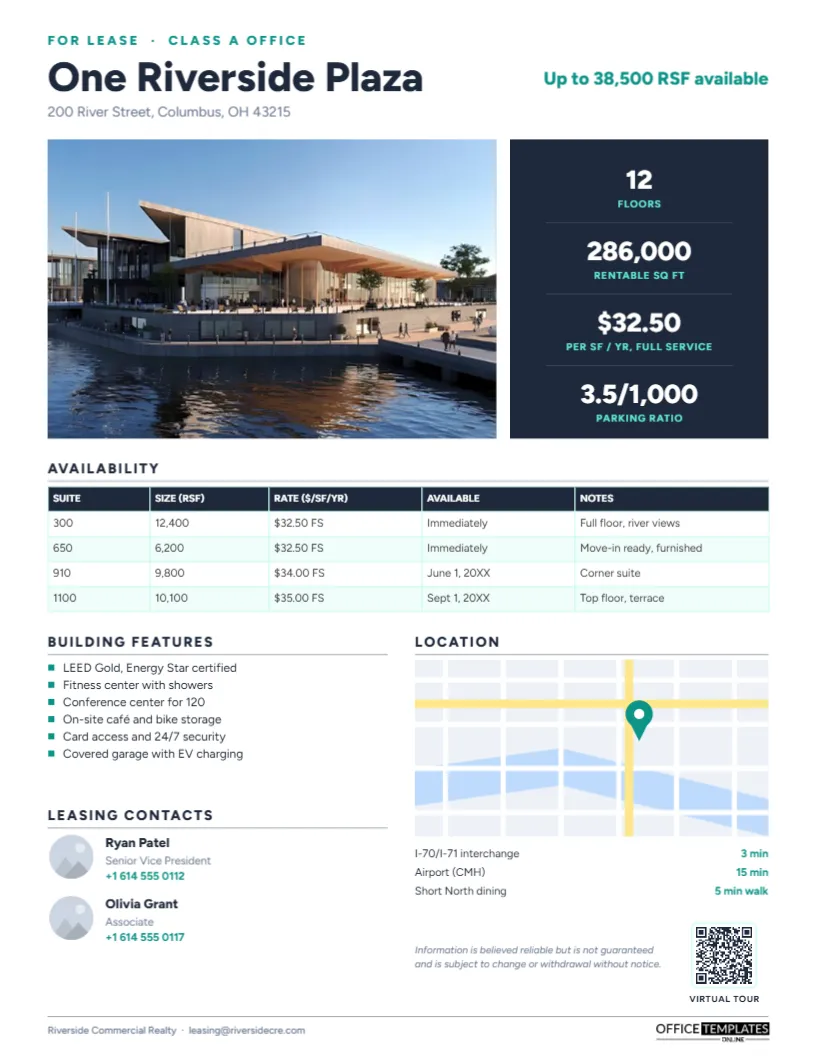
Tenant reps screen dozens of listings for each client requirement. They look first at size, rate, and availability date, then at building quality and location, and finally at who to call. The layout follows that order: headline and available square footage at the top, a photo and key building numbers, a suite-by-suite availability table, building features, a map, and the brokers.
Slate, Teal and a Drawn Map
The top of the page names the listing type in teal capitals, FOR LEASE · CLASS A OFFICE, above the building name, One Riverside Plaza, in bold slate Figtree, and its address. On the right, Up to 38,500 RSF available stands out in teal. A large building photo sits beside a dark slate panel stacked with four key figures: floors, rentable square feet, the asking rate per square foot per year, and the parking ratio, each with a teal label.
An Availability table lists every suite with size, rate, availability date, and notes, on pale teal alternating rows. Below, Building features lists six amenities with teal square bullets. Location shows a simple drawn map (a grid of white streets, two yellow arterials, and a blue river) with a teal pin marking the building, followed by drive and walk times to the interstate, the airport, and a dining district. Leasing contacts present two brokers with round headshots, titles, and phone numbers. A QR code for the virtual tour, the standard broker disclaimer, and a footer with the brokerage name complete the page. It is set up as one 8.5 x 11-inch US Letter page, portrait.
Lease Terms Worth Explaining
| Term | Meaning |
|---|---|
| RSF (rentable square feet) | Usable space plus a share of common areas such as lobbies and corridors |
| USF (usable square feet) | The space inside the suite the tenant actually occupies |
| Full service (FS) | Rent includes operating expenses, taxes, and utilities, typically with a base year. |
| NNN (triple net) | Tenant pays base rent plus a share of taxes, insurance, and maintenance |
| Parking ratio | Parking spaces per 1,000 square feet leased |
| TI allowance | Money the landlord contributes to build out the space |
Putting Your Listing on the Page
- Replace the building photo with a strong exterior shot using Replace Image; twilight photos with lit windows perform well.
- Retype the building name, address, listing type, and the headline availability figure.
- Update the four key figures in the slate panel.
- Select the availability table and use Edit Data; add suites with + Row and remove leased ones with – Row.
- Edit the building features list.
- Move the teal pin on the map, or replace the drawn map with a screenshot from your mapping tool; keep drive times current.
- Replace the broker photos and contact details, and link the QR code to a virtual tour or listing page in the Barcodes & QR panel.
Making the Availability Table Useful
List suites from smallest to largest or by floor, whichever your market expects. Always include the availability date, because a tenant who needs to move in four months cannot use a suite available in nine. Use the notes column for the details that sell a suite: views, a corner location, existing furniture or a terrace. If a suite can be combined with a neighbour, say so; it opens the listing to larger tenants.
Amenities Tenants Prioritise Now
Office tenants increasingly choose buildings that help them bring employees back to the office. Highlight amenities that support that: fitness centres, bookable conference facilities, outdoor terraces, food options, bike storage and showers, EV charging and sustainability certifications such as LEED or Energy Star. List the ones your building actually has; the six on the template are examples.
Other Property Types
With small changes, the same template works for retail space (swap the parking ratio for traffic counts and add co-tenants), industrial and warehouse space (clear height, dock doors, power), medical office, flex space, coworking and land. For investment sales, replace the availability table with a rent roll summary and add cap rate and price to the key figures.
Choosing the Four Headline Figures
The slate panel beside the photo is the fastest-read part of the flyer, so choose its four numbers deliberately. Floors and total rentable area tell a tenant rep the scale of the building. The asking rate, with its basis (full service or NNN), sets expectations immediately. The parking ratio is a deciding factor in suburban and car-dependent markets; in a downtown tower with transit access, you might replace it with walk score, floor plate size, or the year of the latest renovation. Pick whatever your target tenants ask about first.
Presenting Location Without a Paid Map
The drawn map on the template is deliberately simple: a few streets, the river, and a pin. It avoids licensing issues with screenshots from commercial mapping services and keeps the page clean. Relabel it by adding small text for major roads, or delete it and insert your own licensed map image in the same space. Either way, keep the drive-time list below it; brokers quote those numbers on calls.
Keeping Listings Fresh
Stale flyers cost deals. Update the sheet whenever a suite leases or a new one becomes available, and put the revision date in the footer. Email updated flyers to the tenant rep community monthly; a refreshed availability table is a good reason to stay in touch.
Printing for Tours
Print on bright white silk paper for tours and broker events. The slate panel prints richly on colour laser printers. Bring floor plans as a second page for the suites you are showing.
Broker Questions
Should I include asking rates?
In most markets, yes. Listings without rates get fewer inquiries. Use Negotiable only when landlord instructions require it.
Can I add floor plans?
Add a second page with floor plan images for each available suite.
Is the disclaimer required?
It is standard practice. Check your brokerage’s required wording.
Open the template, add your building, suites, and brokers, and give tenant reps a leasing flyer that makes your space easy to shortlist.