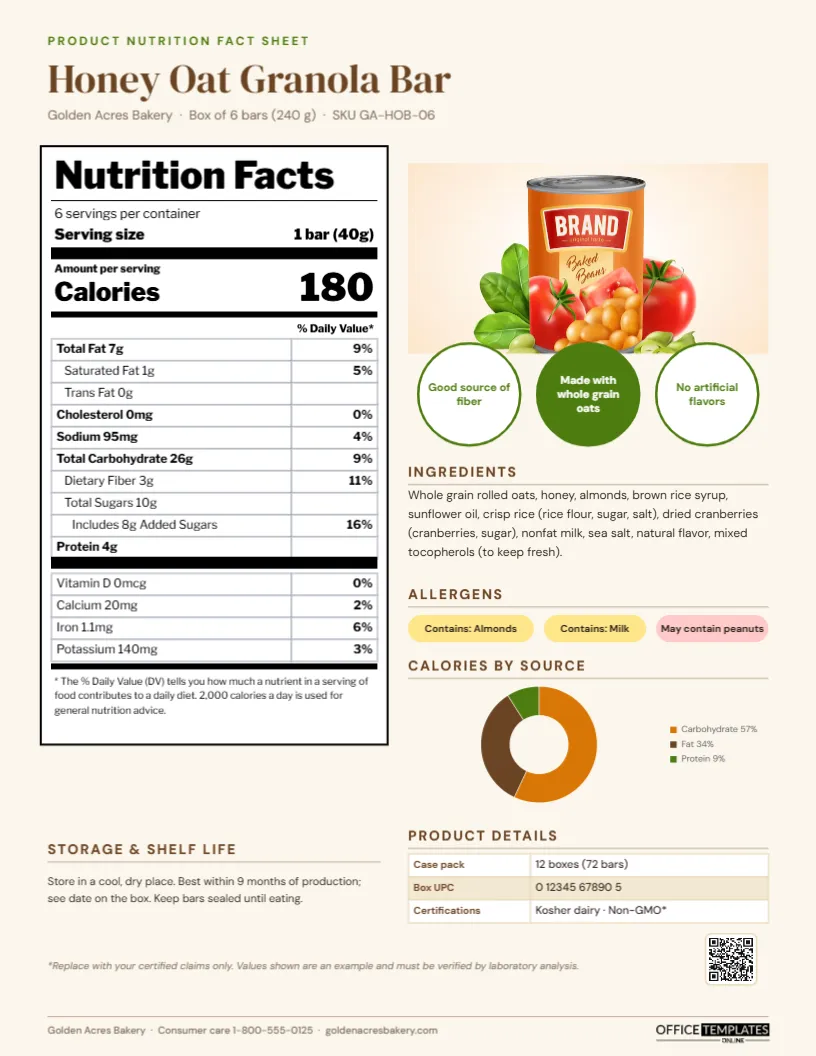
Food producers are asked for product fact sheets constantly: by grocery buyers, distributors, foodservice operators, school nutrition directors, online retailers and dietitians. They need the nutrition facts, ingredients, allergens, shelf life, case pack and UPC in one tidy document, often before a product is listed. This food product nutrition fact sheet template, shown for a honey oat granola bar, presents all of that on one clean page with an editable Nutrition Facts panel modelled on the familiar US label format.
Who Needs a Product Nutrition Sheet
| Reader | Main interest |
|---|---|
| Grocery and retail buyers | Product description, claims, case pack, UPC |
| Distributors and brokers | Case pack, shelf life, storage |
| School and hospital foodservice | Nutrition values per serving, allergens |
| Online retailers | Ingredients and nutrition for product listings |
| Dietitians and consumers | Full nutrition panel, allergens, sugars |
Oat, Honey Brown and a Classic Label Panel
The page has a warm oat background. At the top, a green PRODUCT NUTRITION FACT SHEET label introduces the product name, Honey Oat Granola Bar, in brown DM Serif Display, with the brand, pack size and SKU underneath.
The left side is a full Nutrition Facts panel in black on white, built with the typographic conventions shoppers recognise: a heavy “Nutrition Facts” title, servings per container, serving size in bold, a thick rule, calories in large type, and the nutrient rows with bold headings and indented sub-rows, % Daily Value on the right, vitamins and minerals below another thick rule, and the footnote explaining Daily Value. The nutrient rows are editor Tables in Libre Franklin, so the values can be edited easily.
The right side has a product photo, three round claim badges (“Good source of fiber”, “Made with whole grain oats” and “No artificial flavors”), an Ingredients paragraph, Allergens shown as coloured chips (yellow for “contains”, pink for “may contain”), and a Calories by source doughnut chart splitting calories into carbohydrate, fat and protein. At the bottom, Storage & shelf life sits beside a Product details table with case pack, UPC and certifications, followed by a disclaimer, a QR code and the consumer care line. Everything fits one US Letter page, 8.5 by 11 inches, portrait.
Updating the Nutrition Panel Row by Row
- Retype servings per container, serving size and calories; they are separate text boxes.
- Select the main nutrient table and choose Edit Data. Each row has a label with the amount (for example “Total Fat 7g”) and a % Daily Value cell.
- Keep the indentation for sub-nutrients (saturated fat, trans fat, fiber, sugars, added sugars) by keeping the leading spaces.
- Edit the vitamins and minerals table the same way.
- Adjust the outer border if you add or remove rows so the panel stays enclosed.
The calorie doughnut is an editor chart; select it, press Chart Options, then Edit Chart Data to enter your own percentages.
Where the Numbers Come From
Nutrition values must be accurate. Most producers obtain them from a laboratory analysis of the finished product, or from a nutrition analysis database calculated from the recipe, reviewed by a qualified professional. Rounding rules for the label are specific (for example, calories are rounded to the nearest 5 or 10 depending on the amount), and % Daily Values are calculated against official reference amounts. The sample values on the template are illustrative only; replace them with verified data for your product.
Regulatory Notes for US and Other Markets
In the United States, packaged food labels must follow FDA rules on the Nutrition Facts panel, ingredient lists and allergen declarations, including the major food allergens (milk, eggs, fish, shellfish, tree nuts, peanuts, wheat, soybeans and sesame). Claims such as “good source of fiber” have specific definitions. A sales fact sheet is not the product label, but the information on it should match the label exactly. Other countries use different panel formats, such as the per-100 g tables common in Europe and the UK, so adapt the panel for your market. Ask a food regulatory specialist to check claims before publishing.
Communicating Allergens Clearly
Allergen information must be impossible to miss. The template separates “Contains” statements, which reflect ingredients in the product, from precautionary “May contain” statements, which reflect shared equipment or facilities, using two different chip colours. Keep both lists consistent with the packaging and your allergen control plan, and update the sheet immediately if a recipe or facility changes.
Product Details Buyers Ask For
Retail and foodservice buyers need logistics as well as nutrition. The product details table has room for case pack, UPC and certifications; add rows for case dimensions and weight, pallet configuration (ti-hi), minimum order, country of origin and lead time. Buyers compare these details across suppliers, and missing information slows listings.
Choosing Claim Badges You Can Support
The three round badges beside the photo are prime space, so use them for your strongest verified claims. Nutrient content claims (“good source of fiber”, “low sodium”) must meet regulatory thresholds per serving; ingredient claims (“made with whole grain oats”) must be accurate to the recipe; and certification claims (organic, non-GMO, kosher, gluten-free) require a current certificate. If you do not have three claims you can support, use a badge for something factual and appealing, such as “Baked in small batches” or “Family owned since 1988”.
Other Products This Fits
The layout works for snacks, cereals, beverages, sauces, baked goods, frozen meals, supplements (with a Supplement Facts panel instead), pet food (with a guaranteed analysis) and meal-kit components. Restaurants and caterers can use it to publish nutrition for menu items. Change the photo, claims and colour palette to match the product’s packaging.
Colour and Paper for Sales Kits
For trade shows and buyer meetings, print on bright white paper, and keep the Nutrition Facts panel pure black on white for legibility. The PDF can be uploaded to retailer portals and product information management systems.
Food Producer FAQs
Can I show two serving sizes?
Add a column to the nutrient tables in Edit Data for “per container” alongside “per serving”, as dual-column labels do.
Can I use it for a product range?
Make one page per flavour or SKU, keeping the same layout and changing the photo and values.
Is the panel an image?
No. The text and tables are all editable in the editor.
Open the template, add your product’s verified nutrition data and details, and give buyers everything they need to list it.