A survey report can run to fifty pages, but most people will only ever see one. Journalists, executives, social media followers, and conference audiences want the headline findings, presented visually, with enough methodology to trust them. A Survey Results Fact Sheet is that one page. This template turns a data set into a set of clean infographic tiles, so the most striking numbers get noticed and shared.
From Spreadsheet to Story
The hardest part of presenting survey data is choosing what to leave out. Start by writing down the three or four findings you would tell a friend. Then choose one number that surprises, because that becomes the hero statistic. Every other tile on the page should support or explain that headline. If a chart does not help tell the story, it belongs in the full report, not on the fact sheet.
A Tile-Based Infographic in Teal and Yellow
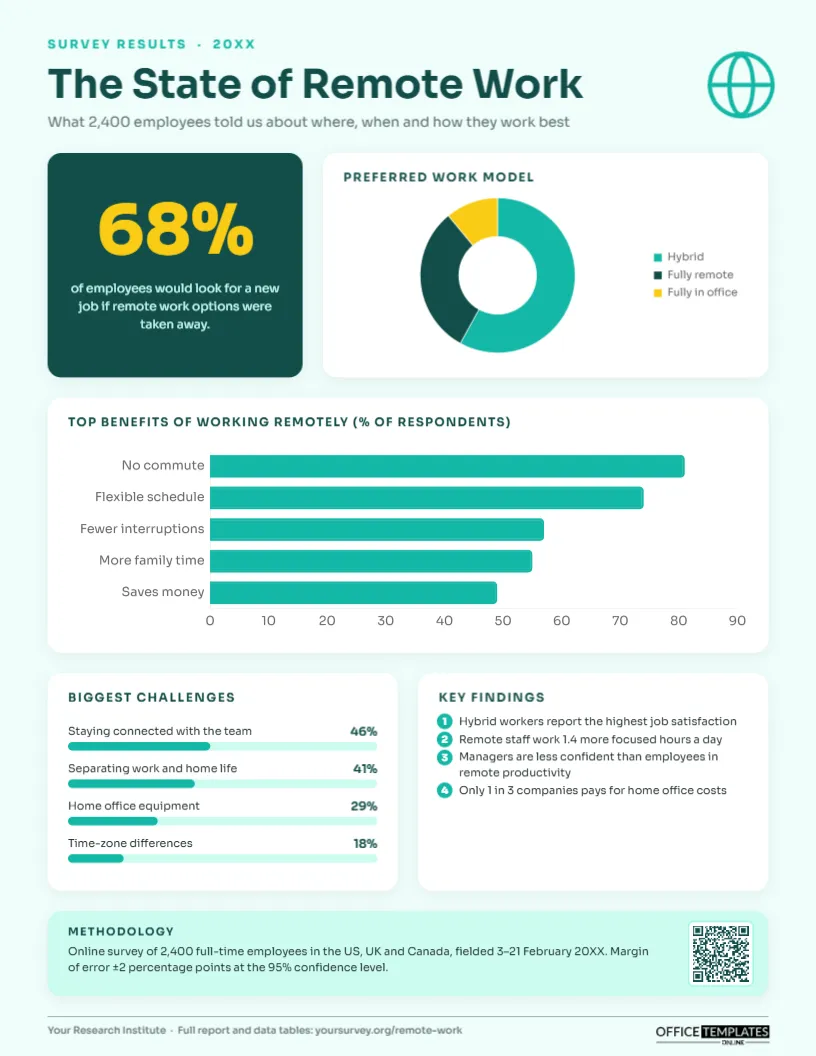
The page has a very pale mint background with white rounded tiles that cast soft shadows. At the top, a teal SURVEY RESULTS · 20XX label, the title The State of Remote Work in dark teal Sora, a subtitle about the 2,400 respondents, and a globe icon in the corner.
The first row pairs a dark teal hero tile, where 68% appears huge in yellow above a sentence about employees who would look for a new job if remote work were taken away, with a white tile holding a Preferred work model doughnut chart: hybrid, fully remote, and fully in office. A wide tile below holds a horizontal bar chart of the top benefits of working remotely, with five bars in bright teal. The third row splits into Biggest challenges, shown as four labelled progress bars with percentages, and Key findings, four numbered statements with teal circles. A mint methodology box explains the sample, countries, field dates, and margin of error, with a QR code to the full report. The footer credits the research organisation and gives the report link. The layout occupies an 8.5 x 11 inch US Letter page in portrait orientation.
Choosing the Right Chart for Each Question
| Question type | Best chart on this template | Why |
|---|---|---|
| Single choice with 2-4 answers | Doughnut | Shows parts of a whole at a glance |
| Multiple choice, select all that apply | Horizontal bar | Totals exceed 100%, so a doughnut would mislead |
| Agreement or severity ratings | Progress bars | Easy to compare a handful of items |
| One striking proportion | Hero number tile | Most shareable element on the page |
| Trend across years | Line or column chart | Swap it in when you repeat the survey |
Swapping In Your Survey Data
Retype the title, year, and subtitle, and change the globe to an icon that suits your topic. Put your hero number and its sentence into the dark tile. The doughnut and the bar chart are live editor charts: select either, press Chart Options, and then Edit Chart Data to paste in your labels and percentages. The progress bars are simple shapes, so after editing a percentage, drag the teal bar’s width to match (the full grey track represents 100%). Rewrite the numbered findings and the methodology text, and point the QR code at your full report from the Barcodes & QR panel.
Reporting Methodology Honestly
A fact sheet without methodology invites doubt. At minimum, state who was surveyed, how many, where, when, how (online, phone, in person), and the margin of error if it was a probability sample. If the sample is not representative, for instance a survey of your own customers, say so. If results are weighted, mention it. The methodology box on the template is short, but it contains everything a careful journalist will check before quoting you.
Pitfalls When Visualising Survey Results
- Doughnuts for multi-select questions: if respondents could choose several answers, use bars.
- Tiny sub-groups: avoid headline claims about a group of fifty people inside a larger sample.
- Rounding that does not add up: note that totals may not equal 100% because of rounding.
- Leading question wording: include the exact question text in the full report.
- Cherry-picking: keep an unwelcome finding if it is important; it builds credibility.
Where Survey Fact Sheets Get Shared
Research teams, PR agencies, associations, universities, think tanks, HR departments, and marketing teams all publish survey findings. Use this page as the press release attachment, the first slide of a webinar, the landing page download, a social media image (crop individual tiles), and the leave-behind at conferences. Internally, it works for employee engagement results, customer satisfaction surveys, and event feedback.
Writing Findings People Will Quote
Each numbered finding should be a complete, quotable sentence with a number or a comparison in it. Hybrid workers report the highest job satisfaction because a reporter can drop it straight into a story. Avoid findings that only describe a chart (Most respondents chose hybrid); the chart already shows that. Instead, use the findings for insights that connect two data points or compare groups, such as managers versus employees. If a finding needs a caveat, keep it in the full report and choose a cleaner finding for the page.
Building a Series
If you run the survey every year, keep the same tile structure and colours so readers recognise your research instantly, and add a small trend line to one tile to show how the headline has changed. A consistent annual fact sheet becomes a reference that journalists come back to.
Print and Digital Tips
The pale mint background prints subtly on most laser printers; if you want pure white, change the page background. For social media, export at high resolution and crop to the tile you want to share.
Researcher Questions
Can I add a map?
Yes. Replace the globe icon with a map vector from the editor’s library and shade regions to show differences.
What if my hero number is not a percentage?
Any striking figure works: an average, a count, a multiple such as 3x. Keep it to four or five characters so it stays large.
How many findings should I list?
Three to five. More than that and none of them stand out.
Open the template, add your survey’s headline numbers and charts, and give your research the one-page summary people will actually read.