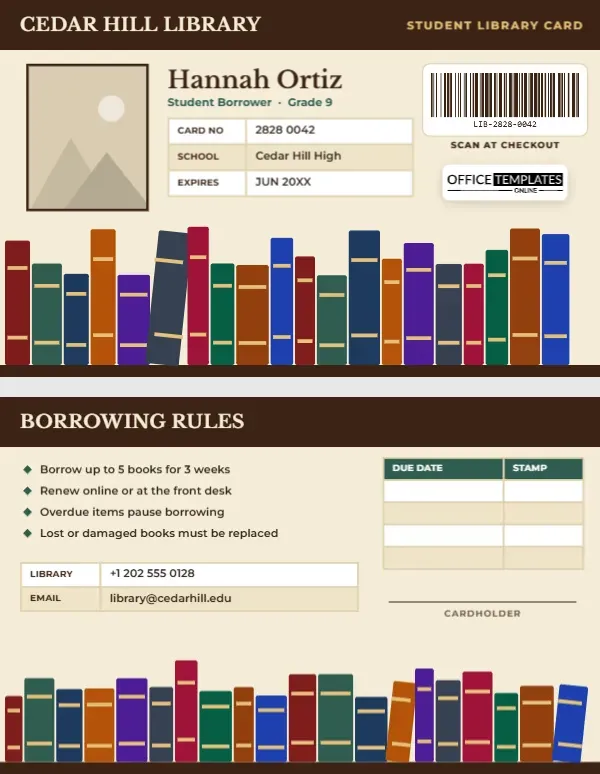
A library card is often the first card a young person owns, and for many students it becomes one of the most useful: it unlocks books, e-books, laptops, study rooms, and quiet space to work. School and public libraries alike issue student cards, and they all need the same essentials: the student’s name, a scannable number, and the borrowing rules. This Student Library Card wraps those essentials in a design every reader loves: a shelf of colourful book spines, with an old-fashioned due-date stamp grid on the back.
A Shelf Full of Books
The card is horizontal, 3.375 by 2.125 inches, the size of a credit card. A rich leather-brown header runs across the top with CEDAR HILL LIBRARY in cream Libre Baskerville and STUDENT LIBRARY CARD in gold on the right. The student’s photo sits on the left with a brown border, and beside it the name, Hannah Ortiz on the sample, is set in Libre Baskerville with Student Borrower · Grade 9 in green. A small table lists the card number, school, and expiry date.
On the right, a barcode panel labelled SCAN AT CHECKOUT holds the library number, the part of the card scanned most often, which is why it sits on the front. Our logo is below it. The lower third of the card is a bookshelf: a row of book spines in maroon, forest green, navy, amber, purple and slate, of different heights and widths, each with gold bands, and one book leaning slightly as they do on real shelves, all standing on a brown wooden shelf.
Borrowing Rules and a Stamp Grid
The back has the same brown header reading BORROWING RULES. Four short rules sit on the left with small green diamond bullets: borrow up to five books for three weeks; renew online or at the front desk; overdue items pause borrowing; lost or damaged books must be replaced. On the right, a DUE DATE and STAMP grid recalls the date cards once tucked into library book pockets, a place for librarians to stamp or write return dates. A contact table lists the library phone and email, a cardholder signature line sits beside it, and a second bookshelf fills the bottom of the card.
What a Student Library Card Unlocks
| Service | Typical rule for students |
|---|---|
| Books | A few items at a time, loans of two to three weeks |
| E-books and audiobooks | Borrowed through the library app with the card number |
| Laptops and tablets | Short loans, often in-library use only |
| Study rooms | Booked in advance with the card |
| Databases and online resources | Access from home using the card number |
| Printing and copying | Pay-per-page or a free allowance |
Edit the rules on the back to match your library’s policies.
Creating Cards for Your Library
- Photo: the brown-bordered portrait on the left swaps with Replace Image. Many public libraries skip photos for children, so you can delete the slot and move the name left.
- Library name: retype CEDAR HILL LIBRARY on both sides.
- Card number and school: edit them in the front table through Edit Data.
- Barcode: in the Barcodes & QR panel, enter the exact number your library system uses, so checkout scanners read it correctly.
- Rules and due dates: each rule is a separate text line; the stamp grid gets extra lines through + Row.
- Bookshelf: each shelf is one group; recolour spines to match your library’s brand or school colours.
Barcodes and Library Systems
Most library management systems use barcodes with a fixed number of digits, often starting with a prefix that identifies the library. Before printing a batch, ask your system administrator for the correct format and test one card at the checkout desk. Keep numbers short enough to scan reliably on a small card: this design fits a barcode of around a dozen characters comfortably. If your library uses RFID, print this design on RFID-enabled PVC cards.
Encouraging Young Readers
Getting a library card can be a milestone for a child. Many libraries run library card sign-up month events each September, and schools often take classes to the public library to sign up together. A card that looks as inviting as a bookshelf makes the moment special. Librarians can add a personal touch by writing the first due date in the stamp grid and chatting about the student’s first book choice.
School Libraries, Public Libraries and Book Clubs
School libraries, public library branches, university libraries, community reading programmes, classroom libraries run by teachers, and book clubs that share collections can all use this card. Classroom teachers can make a version without a barcode, using the stamp grid to track borrowed books.
Printing the Bookshelf
The bookshelf uses many rich colours and fine gold bands, which print beautifully on PVC. Check that the thin gold bands on the spines are visible and that the barcode prints crisply in black on white. Library cards live in wallets for years, so PVC is worth the small extra cost.
Protecting Student Privacy
Libraries take reader privacy seriously: what a student borrows is their own business. Keep the card simple, with no borrowing history, and remind students not to share their card number or PIN, since it gives access to their account and online resources. If a card is lost, the library can block the old number and issue a new one straight away. Younger students may need a parent to sign for the card, which is what the cardholder line on the back is for.
Library Card Questions
Can the card show a borrowing limit?
Yes. Edit the first rule to your limit, such as Borrow up to 10 items.
Can the bookshelf be taller?
Each shelf is one group; stretch it upward or move the content above it.
Is the stamp grid useful with a computer system?
Many students like a written reminder of due dates; it complements the receipt or email from the library system.
Open the template, add the student’s name and number, fill the shelves, and hand every reader a card that invites them to borrow another book.