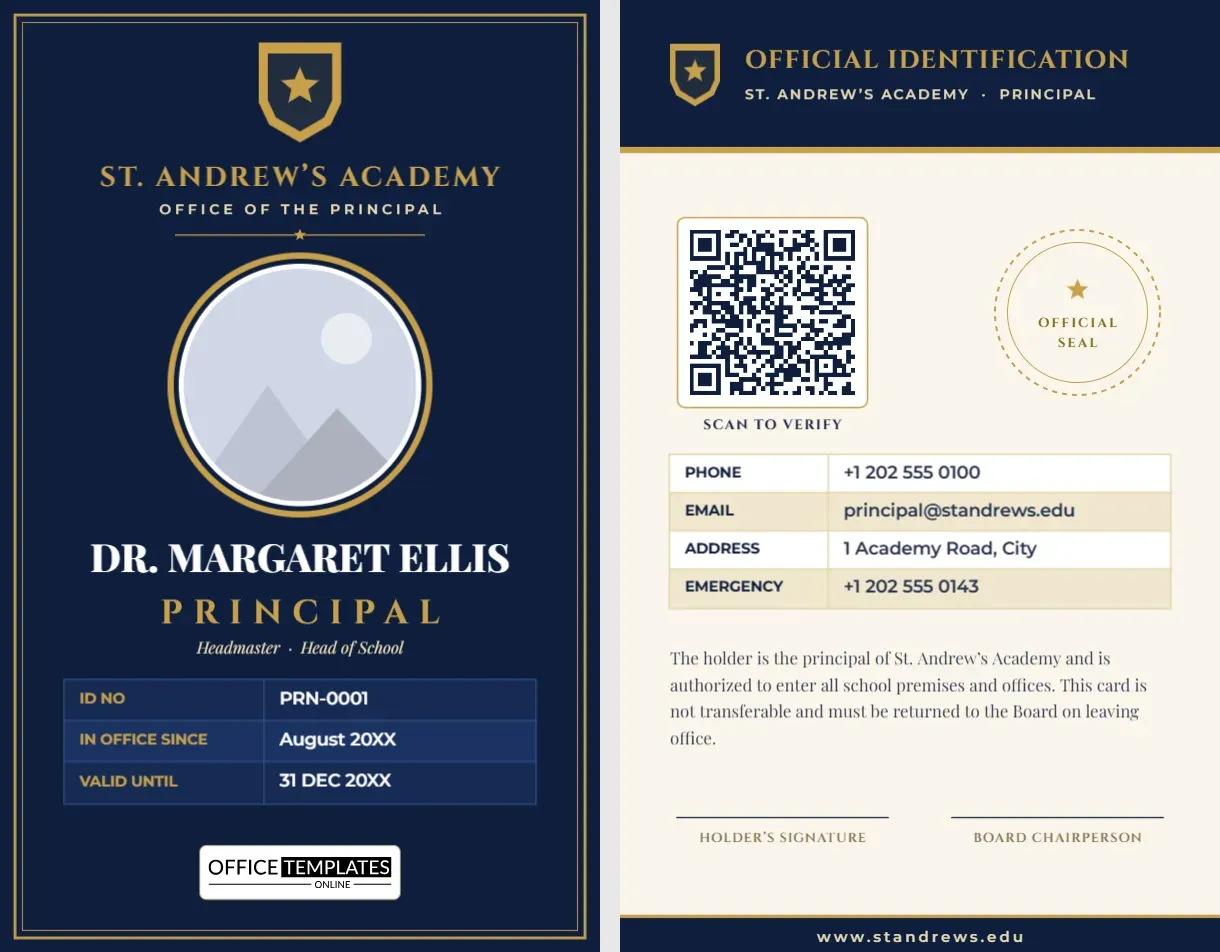
The principal is the face of the school. When a parent, an inspector or a visiting official meets the head, the first document they may see is an identity card, and it should look every bit as dignified as the office. This principal and headmaster ID card template uses a navy and gold palette, a crest, classic capitals and a framed layout to signal authority and care.
Leadership cards deserve a different tone
A card for a class teacher can be bright and welcoming. A card for the head should carry more weight. This design therefore avoids playful shapes and bright colours. Navy stands for trust and stability, gold adds a note of prestige and the double border around the front frames the whole card like a certificate. The typography follows the same logic: a stately capital face for the school name and title, an elegant serif for the name and a clean sans-serif for the data.
Front panel breakdown
- Crest. A gold shield with a star at the top centre. Swap it for your school’s own crest by uploading an image.
- School name. “St. Andrew’s Academy” in spaced gold capitals, with “Office of the Principal” beneath it.
- Portrait. A large round photo with a gold ring and a fine navy inner line. It is pattern-filled, so replacing it does not resize the frame.
- Name. A serif name in white, for example “Dr. Margaret Ellis”.
- Title. “Principal” in gold capitals with wide spacing, and a small italic line naming related titles such as Headmaster or Head of School.
- Table. ID number, date of taking office and validity date in a navy table with gold labels.
- Logo credit. A small white plate with our logo that you can remove.
What is on the back
The reverse switches to a cream background so it is easy to print. A navy header reads “Official Identification” and names the school and role. A QR code with a gold frame sits on the left, and a dashed circular “Official Seal” placeholder sits on the right. Below them are contact details, a paragraph confirming the holder’s authority and two signature lines: one for the holder and one for the board chairperson. A navy footer carries the school website.
Titles that fit this card
Different countries and school types use different titles, and the card handles all of them with a text change.
- Principal
- Headmaster or Headmistress
- Head of School
- Vice Principal or Deputy Head
- Assistant Principal
- Executive Director
- Rector
The official seal placeholder
A dashed gold ring on the back reserves space for an embossed or stamped seal. If your school has one, print the card, then stamp the ring by hand. If you prefer a printed seal, upload an image of your seal and place it over the ring. If neither applies, delete the ring and enlarge the contact table.
How to personalise it
- Replace the crest with your school’s own image, or edit the shield colours.
- Type the school name and the office title.
- Replace the portrait with a formal headshot.
- Enter the principal’s name and title.
- Update the ID number, the start date and the validity date.
- On page 2, set the QR link, the contact details and the signatories.
- Download as PDF, PNG or JPG.
Choosing the QR link for a leader’s card
A principal’s QR code is best pointed at a page on the school’s own website that confirms the person’s name, photo and role. That way an inspector or visiting official can confirm the identity in seconds, and the school controls the page. Avoid linking to a personal social profile. If the head leaves, change the page to show the new principal and the old card stops verifying.
Print quality for a premium look
The card is portrait CR80, 2.125 x 3.375 inches. For a distinguished finish, print on 30 mil white PVC with a matte or soft-touch coating, and consider a printer that can render metallic or spot gold. If you are using a standard colour printer, keep the gold as it is; it prints as a warm ochre that still reads as gold. Print a test to check the dark navy does not turn purple, and adjust the colour if needed.
Questions and answers
Can I use the card for a vice principal or an academic coordinator?
Yes. Change the title and the details, and keep the layout for a consistent leadership set.
Will it work for a college or a school district office?
It can. Replace “Academy” and “Office of the Principal” with the name of your institution or department.
Is the frame editable?
Yes. The gold frame is two thin rectangles that you can recolour, resize or delete.
When the principal is the one who signs everything
A head is often both the holder of a card and the person who signs everyone else’s. The back of this card names the board chairperson as the countersignatory, which fits schools with a governing body. If your school has no board, replace the label with “District Superintendent”, “Education Officer” or “Proprietor”. In smaller private schools where the principal is also the owner, use the second line for “Issued by” and add the date of issue instead.
Pairing the leader’s card with the rest of your set
Many schools want the head’s card to be recognisably part of the same family as the staff cards without looking identical. A simple approach is to use the same crest and school name across all cards but reserve navy and gold for leadership only. Teachers might carry a blue card, support staff a green one and the principal this navy and gold design. Visitors then read the hierarchy at a glance, and nobody has to explain it. Keep the layout of the back consistent so that scanners and readers behave the same way across the whole set.
Small details that show care
- Print the ID with a leading zero, such as PRN-0001, so the number looks official.
- Use the person’s full academic title, including degrees, only if your school customarily does so.
- Match the gold of the card to the gold of your letterhead as closely as your printer allows.
- Keep the photo formal: a dark jacket, a plain background and a neutral expression.
A leader’s card sets the standard for every other card in the building. Open the template, add the head’s details and produce an ID card that carries the dignity of the role.