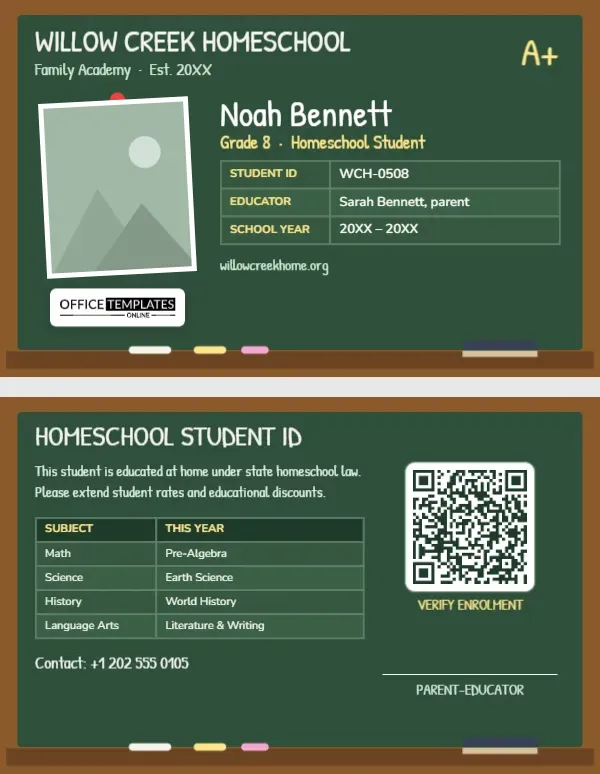
Homeschooled students miss out on one small but useful thing that school students take for granted: an ID card. Without one, it can be harder to claim student prices at museums, science centres, cinemas, and bookshops; register for competitions; or prove student status for transit passes and library cards. This Homeschool Student ID Card fills that gap. It is designed as a classic green chalkboard in a wooden frame, and the back politely explains that the student is educated at home and should be offered student rates.
A Chalkboard in a Wooden Frame
The card is landscape, 3.375 inches by 2.125 inches, the size of a credit card. A warm wooden frame surrounds a deep green chalkboard, and a wooden chalk tray along the bottom holds pieces of white, yellow, and pink chalk and a felt eraser. Everything on the board looks hand-chalked: the school name, WILLOW CREEK HOMESCHOOL, and Family Academy · Est. 20XX are set in Patrick Hand, a friendly handwriting font, and a yellow A+ is chalked in the top corner.
The student’s photo is pinned to the board with a red pushpin, slightly tilted, with a white border. To the right, the student’s name, Noah Bennett, on the sample, is chalked in large letters, with Grade 8 · Homeschool Student in yellow. A table in chalkboard green lists the student ID, the educator (Sarah Bennett, parent), and the school year. Our logo sits on a white plate on the board, and the family’s website is chalked below the table.
The Back: Proof for Student Discounts
The back is the reason many families will print this card. On the same chalkboard, HOMESCHOOL STUDENT ID is followed by a short note: This student is educated at home under state homeschool law. Please extend student rates and educational discounts. A subjects table lists this year’s courses (Pre-Algebra, Earth Science, World History, Literature & Writing), a contact line gives the family’s phone number, and a QR code labelled VERIFY ENROLMENT can link to a letter of intent, a co-op membership page, or a homeschool association’s verification page. A signature line for the parent-educator completes the card.
Where a Homeschool ID Is Often Accepted
| Place | What it can help with | What else to bring |
|---|---|---|
| Museums and science centres | Student admission prices, educator programmes | Sometimes a parent’s educator ID too |
| Libraries | Student cards and educational loans | Proof of address |
| Bookshops and art stores | Educator or student discounts | Ask at the till about their policy |
| Competitions and exams | Registration as an independent student | Official registration documents |
| Transit and travel | Youth fares in some areas | Local rules vary widely |
Acceptance is always at the organisation’s discretion, and some will ask for additional proof. A professional-looking card with a verification link makes the conversation easier.
Know Your Local Homeschool Rules
Homeschooling rules differ from state to state and country to country. Some areas require a notice of intent, annual assessments, or a portfolio; others require very little. The card’s wording, educated at home under state homeschool law, is intentionally general. If your area uses a specific term, such as private home education programme or registered home educator, change the note to match. Families who belong to an umbrella school or co-op can name it on the card, which often carries extra weight with museums and organisations.
Chalking In Your Family’s Details
- Pinned photo: the tilted picture below the red pushpin is a photo slot. Click it and swap in the student’s picture with Replace Image.
- School name: many families give their homeschool a name; type yours over WILLOW CREEK HOMESCHOOL.
- Student and grade: edit the chalked name and grade line.
- Tables: the student details and the subjects list are Tables; change them from the Edit Data button, adding subjects with + Row.
- QR code: in the Barcodes & QR panel, link to a co-op page, association membership, or your homeschool’s website.
- Chalk tray: the tray and chalk pieces are one group; leave them as they are or delete them for more space.
Cards for Every Child and the Parent-Educator
Print a card for each child in your homeschool, with their own photo, grade, and subjects. Many families also make an educator version for the teaching parent, changing the name and role line to PARENT-EDUCATOR; some museums and stores offer discounts to home educators and students. Homeschool co-ops can use the template for every family in the group, with the co-op’s name at the top and each child’s details below.
Printing a Chalkboard Card
Dark green prints best on PVC or on matte photo cardstock. Check that the chalk-coloured text is crisp and that the yellow lines stand out. Laminate the card if it will live in a wallet or a lanyard. Print the back at the same time; the discount note is the part most people will read.
Building a Simple Homeschool Records File
An ID card works best alongside a small file of records you can show if anyone asks for more. Useful items include a copy of your notice of intent or registration letter where one is required, a list of this year’s curriculum, attendance or hours logs, samples of the student’s work and any test or assessment results. Keep digital copies in a folder you can reach from your phone, and link the card’s QR code to a simple page that confirms the student’s enrolment. Families who organise this once at the start of the year find that museum visits, library sign-ups and competition entries become much easier.
Homeschool ID Questions
Is a homeschool ID an official government document?
No. It identifies the student as enrolled in your home education programme. Organisations decide whether to accept it.
Can I add the student’s date of birth?
Yes. Add a row with + Row; some places ask for age to confirm youth pricing.
Can I use it for a co-op or learning pod?
Absolutely. Replace the family school name with the co-op or pod name.
Open the template, pin up your student’s photo, chalk in the subjects, and head to the museum with a card that speaks up for home education.