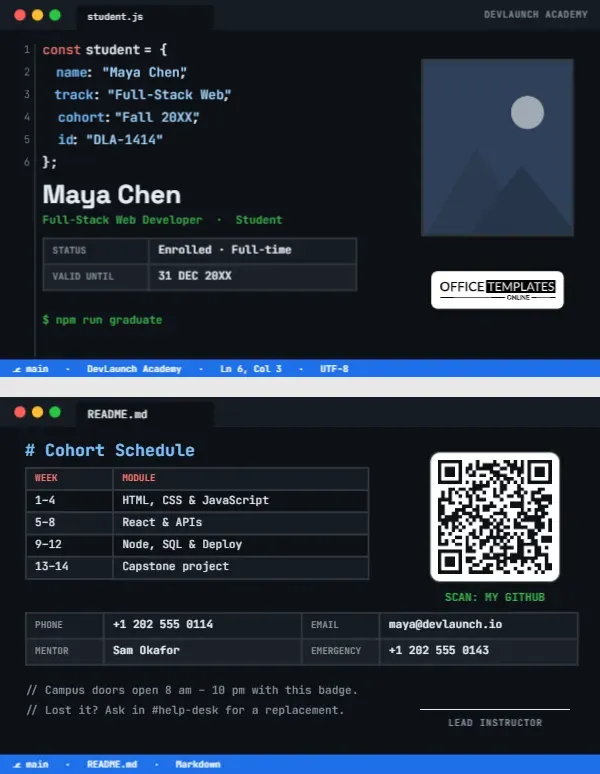
Coding bootcamps move fast: twelve to sixteen intense weeks of HTML, JavaScript, frameworks, databases, and deployment, followed by a capstone project and job hunting. Students spend nearly all of that time staring at a code editor, so an ID card that looks like one is a natural fit. This Coding Bootcamp Student ID Card turns the student into a JavaScript object, complete with syntax highlighting, line numbers, and a status bar, and its back is a README with the cohort schedule and a QR code for the student’s GitHub.
The Student as Source Code
The card is landscape, the standard 3.375 by 2.125 inch CR80 size, in the near-black of a dark editor theme. Across the top is a window bar with the familiar red, yellow, and green buttons and an open tab namedstudent.js, with DEVLAUNCH ACADEMY on the right. On the left, numbered lines of code declare the student:
const student = {name: "Maya Chen",track: "Full-Stack Web",cohort: "Fall 20XX",id: "DLA-1414"};
Keywords are coral, property names blue, and strings light blue, as in popular dark themes. Below the code, the student’s name is set large in white, Full-Stack Web Developer · Student in terminal green, and a small table shows enrolment status and validity date. A green prompt reads. $ npm run graduate. The student’s photo sits on the right in a dark frame, our logo beneath it, and a blue status bar runs along the bottom with the branch name, school, cursor position, and encoding, just like a real editor.
The README on the Back
The back opens a second tab, README.md. A Markdown heading reads # Cohort Schedule, with a table of weeks and modules: weeks 1–4 HTML, CSS and JavaScript; 5- 8 React and APIs; 9- 12 Node, SQL and deployment; 13- 14 the capstone project. A QR code labelled SCAN: MY GITHUB links to the student’s profile or portfolio, which is useful at demo days and hiring events. A contact grid lists phone, email, mentor, and emergency number, and two code comments explain building access hours and what to do if the card is lost. A lead instructor signature line and the status bar finish the card.
A Typical Full-Stack Bootcamp Curriculum
| Phase | Topics | Deliverable |
|---|---|---|
| Foundations | HTML, CSS, JavaScript, Git | Personal website |
| Front end | React, state, APIs, testing | Interactive web app |
| Back end | Node, Express, SQL, authentication | REST API with a database |
| Deployment | Cloud hosting, CI/CD basics | Live, deployed project |
| Capstone | Team project, agile workflow | Demo day presentation |
Edit the schedule table to match your bootcamp: data science, UX design, and cybersecurity tracks follow the same layout.
Editing the Code
- Photo: the framed picture on the right side of the editor is the photo slot; click it, then click Replace Image.
- Code lines: every coloured segment is its own text box, so double-click the string values to type the student’s name, track, cohort, and ID. Keep the quotes and commas for the full effect.
- School name: change DEVLAUNCH ACADEMY in the window bar and status bar.
- Tables: the status and schedule tables change via Edit Data; an extra module is one + Row away.
- QR code: point it to GitHub, GitLab, a portfolio site, or LinkedIn in the Barcodes & QR panel.
- Theme colours: recolour the background and syntax colours to match a light theme if you prefer.
From Student Card to Portfolio Link
Bootcamp graduates are hired on the strength of their projects. Putting a QR code to the student’s GitHub or portfolio on the back of their ID turns every networking conversation into a chance to show real work. At demo day, recruiters can scan it on the spot. Encourage students to pin their capstone and two or three strong projects on their GitHub profile, write clear README files, and deploy at least one live app before graduation.
Campus Access and Community
Many bootcamps run in shared buildings or co-working spaces, where the student ID gets students through the front door and into evening study sessions. The comment lines on the back note the opening hours and the help-desk channel for lost cards. Changing them to your own rules takes a few seconds, and keeping the comment style preserves the joke that the whole card is source code.
Bootcamps, Hackathons and Code Clubs
Coding bootcamps, university coding programmes, online academies with in-person events, high school computer science clubs, hackathon organisers (change the card to a participant badge), girls-who-code style clubs and corporate apprenticeship programmes for software developers can all use the design. It also makes a fun badge for developer conferences and meetups.
Printing a Dark Theme
The near-black background looks sharp on PVC and matte cardstock. Check that the smaller grey line numbers and comments are still readable on your printer; if not, lighten them slightly in the editor. The blue status bar is a nice visual anchor, so make sure it prints fully to the edge by using a card printer or trimming a slightly larger print.
Surviving an Intensive Cohort
Bootcamps are demanding, and the students who finish strong usually share a few habits. They pair-program and ask questions early instead of struggling alone for hours. They commit code every day, even when it is messy, so their GitHub history tells a story of steady progress. They take real breaks, sleep, and step away from the screen when a bug refuses to budge. And they start building their portfolio and networking before the final weeks. The schedule on the back of the card helps students see where they are in the journey and what comes next.
Bootcamp FAQ
Can I switch the code to Python?
Yes. Rewrite the lines as a Python dictionary, for example student = {"name": "Maya Chen", ...}and rename the tab to student.py.
Is the code real text?
Yes, every piece is editable text, so the card stays sharp when printed.
Can mentors have their own card?
Duplicate it and change student to mentor and the track to the mentor’s specialty.
Open the template, declare your student in code, and ship a card that compiles on the first try.